
Source: Flickr

Browser plug-ins can be a huge help or a major hassle, depending on what is installed. Many of us still have nightmares about asking to use a friend’s computer, only finding Internet Explorer, and opening the program to see toolbars and add-ons clogging up half of the window space.

With time (and better browsers) however, many browser extensions have risen that actually help improve productivity. Google Chrome, for example, has tons of great free extensions in the Chrome Web Store, and Awwwards.com has cherry-picked some of the best for designers and developers.

One extension seems almost magical for us designers who have seen a fantastic font online, and then spent hours looking through collections of typefaces trying to find the closest match. WhatFont quickly inspects fonts on webpages just by hovering over them, no fuss or hassle.

Resolution Test, on the other hand, is an extension that allows developers to test web pages in different screen resolutions, simulating testing on various devices.

Some plug-ins aren’t meant to replace tools like the two listed above, but instead are intended to add to other tools. Firebug Lite for Google Chrome isn’t intended to replace Firebug or Chrome Developer Tools. It works together with them to provide rich visual representations developers are used to seeing in Firebug.

Awwwards have twelve more tools many designers and developers will find useful. Everyone loves free tools and resources, and these plug-ins can help streamline your work process without taking up hardly any space on your computer.

The breakout star in SEO so far this year appears to be content marketing. It was pretty talked about in 2013, but with Google’s penalties and algorithms it will only be more important as the year progresses.

Of course, just as with any SEO tactic, content marketing has its risks. Google has shown that even using the best practices too much can still lead to penalties, and the Penguin and Panda updates have made it clear that you have to put good thought into any campaign you are going to run. Algorithmic updates by their nature don’t have room for leniency.

If you want to keep succeeding with SEO, you have to follow the rules to the letter. Of course, this is complicated Google’s reluctance to give hard rules for SEO. From what we know, it seems moderation is really the key to content marketing and optimization.

Adam Mason, writer for Search Engine Journal and SEO manager at Zazzle Media, shows the best method of dealing with content marketing optimization is to learn the history and know what has changed in the past few years. If you want to know how to push your content marketing campaigns without being hurt by penalties, his article covers anything and everything you would want to know.

Less than a year ago, Google unleashed an update called the “webspam algorithm” that seemed innocuous at first, until experts began to notice how widespread its effects were. The impact of the update was so large, Google eventually gave it an official name more in line with their other update, Panda. The “webspam algorithm” became Penguin.

The original name for the update was an accurate description for what this update did. It was aimed to demote sites violating the Webmaster Guidelines for Google, specifically sites full of webspam. These sites used manipulation to improve their rankings in the search engines, but some innocent sites were affected, and more have been affected by each subsequent update to Penguin.

These “black hat” methods such as keyword stuffing, cloaking, participating in link schemes, and purposefully using duplicate content had been around on the internet since SEO has existed (pretty much as long as the internet has been widely used), and Penguin sought to finally deal with the spammers, but with it a new set of rules for SEO were created.

Pratik Dholakiya has collected these rules into “The Definitive Guide To Penguin Friendly SEO” which explains which methods have been shunned and what new techniques are favorable for SEOs.

If you were actively using black hat techniques, you won’t find new ones to continue spamming in a different way, but for any SEO looking to legitimately improve their search performance with good content and practices, this list will help steer readers away from any bad methods.

Receiving an email from Google saying that they have noticed unnatural links associated with your website is never a good thing. The best outcome still involves losing organic search traffic from Google for at least some time, plus the email means you have work to do really quickly.

Search Engine Watch writer Chuck Price has seen webmasters respond to manual penalties and many of them actually make their problems worse, especially when they panic. Webmasters who panic when they receive a manual penalty website tend to fly into manic states running around doing the first thing they can think of to try to get the penalty fixed; thoughts like filing reconsideration requests before actually fixing the problem.

If you’ve received an email about unnatural links or manual penalties, take a minute to breath. There is no reason to panic. You have to do some work to identify the issues and fix your site’s linking problems, but panicking isn’t going to get that done any faster, and might blow your one chance to get your links reconsidered by Google in the near future.

Once you’re calm, it is time to get to work. Price has suggestions for how to get your page back in order no matter how many bad links you have. However, if you have been actively building thousands of unnatural links, you will have to make huge efforts to make up for the spamming.

Google AdWords allows you to automate a great deal of your campaign management. One particularly helpful aspect to automate is keyword bidding. Joel Chudleigh has a great rundown at Business2Community of how to set rules in AdWords to ideally bid for and pause keywords, but I’ll give you a quick summary.

When setting your rules, simply consider what an optimal keyword performance for your campaign is. A keyword that gains clicks but no conversions would likely need to be paused, so set a rule that does so after a certain number of clicks without conversions.

What’s an acceptable average cost per conversion? Set up a rule that bids up any keyword that exceeds that average. You can also bid down keywords that are out of your price range and in less than optimal position.

I think the key here is to put some real thought into setting your rules and make sure to keep checking on the campaign’s progress, even after automation.

With all of the changes Google made in the past year, it is easy to get mixed up as to what changes affected what areas of a site’s SEO information, and what was penalized by which algorithm updates. Combine that with a disavow links tool which most don’t seem to understand, and it is a wonder anyone can keep up with Google’s updates.

Pratik Dholakiya, writer for Search Engine Journal, recognized how confusing this all must be, and sought to explain which types of updates affected what, as well as all of the misconceptions surrounding these updates. He breaks them down into three basic types of updates, and each focused on different aspects of SEO.

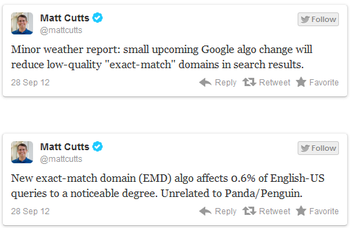
EMD Algorithm Update – The September update targeted sites with exact match domains (EMDs), or sites named after keywords instead of brands. This change didn’t so much penalize most affected as it removed a special boost they were receiving due to the name of the website.

The only people really penalized by the update were those who had over-optimized their site around the keyword. There is also a misconception the EMD updates were Panda or Penguin related, but Matt Cutts has put that idea to rest.


Panda Updates – The main area the Panda updates looked at was your on-site content. Google was trying to weed out low-quality or duplicate content, and they’ve been churning out constant new versions of Panda all year.

Penguin Updates – Despite the close association with Panda, Google’s Penguin updates are actually their own beast, formerly known as the webspam algorithm update. They are targeting all of the spammy sites out there, and unless you’re a spammer, the only penalties you may have seen from these updates were from links.

If you have seen any penalties from these updates, Dholakiya explains how to help fix the problems. The Disavow Links tool can help with that, especially if you’ve seen penalties from the Penguin updates, but it isn’t a magic solution.

There’s been an interesting development with Google’s AdWords Express, which is marketed as a headache-free alternative for small businesses. Recently, Google announced that you could use the ads Google sets up for you with your budget in AdWords Express to drive users to your Google+ page. However, Google+ itself is an ad-free zone and you are unable to even set parameters so only Google+ users will be shown the ads.

For small businesses with no website, this could still be a valuable tool to create some sort of web presence. Google had been offering AdWords Express users with no site of their own the ability to create a free site, but with the included option of using a company’s Google+ page, that may be a thing of the past.

However, there are also some obvious glitches in this AdWords Express, Google+ relationship. For one, Google is essentially allocating your AdWords budget to promote Google+. Read more about the sketchy side of this deal in Greg Finn’s article at Marketing Land.

After Google launched the disavow link tool in mid-October, there were a fair amount of doubters and those that claimed it doesn’t work. Dixon Jones from Majestic SEO, a well known and respected member of the SEO community posted in a Google+ thread that he used it for a site and it worked to remove a manual link penalty.

SEO Roundtable has the exact posts he made explaining the process and what happened. For Jones, the manual penalty was removed fairly efficiently, but those wanting to use it for a Penguin link penalty may need to wait for a new refresh.

The best option is of course to try to avoid link penalties or bad links, but the world isn’t perfect. If you’ve dealt with the root issue which caused the penalty, the disavow links tool may just be the solution you need.


Have you ever wondered how Google handles web spam in other languages or other countries? According to Matt Cutts, head of Google’s webspam team,  they have people placed on the ground across the globe to handle markets for their native countries.

Cutts, was responding to a question asked online, when he said, “If an algorithm misses something, they are there to find the spam. They know the lay of the land, they know who the big players are, and they’re really quite expert. So if there’s some really unique kind of link spam going on in Poland, for example, there’s a person there.”

The video is below. The question was poorly phrased (Europe is smaller than the US? Really?), but it helps illustrate just how international of a company Google is trying to be. I’ve heard European countries use Google less than the US, but clearly Google is still trying to offer the same experience across the globe.


The reality of online marketing is that advertisers must find a way to reach users on a variety of different devices. AdWords recently made that difficult task a little easier with a new tool that allows you to convert ads using Flash to HTML5.

Since many tablets do not support Flash, this tool could help your business reach thousands of additional users. And converting takes just a couple of mouse clicks, no expert knowledge is needed.

To find out more, check out Chris Crum’s article at Web Pro News.


