Google has been making a move towards providing searchers more lengthy and thorough content in recent history. They estimate that roughly 10 percent of all searches call for in-depth article information and they have been aiming to make those types of sources more available, especially when it may be more relevant for users.
The first big move came a couple months ago, back in August. The search engine launched an update to include in-depth articles for relevant searches, with a special block of articles at the bottom of the search results page.
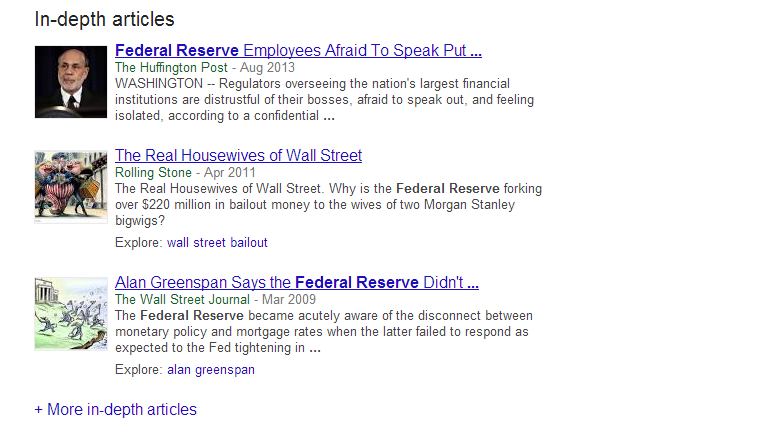
Now, Google has expanded the in-depth articles section so that users can view even more comprehensive articles by adding a new link which reads “More in-depth articles” beneath the initial selection of sources. Clicking that link shows 10 more articles on the same page. A screenshot of the update is below:
The latest update also implemented the ability to explore related topics with an explore section next to articles which may be connected to other keywords. Search Engine Land notes that you can also search exclusively for in-depth articles by adding &ida_m=1 to the end of your search URL.
Currently this new feature doesn’t have much impact on the content your brand creates, but the trend could have huge implications for the future of search and Google’s focus. For now the majority of searches call for less extensive results, but eventually longer and more detailed content could be hugely rewarding for those willing to put in the effort.
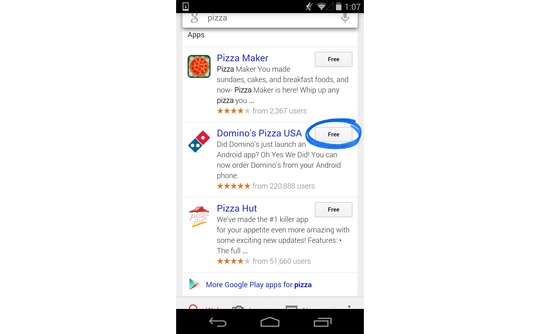
Google is attempting to bridge the gap between apps and normal internet use, and it appears their first step is to make apps part of the search results for Android users. When logged in, you will also be able to see what apps you have and search the content within them.
“Starting today, Google can save you the digging for information in the dozens of apps you use every day, and get you right where you need to go in those apps with a single search. Google Search can make your life a little easier by fetching the answer you need for you – whether it’s on the web, or buried in an app,” Scott Huffman, VP of engineering, announced on Google’s Inside Search blog.
These results won’t be ads for apps. Instead, when the best results for a query come from an app, Google Search will include the app in the result and make it easy to download or access. If you already have the app, you will just have to touch “Open in app” and you will be taken to the relevant content.
The app results will be grouped together, so don’t expect them to hurt many sites’ rankings or visibility. These results are just another option added for user convenience.
Currently only a few apps are compatible with the Open in App feature, including:
AllTrails
Allthecooks
Beauytylish
Etsy
Expedia
Flixster
Healthtap
IMDb
Moviefone
Newegg
OpenTable
Trulia
Wikipedia
“This is just one step toward bringing apps and the web together, making it even easier to get the right information, regardless of where it’s located,” Huffman wrote.
Search Engine Watch reports the new ability is currently limited to English version users of Android 2.3 or higher within the United States.
00Taylor Ballhttps://www.tulsamarketingonline.com/wp-content/uploads/2018/07/TMO-Logo.pngTaylor Ball2013-12-05 14:15:022013-12-05 14:15:02Android Users Can Now See Apps In Their Google Search Results
Google is making it easier for webmasters to identify and address smartphone specific errors they might not have known about in the past. Previously, detecting and fixing errors that happen on smartphone errors was complicated, so the search engine added a section to the crawl errors report in Webmaster Tools that displays the more common errors Google sees webmasters make in regards to how mobile users access their site.
Pierre Far, Google Webmaster Trends Analyst announced the feature earlier today, saying that some of the errors may “significantly hurt your website’s user experience and are the basis of some of our recently-announced ranking changes for smartphone search results.” While Google is trying to help make it easier for webmasters to solve problems with their site, the search engine is also using this as another means to push webmasters towards making their sites more mobile friendly.
The new report for smartphone errors looks like this:
Some of the errors included are:
Server errors: A server error is when Googlebot got an HTTP error status code when it crawled the page.
Not found errors and soft 404’s: A page can show a “not found” message to Googlebot, either by returning an HTTP 404 status code or when the page is detected as a soft error page.
Faulty redirects: A faulty redirect is a smartphone-specific error that occurs when a desktop page redirects smartphone users to a page that is not relevant to their query. A typical example is when all pages on the desktop site redirect smartphone users to the homepage of the smartphone-optimized site.
Blocked URLs: A blocked URL is when the site’s robots.txt explicitly disallows crawling by Googlebot for smartphones. Typically, such smartphone-specific robots.txt disallow directives are erroneous. You should investigate your server configuration if you see blocked URLs reported in Webmaster Tools.
Not only are these errors capable of ruining the user experience for visitors on mobile devices, they can severely damage your site’s visibility if you don’t resolve the issues quickly. At least now there is a convenient way for you to find the problems.
Recently I discussed a common issue sites have where a misplaced noindex tag on the front page of a site can keep search engines from crawling or indexing your site. It happens all the time, but it isn’t the only reason your site might not be crawled. The good news is there is little to no long term damage done to your site or your SEO, according to a recent statement from Google’s John Mueller.
Barry Schwartz noticed Mueller had responded to a question on the Google Webmaster Help forums from an employee for a company who had accidentally blocked GoogleBot from crawling and indexing their site. In John Mueller’s words:
From our point of view, once we’re able to recrawl and reprocess your URLs, they’ll re-appear in our search results. There’s generally no long-term damage caused by an outage like this, but it might take a bit of time for things to get back to “normal” again (with the caveat that our algorithms change over time, so the current “normal” may not be the same state as it was before).
So don’t worry to much if you discover you find your site has been having problems with crawling or indexing. What matters is how quickly you respond and fix the problem. Once the issue is solved, everything should return to relatively normal. Of course, as Mueller mentions, you might not return back to your exact same state because these things are always fluctuating.
00Taylor Ballhttps://www.tulsamarketingonline.com/wp-content/uploads/2018/07/TMO-Logo.pngTaylor Ball2013-12-03 12:59:002013-12-03 12:59:00Problems With Search Engines Crawling or Indexing Your Site? Google Says “No Long Term Damage”
Maybe Google really is listening. At long last, they have finally added one of the most requested features for AdWords by implementing the simple “Undo” function. It is exactly what it sounds like, basically backing up settings for all aspects of your account and keeping track of the changes you made. If you click the button, your campaign will return to the state it was at the specified time.
The most obvious benefit of the new feature is that it will make testing in your campaigns easier. If your newest test results in a lower click through rate (CTR) or cost per action (CPA), all you have to do is undo the changes with a single click.
“The ability to undo changes in AdWords will be a valuable feature to advertisers,” Lisa Raehsler of Big Click Co. told Search Engine Watch. “Sometimes changes will have a different impact on an account than what was intended. Simply using ‘undo’ will save time and ultimately money.
“But remember that account edits influence one another,” Raehsler said. “Some optimization edits are interdependent, so a change on Monday may have forced another change on Thursday. Now the ‘undo’ button is something to consider as a change in and of itself.”
There are still some kinks to be worked out, as it currently doesn’t appear that all changes are being documented, and it is unclear whether multiple changes are being grouped into a single undo.
For business owners this means you can more easily control and target your advertising campaigns. You don’t have to undo your changes by hand any longer, which saves you time to invest in other more important tasks.
The “Undo” feature isn’t live for everyone yet, so it may just be an experiment Google is running. But, hopefully they decide to work out the bugs and make it a universal feature. We have certainly been asking for it long enough.
You may have noticed earlier this month that the AdWords Bid Simulator tool has a new feature which offers estimates for conversions in addition to impressions and clicks to show how bid changes may affect conversion volume and values.
For each bid option that appears in the tool, the bid simulator gives the number of conversions and conversion values if assigned or set. As Ginny Marvin explains, conversion estimates display how many clicks you would likely result in a conversion in one day, based on a “recent 7 day period.” Notably, Google does not say their estimates will be based on the most recent 7 days.
Google says the estimates will be more accurate if you have more conversion history and conversion volume in your account, so you will want to have conversion tracking set up and stable for a couple weeks before you start trying to use the bid simulator conversion estimates.
Sometimes the source of the problem is so glaringly simple that you would never consider it. This is the case of many webmasters frustrated with their sites not being indexed or ranked by search engines. While there are numerous more technical reasons search engines might refuse to index your page, a surprising amount of time the problem is caused by you telling the search engine not to index your site with a noindex tag.
This is frequently overlooked, but it can put a complete halt to your site’s rankings and visibility. Thankfully it is also very easy to fix. The biggest hassle is trying to actually find the redirect, as they can be hard to spot due to redirects. But, you can use a http header checker tool to verify before the site page redirects.
Don’t be embarrassed if this small mistake has been keeping you down. As Barry Schwartz mentions on SEO Roundtable, there have been large Fortune 500 companies with these same problems. John Mueller also recently ran into someone with a noindex on their homepage. He noticed a thread in the Google Webmaster Help forums where a site owner had been working to fix his problem all day with the help of the other forum members. John explained the problem wasn’t nearly as complex as everyone else had suggested. It was much more obvious:
It looks like a lot of your pages had a noindex robots meta tag on them for a while and dropped out because of that. In the meantime, that meta tag is gone, so if you can keep it out, you should be good to go :).
When you encounter a problem with your site ranking or being indexed, it is always best to start with the most obvious possible causes before going to the bigger and more difficult mistakes. While we all like to think we wouldn’t make such a simple mistake, we all also let the small things slip by.
https://www.tulsamarketingonline.com/wp-content/uploads/2018/11/seo-3559564_1280.jpg7971280Taylor Ballhttps://www.tulsamarketingonline.com/wp-content/uploads/2018/07/TMO-Logo.pngTaylor Ball2013-11-25 13:14:412013-11-25 13:14:41Is Your Site Struggling Due to a Misplaced NoIndex Tag?
Usually Matt Cutts, esteemed Google engineer and head of Webspam, uses his regular videos to answer questions which can have a huge impact on a site’s visibility. He recently answered questions about using the Link Disavow Tool if you haven’t received a manual action, and he often delves into linking practices which Google views as spammy. But, earlier this week he took to YouTube to answer a simple question and give a small but unique tip webmasters might keep in mind in the future.
Specifically, Cutts addressed the need to have a unique meta tag description for every individual page on your site. In an age where blogging causes pages to be created every day, creating a meta tag description can seem like a fruitless time-waster, and according to Cutts it kind of is.
If you take the time to create a unique meta tag description for every page, you might see a slight boost in SEO over your competitors, but the difference will be negligible compared to the other aspects of your site you could spend that time improving. In fact, overall it may be better to simply leave the meta description empty than to invest your time paying attention to such a small detail. In fact, on his own blog, Cutts doesn’t bother to use meta descriptions at all.
Cutts does say that you shouldn’t try to skimp on the meta tag descriptions by using copy directly from your blog. It is better to have no meta tag description than to possibly raise issues with duplicate content, and Google automatically scans your content to create a description any time you don’t make one.
00Taylor Ballhttps://www.tulsamarketingonline.com/wp-content/uploads/2018/07/TMO-Logo.pngTaylor Ball2013-11-21 12:29:182013-11-21 12:29:18Matt Cutts Says No Meta Tag Description is Better Than Duplicate Content
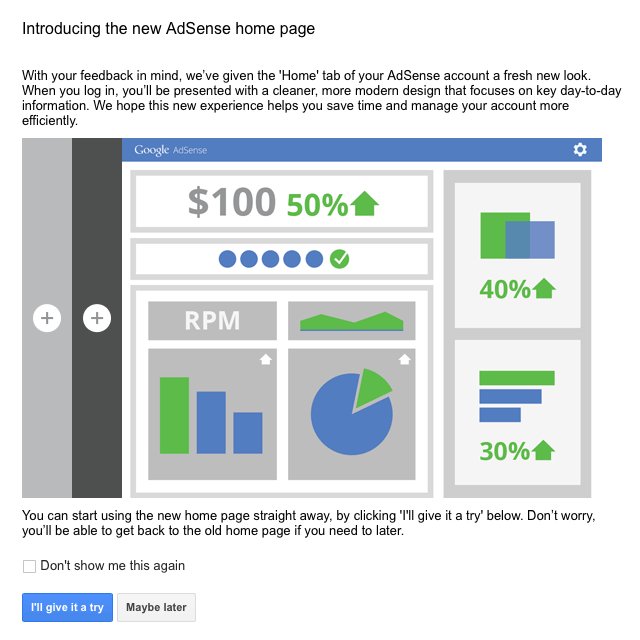
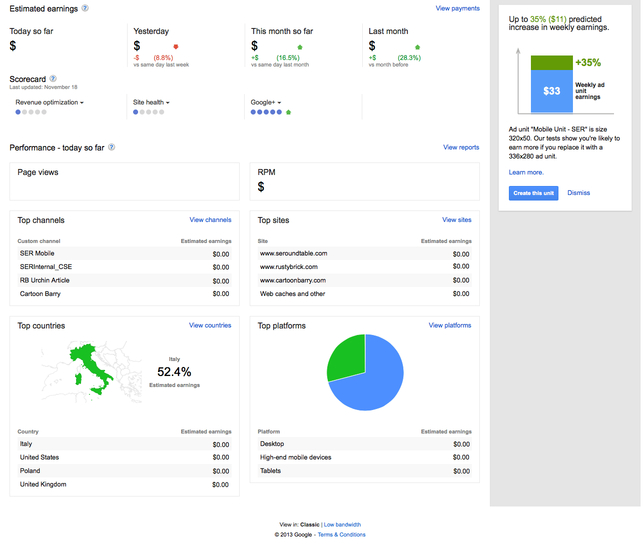
The gradual remodeling going on over at Google has made its way to AdSense. After subtly redoing their homepage and their logo, as well as those for select other Google products, the search engine is testing a new home page design for the AdSense publisher console.
The new design can be seen immediately by logging into google.com/adsense. You will be presented with an option to try out the design or continue using the older style for the moment. They also clarify that you can return to the original home page if you decide you aren’t enjoying the new layout, which intends to help you “focus on key day-to-day information.”
Ever since the roll-out of Google’s Penguin algorithm there has been a substantial amount of confusion regarding the current state of link building within the search marketing community. Thanks to Google’s vague practices everyone has an opinion on an algorithm which few actually understand in depth. Everything we know on this side comes from what Google has told us and what we’ve seen from data and analysis in the two years since Penguin came out.
The fact of the matter is that link building in the post-Penguin climate is risky business, but it is important for your online presence. If anything, links are more potent for your visibility than ever before. The problem is the rules are stricter now. You can’t buy and sell wholesale links, and bad links can be heavily damaging to your traffic and profits.
If you acquire quality links, your site is likely excelling in numerous areas and seeing success in both web traffic and search engine visibility. However, getting the wrong types of inbound links is almost certain to result in penalties from Google. In fact, Jayson DeMers from Search Engine Land says it is often more expensive to clean up the mess from bad backlinks than it would be to just acquire good links to begin with.
So what exactly constitutes a bad link? A bad link is any which is gained through questionable methods or goes against Google’s best practices. DeMers pinpointed six of these link building tactics which are likely to cause you problems if you attempt them.
Paid Links – Buying or selling links in the post-Penguin market is the same as putting a target on your website’s metaphorical back. Your site will get seen and penalized. Google has openly stated multiple times that buying or selling links is a huge no-no, and even links from long ago can come back to haunt you.
Article Directory Links – Article directory links were once a staple of link building because they were easy to get and they worked. But, low-quality spun content and distribution software relegated to the spammy category. At this point, Google has outright penalized many article directories, and this practice won’t help your SEO anymore.
Link Exchanges – For years link exchanges were a highly popular form of link building. It almost seemed like common courtesy to practice the concept of “you link to me and I’ll link back to you”, but of course many began to abuse the system. Once it was compromised and turned into a large scale pattern of link scheming, Google shut it down.
Low-Quality Press Releases – A press release is still a popular means of announcing important company information to the public, but don’t expect them to help your SEO. Most free press release submission websites are entirely ignored by Google.
Low Quality Directory Links – There are still a small number of industry-specific directories that are great for helping certain industries gain good links and traffic, the majority of old, free directory sites have been de-indexed by Google, and the search engine has publicly denounced the practice. In general, you should be staying away from low-quality directory links.
Link Pyramids, Wheels, Etc., – Over time, many SEOs came to believe they could get around Google’s watchful eye by using methods to artificially pass page rank through multiple layers of links, obscuring the distribution patter. But, in May, Matt Cutts, Google’s head of Webspam mentioned how the new version of Pengion has been refined to further fight link spammers and more accurately measure link quality. While we don’t know for sure what practices Cutts was referencing, it is widely believed he was talking about link pyramids and wheels.
00Taylor Ballhttps://www.tulsamarketingonline.com/wp-content/uploads/2018/07/TMO-Logo.pngTaylor Ball2013-11-20 11:39:282013-11-20 11:39:28Six Link Building Practices That Will Hurt Your Site



 Maybe Google really is listening. At long last, they have finally added one of the most requested features for AdWords by implementing the simple “Undo” function. It is exactly what it sounds like, basically backing up settings for all aspects of your account and keeping track of the changes you made. If you click the button, your campaign will return to the state it was at the specified time.
 You may have noticed earlier this month that the AdWords Bid Simulator tool has a new feature which
 Usually Matt Cutts, esteemed Google engineer and head of Webspam, uses his regular videos to answer questions which can have a huge impact on a site’s visibility. He recently answered questions about using the Link Disavow Tool if you haven’t received a manual action, and he often delves into linking practices which Google views as spammy. But, earlier this week he took to YouTube to answer a simple question and give a small but unique tip webmasters might keep in mind in the future.