Have you gotten your brand’s website ready for the upcoming Google Page Experience ranking signal update? 

If not, Google Developer Martin Splitt says there’s no need to panic. 

In an interview on the Search Engine Journal Show on YouTube, host Loren Baker asks Splitt what advice he would give to anyone worried their site isn’t prepared for the update set to launch in mid-June. 

Giving a rare peek at the expected impact of the impending update, Splitt reveals the Page Experience signal update isn’t going to be a massive gamechanger. Instead, it is more of a “tiebreaker.”

As a “lightweight ranking signal”, just optimizing your site’s Page Experience metrics isn’t going to launch you from the back of the pack to the front. If you are competing with a site with exactly the same performance in every other area, however, this will give you the leg up to receive the better position in the search results. 

Don’t Ignore The Update

While the Page Experience update isn’t set to radically change up the search results, Splitt says brands and site owners should still work to optimize their site with the new signals in mind. 

Ultimately, making your page faster, more accessible on a variety of devices, and easier to use is always a worthwhile effort – even if it’s not a major ranking signal. 

As Splitt says:

“First things first, don’t panic. Don’t completely freak out, because as I said it’s a tiebreaker. For some it will be quite substantial, for some it will not be very substantial, so you don’t know which bucket you’ll be in because that depends a lot on context and industry and niche. So I wouldn’t worry too much about it.

I think generally making your website faster for users should be an important goal, and it should not just be like completely ignored. Which is the situation in many companies today that they’re just like ‘yeah, whatever.’”

As for how he thinks brands should approach the update, Splitt recommended focusing on new projects and content rather than prioritizing revamping your entire site upfront. 

… For new projects, definitely advise them to look into Core Web Vitals from the get-go. For projects that are already in maintenance mode, or are already actively being deployed, I would look into making some sort of plan for the mid-term future — like the next six months, eight months, twelve months — to actually work on the Core Web Vitals and to improve performance. Not just from an SEO perspective, but also literally for your users.”

Much of the discussion focuses on the perspective of SEO professionals, but it includes several bits of relevant information for anyone who owns or manages a website for their business. 

To hear the full conversation, check out the video below from Search Engine Journal:
Google’s upcoming Page Experience ranking update – initially believed to be exclusive to mobile search – will also be coming to desktop search results in the future. 

The reveal came during part of Google’s annual big I/O event this week, by Google Search product manager Jeffrey Jose. 

Since the announcement of the Page Experience update, which will implement new ranking signals based on “Core Web Vitals” which assess the user friendliness of a site, was going to be rolled out to only Google’s mobile search results. 

As Jose explained, however, the update will also be coming to desktop search – at a later date.

“Today I am happy to announce that we are bringing Page Experience ranking to desktop. While we’re launching Page Experience on mobile soon, we believe page experience is critical no matter the surface the user is browsing the web. This is why we’re working hard on bringing page experience ranking to desktop. As always we’ll be providing updated guidance, documentation, and tools along the way to help your pages perform at its best. Stay tuned for more details on this.”

The specific wording of the announcement suggests the desktop update may use its own set of unique or modified ranking signals or criteria. This is reasonable considering users are likely to have different usability expectations depending on which platform they are using. 

While the launch of the desktop Page Experience update is unknown, the mobile version is still scheduled to begin rolling out in June and be completely implemented by August.

To learn more about the Page Experience update and to see the announcement for yourself, check out the video below:

It can be easy to take for granted how little spam shows up in the dozens of Google searches we make every day.

While we are almost always able to find what we need through the search engine without an abundance of malicious, copied, or just plain spammy websites, the search engine says it has been ramping up spam detection behind the scenes to fight the seemingly endless hordes of illicit or otherwise problematic sites from filling up its search results.

In fact, Google’s webspam report for 2020 says the search engine detected more than 40 billion pages of spam every day last year. This reflects a 60% increase from the year before.

How Google Search is Fighting Spam

It is possible there was a distinct increase in spammy sites last year, potentially due to disruptions and other changes brought about by the Covid pandemic. According to the search engine though, the bulk of this increase is the result of increased spam prevention efforts with the help of AI.

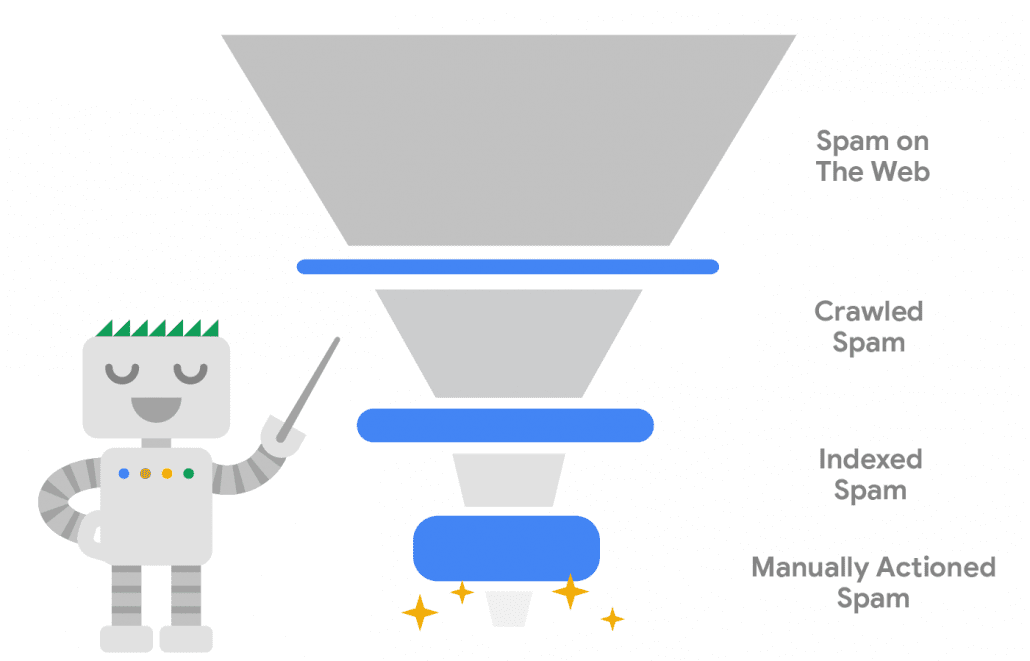
Artificial intelligence and machine learning have helped the company keep with new spam methods and are credited with allowing the search engine to reduce auto-generated or scraped content “by more than 80% compared to a couple of years ago.”

This AI-based approach also frees up Google’s manual action spam team to focus on more advanced forms of spam, such as hacked sites which were “still rampant in 2020.”

To show you how this approach works and helps filter out the bulk of webspam before it even gets added to Google’s indexes, the company shared a simple graphic:

COVID Spam and Misinformation

As with everyone, Google faced unprecedented situations in the past year as it responded to the COVID-19 pandemic. This included devoting “significant effort in extending protection to the billions of searches” related to the virus.

One part of this effort was instituting a “more about this result” feature which added additional context about sites before clicking through to one of their pages. This intends to help users avoid bad actors that popped up, especially during the early stages of the pandemic.

Additionally, the search engine says it worked to remove misinformation that could be dangerous during the course of the pandemic.

What This Means For You

Assuming you are a reputable professional in your industry, Google’s increased efforts to fight spam should only be a source of comfort. There have been fewer reports of sites being incorrectly targeted by these spam prevention methods in recent years, while the overall level of deceptive, spammy, or harmful sites in the search results has plummeted. 

All in all, this means a better experience for both users trying to find information and products, as well as brands fighting to reach new customers online.

After a prolonged period of testing, Google Ads has officially launched the new Insights page to all advertisers. 

As the company announced, starting April 14th, 2021, “the Insights page is available to all advertisers globally.”

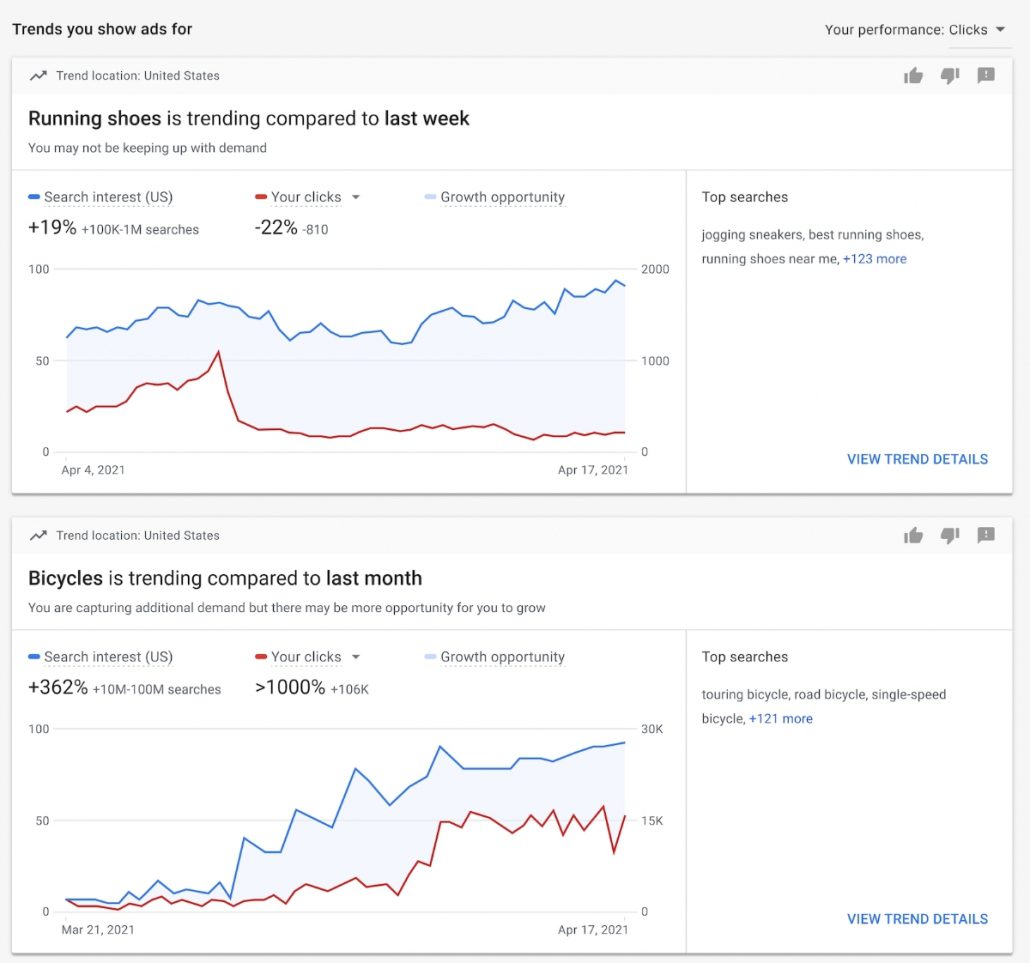
The Insights tool allows for advertisers to easily track and explore emerging trends in your industry to create more effective ads. 

The latest announcement gives an example of how a brand could use the tool:

“Let’s say you’re a pet store looking to reach more customers. With the Insights page, you can see rising demand for ‘dog subscription boxes’ and ‘dog toys’. You can then act on these trends by creating campaigns to reach new pet owners, or even explore selling dog care packages.”

“The Insights page surfaces trends tailored to your business, so you can see if you’re keeping up with demand for trending products or services,” continued the statement.

How Google Ads Insights Works

The new tool pulls data from your account’s performance history and campaign settings, before combining them with search trends across Google to automatically show you relevant trends and insights. 

Currently, the Insights tool only provides one type of data, showing search trends to help you better understand the most recent patterns in search behavior and identify relevant trends in your market. 

However, Google Ads says it will be rolling out more types of insights in the future. 

For more information about the new page, Google Ads has published a help document to get you started tracking the latest trends in your industry. 

It can be easy to forget that online marketing can have a much wider effect than just “online”. These days, it is also one of the most powerful tools businesses have to drive in-person and other types of offline sales.

The key is knowing how to optimize specifically for local searches to help those nearby find you and your products or services at the most effective times.

To help smaller businesses do this, Google recently published a small guide with 4 tips and ideas for driving offline sales using your online ads and marketing.

Creating In-Person Sales With Online Marketing

Establish Your Digital Storefront

The first step to using your brand to drive local sales is establishing your Google My Business profile. This allows you to appear in the prime search results placements for relevant localized searches. 

As Google says:

“Stand out when people search for your business, products or services. Getting your business on Google is the essential first step towards driving and measuring visits to your stores.”

2) Measure Your Offline Impact

These days, the search engine’s analytics tools can measure a lot more than online traffic and conversions. Using metrics like Store Visits and Local Actions, you can see exactly how effective your online ads and marketing are in the real world.

“Getting the full picture of how your ads drive impact across channels is important to refine campaigns, make budgeting decisions, and inform your overall business strategy.”

3) Optimize For Online AND Offline

Use ads and optimization to highlight what you have online and what you have to offer at your brick and mortar locations. Not only can you use Google Shopping to showcase your products in search results, you can specifically promote your in-store inventory using Local Inventory ads.

The guide suggests:

“Make the most of your marketing investment and grow revenue for your stores, whether customers ultimately purchase online or in-store.”

4) Showcase Your Locations

Use local campaigns to highlight your local stores and send online searchers straight to your door. 

“Machine learning makes it easier and more efficient to promote your physical business locations at scale across Google properties. It can help you reach customers throughout their purchase journey and optimize for those who are most likely to visit your business.”

For more about how you can use Google and online marketing to drive both online and offline sales read the full Google Ads Help guide here.

For many small-to-medium businesses, appearing in search results around their local area is significantly more important than popping up in the results for someone halfway across the country. 

This raises the question, though. How many of the countless searches made every day are actually locally based?

We now have the answer to that question thanks to a new tool released by LocalSEOGuide.com and Traject Data.

What Percent Of Searches Are Local?

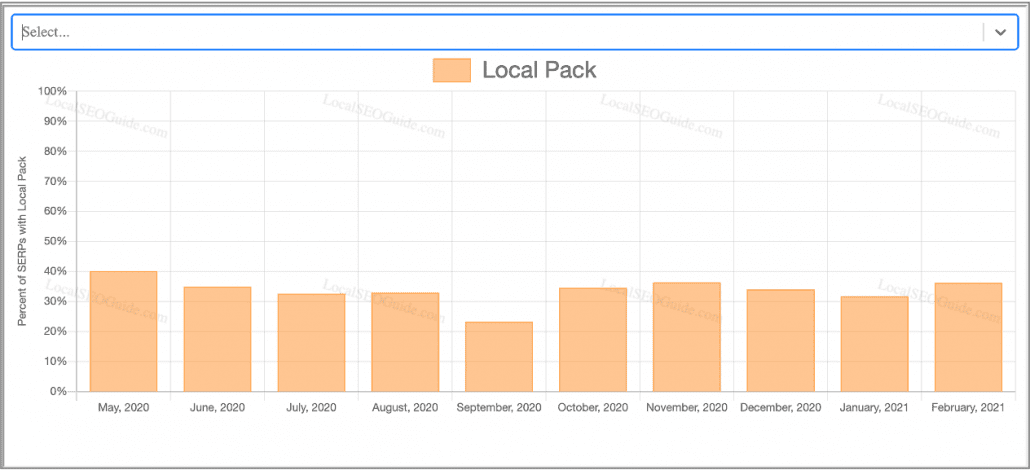
Working together, the companies analyzed over 60 million U.S. search queries and found that over a third (approx. 36%) of all queries returned Google’s local pack – indicating the search was location-based. 

Perhaps the biggest surprise from the data is that locally-based searches have remained largely consistent throughout the year. Following an uptick in early 2020 (likely driven by the coronavirus pandemic), the rate stayed around 36% over the course of the year. The only significant exception came in September, where the data shows a significant decrease in locally-driven searches. 

This data shows just how important it is for even brands that are strictly local to establish their brands online and optimize for search engines. Otherwise, you might be missing out on a big source of potential business.

Other Features In The Local Pack-O-Meter

Along with data on the appearance of local packs in Google search results, the Local Pack-O-Meter includes information on several other search features. These include:

  • Knowledge Graphs
  • “People Also Ask” Panels
  • Image Boxes
  • Shopping Boxes
  • Ads
  • Related Searches
  • And more

Though the current form of the tool doesn’t include ways to more selectively filter the information, there is plenty to take from the information for planning what search features you need to prioritize and which can be put on the back burner. 

To explore the Local Pack-O-Meter for yourself, click here.

If you are an online retailer, you are no doubt familiar with Google’s wide array of special features built for online shopping. You are also probably aware of how confusing it can be to get included in these unique search results.

To help clarify this process and make it easier to get your products highlighted in Google’s search results, the search engine recently revealed some technical tips and tricks for e-commerce sites. 

Why It Takes Extra Work To Get In Google Shopping Results

The first question most business owners or site managers might have when they start trying to get their products included in Google Shopping results is “why do I have to do all this extra work?”

Google’s whole thing is analyzing sites and automatically delivering that information in its search results, right? Why can’t they just pull your product info when your pages get indexed?

The simple answer is that Google knows online retail changes very quickly and shoppers get very frustrated with out of date or inaccurate information. If this became a frequent problem, users would likely stop paying attention to Google’s product-related search results. 

While the search engine regularly re-indexes updated webpages, it can’t guarantee pages will be indexed fast enough to ensure information is up-to-date for searchers. 

Additionally, there are some features which online retailers tend to provide to help shoppers which can make things a little confusing for search engines to understand. 

For example, Google says it still struggles with accurately telling the difference between these types of information:

  • Original Price vs. Discounted Price
  • Related Products vs. The Main Product Being Sold
  • Taxes or Shipping Costs vs. The Actual Product Price

This is why the search engine asks online retailers to help provide this information for Google Shopping results.

Now, let’s get into the advice from Google Developer Advocate Alan Kent and how you can get your products into Google product showcases.

Two Ways To Give Google Your Product Data

In the latest Lightning Talks video, Kent discusses two different ways site managers can get their product information to Google. 

The first method is by using structured data. This is essentially using special coding embedded into pages to provide Google with additional information typically not provided through regular site code or markup. 

This is generally seen as the advanced approach because it requires significant knowledge of coding and the latest structured data techniques. 

The other method covered by Kent is by directly providing product data through Google Merchant Center, which can be done with:

  • A feed of all product data manually submitted to the search engine.
  • An API developed to update products individually as changes are made on your site. 

For more information, check out the guide provided by Google.

Conclusion

While providing product data to search engines is essential for appearing in these specific product-centric search results, the company emphasizes that these practices don’t replace traditional SEO.

“Remember that SEO still matters for organic search. Make your product details, such as images and descriptions, appealing to your customers.”

If you want to watch the full explanation from Kent, it is available below:

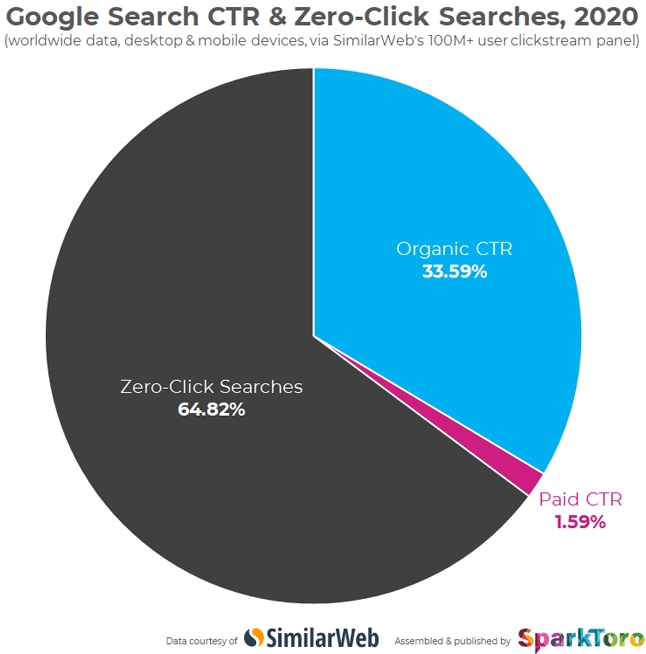
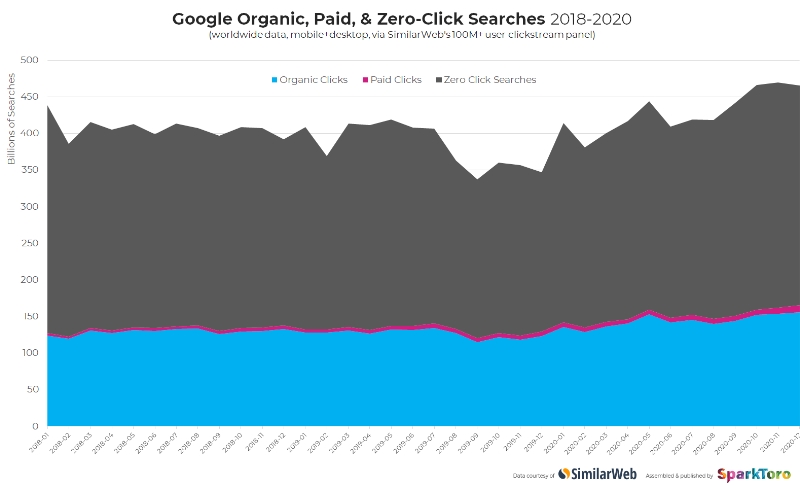
Throughout 2020, approximately 65% of searches made on Google were “zero-click searches”, meaning that the search never resulted in an actual website visit.

Zero-click searches have been steadily on the rise, reaching 50% in June 2019 according to a study published by online marketing expert Rand Fishkin and SimilarWeb.

The steep rise in these types of searches between January and December 2020 is particularly surprising because it was widely believed zero-click searches were largely driven by mobile users looking for quick-answers. Throughout 2020, however, most of us were less mobile than ever due to Covid restrictions, social distancing, and quarantines.

The findings of this latest report don’t entirely disprove this theory, though. Mobile devices still saw the majority of zero-click Google searches. On desktop, less than half (46.5%) were zero-click searches, while more than three-fourths (77.2%) of searches from mobile devices did not result in a website visit.

Study Limitations

Fishkin acknowledges that his reports do come with a small caveat. Each analysis used different data sources and included different searching methods, which may explain some of the variance. Additionally, the newer study – which included data from over 5.1 trillion Google searches – had access to a significantly larger data pool compared to the approximately one billion searches used in the 2019 study.

“Nonetheless, it seems probable that if the previous panel were still available, it would show a similar trend of increasing click cannibalization by Google,” Fishkin said in his analysis.

What This Means For Businesses

The most obvious takeaway from these findings is that people are increasingly finding the information they are looking for directly on the search results pages, rather than needing to visit a web-page for more in-depth information.

It also means that attempts to regulate Google are largely failing.

Many have criticized and even pursued legal action (with varying levels of success) against the search engine for abusing their access to information on websites by showing that information in “knowledge panels” on search results.

The argument is that Google is stealing copyrighted information and republishing it on their own site. Additionally, this practice could potentially create less reason for searchers to click on ads, meaning Google is contributing to falling click-through rates and making more money off of it.

Ultimately, Google is showing no signs of slowing down on its use of knowledge panels and direct answers within search results. To adjust to the rise of zero-click searches, brands should put more energy into optimizing their content to appear in knowledge panels (increasing your brand awareness) and diversify their web presence with social media activity to directly reach customers.

Google My Business is finally giving businesses a little more information and control over their reviews with a new tool available here.

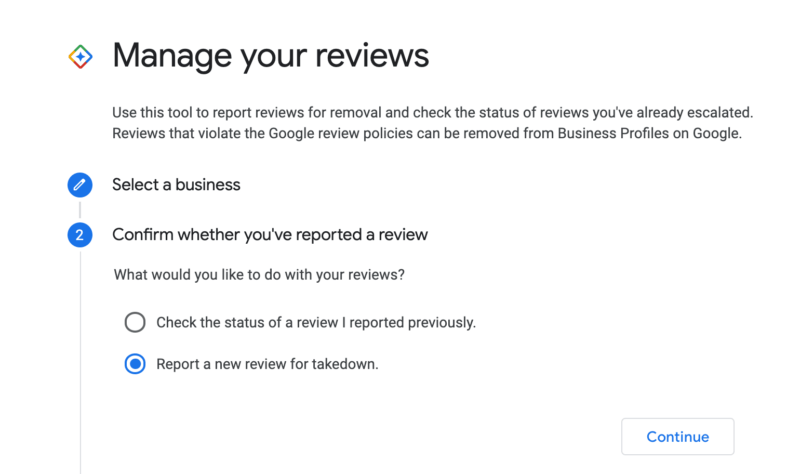
Through the tool, business owners or managers can view reviews, submit a request to remove misleading or problematic reviews, and check the status of takedown requests for these reviews.

How To Use The New Google My Business Review Tool

Rather than being built into the Google My Business dashboard, the tool is available through the GMB Help Center.

To get started, simply sign into the Google account related to your business and go to the help page. 

From there, select whether you want to check the status of a review or file a new report for a problematic review.

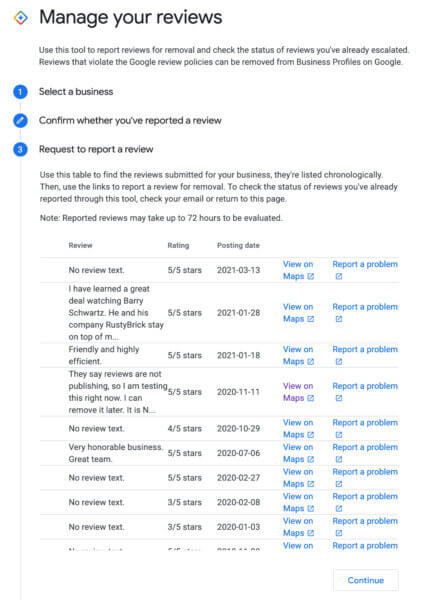
If you wish to submit a new takedown request, Google My Business will pull a list of your recent reviews which can be viewed and reported within the tool.

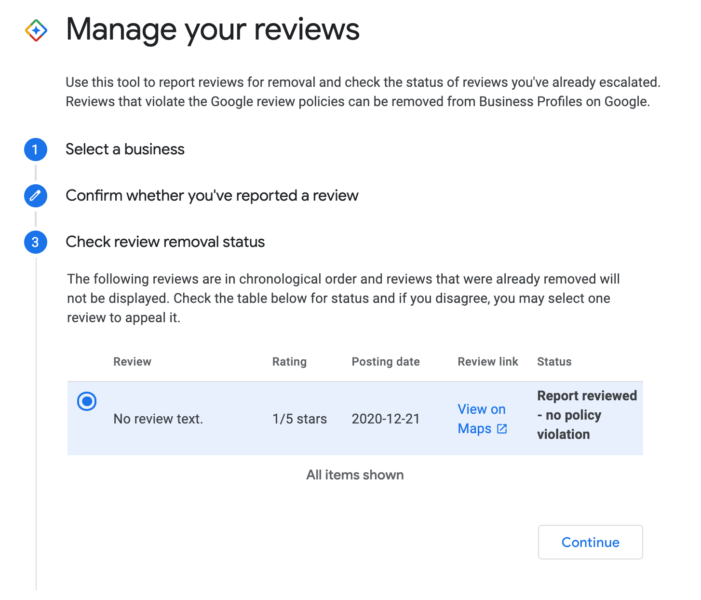
If you are simply checking the status of a past takedown request, the tool will show all your most recent requests along with information about the status of the request.

If you select a review, you can also get more in-depth information about the review and request. You can also submit an appeal from here if you believe a request has been improperly denied.

Only Available For Small Accounts

At this point, it appears the tool is only available for accounts with just a few Google My Business listings. Several SEO specialists who manage dozens or even hundreds of listings say they have received a message stating “Based on the number of Business Profiles you manage, this process is not available” when attempting to use the tool. It is unclear if or when GMB plans to expand the tool for larger accounts.

In a Google Search Central SEO session recently, Google’s John Mueller shed light on a way the search engine’s systems can go astray – keeping pages on your site from being indexed and appearing in search. 

Essentially the issue comes from Google’s predictive approach to identifying duplicate content based on URL patterns, which has the potential to incorrectly identify duplicate content based on the URL alone. 

Google uses the predictive system to increase the efficiency of its crawling and indexing of sites by skipping over content which is just a copy of another page. By leaving these pages out of the index, Google’s engine has less chances of showing repetitious content in its search results and allows its indexing systems to reach other, more unique content more quickly. 

Obviously the problem is that content creators could unintentionally trigger these predictive systems when publishing unique content on similar topics, leaving quality content out of the search engine. 

John Mueller Explains How Google Could Misidentify Duplicate Content

In a response to a question from a user whose pages were not being indexed correctly, Mueller explained that Google uses multiple layers of filters to weed out duplicate content:

“What tends to happen on our side is we have multiple levels of trying to understand when there is duplicate content on a site. And one is when we look at the page’s content directly and we kind of see, well, this page has this content, this page has different content, we should treat them as separate pages.

The other thing is kind of a broader predictive approach that we have where we look at the URL structure of a website where we see, well, in the past, when we’ve looked at URLs that look like this, we’ve seen they have the same content as URLs like this. And then we’ll essentially learn that pattern and say, URLs that look like this are the same as URLs that look like this.”

He also explained how these systems can sometimes go too far and Google could incorrectly filter out unique content based on URL patterns on a site:

“Even without looking at the individual URLs we can sometimes say, well, we’ll save ourselves some crawling and indexing and just focus on these assumed or very likely duplication cases. And I have seen that happen with things like cities.

I have seen that happen with things like, I don’t know, automobiles is another one where we saw that happen, where essentially our systems recognize that what you specify as a city name is something that is not so relevant for the actual URLs. And usually we learn that kind of pattern when a site provides a lot of the same content with alternate names.”

How Can You Protect Your Site From This?

While Google’s John Mueller wasn’t able to provide a full-proof solution or prevention for this issue, he did offer some advice for sites that have been affected:

“So what I would try to do in a case like this is to see if you have this kind of situations where you have strong overlaps of content and to try to find ways to limit that as much as possible.

And that could be by using something like a rel canonical on the page and saying, well, this small city that is right outside the big city, I’ll set the canonical to the big city because it shows exactly the same content.

So that really every URL that we crawl on your website and index, we can see, well, this URL and its content are unique and it’s important for us to keep all of these URLs indexed.

Or we see clear information that this URL you know is supposed to be the same as this other one, you have maybe set up a redirect or you have a rel canonical set up there, and we can just focus on those main URLs and still understand that the city aspect there is critical for your individual pages.”

It should be clarified that duplicate content or pages impacted by this problem will not hurt the overall SEO of your site. So, for example, having several pages tagged as being duplicate content won’t prevent your home page from appearing for relevant searches. 

Still, the issue has the potential to gradually decrease the efficiency of your SEO efforts, not to mention making it harder for people to find the valuable information you are providing. 

To see Mueller’s full explanation, watch the video below: