Tag Archive for: News

If you’ve ever received a notification from Google about a manual spam action based on “unnatural links” pointing to your webpage, Google has a new tool for you.

Links are one of the most known about factors Google uses to order search results, and they examine the links between sites to decide which pages are reputable. As you probably know, this is the foundation of PageRank, another of the most well-known “signals” Google uses to order search results. Google is concerned about spammers trying to take advantage of PageRank, and often they have to take manual action.

The notification you may have received in Webmaster Tools about those unnatural links suggests you got caught up in linkspam. Linkspam is the use of paid links, link exchanges, and other tactics like those. The best response to the message would be to remove as many low quality links as possible from your site. This keeps Google off of your back, and will improve the reputation of your site as a whole.

If you can’t seem to get rid of all of the links for some reason, Google’s new tool can help you out. The Disavow Links page allows you to input URLs which you would like disavowed from your site, and the “domain :” keyword will help you disavow links across all pages on a specific site.

Everyone is allowed one disavow file per website, and the file is shared among site owners through Webmaster Tools.

If you need assistance finding bad links in your site, the “Links to Your Site” feature in Webmaster Tools can also assist you in starting your search.

Google’s Webmaster Central Blog included a few quick answers in their announcement for the tool for questions you may have, noting that most sites will not need to use the feature in any way unless they’ve received a notification.
 

Now as much as ever, the web design industry and the SEO industry are intertwined. The question that arises anytime a business industry and a creative industry become so connected is whether the business side limits the creative side or not.

Most in the web design industry will agree that SEO shouldn’t limit web designers at all. SEO is important, but limiting art isn’t necessary.

One of the most important things for web designers and SEO professionals to be concerned about is load times. Lots of designers want to make amazing headers, but these lead to slow load times. There are sites where load times do matter less. Portfolio sites should have plenty of quality graphics of work, but in these instances SEO doesn’t matter.

For commercial websites however, fast load times are essential because customers will go elsewhere rather than wait.

For those that think standard navigation practices limit their artistic license, think about this. The job of a web designer isn’t just to create an aeshtetically pleasant site, but to make one that is also functional and user-friendly. Breadcrumbs and easily accessible navigation systems make users happy, and it allows them to see all of the well designed areas of the site.

Overall, if you aren’t designing overly flashy sites, SEO shouldn’t be limiting your abilities as a designer. The latest SEO practices rely on quality content, and the designer’s job is to to deliver this content is a good looking package. If anything, SEO guidelines will help you understand how to create a site your viewers will like.

For some more pros and cons of the relationship between SEO and web design, Rean Jean Uehara has a great article at 1stwebdesigner.


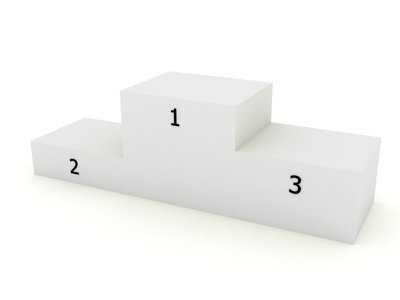
New research from Compete.com is suggesting being the first result on a SERP can make a huge difference from being second.

The analysis comes from “tens of millions” of consumer-generated search engine results pages from the last quarter of 2011. It also had some really interesting findings. 85 percent of all listings shown are organic, with only 15 percent paid search listings.

Out of the organic listings, 53 percent of clicks are going to the very first result, with the second result only seeing 15 percent, and all others getting even less.

Analysts from Compete.com summarize “since the vast majority of listings on a SERP are organic, and the majority of clicks are on the first listing, it’s imperative that brands strategy including constantly monitoring results due to the ongoing evolution of search engine algorithms.”

The paid results are also getting a large amount of clicks. Most specifically, ads in the top of the page perform very well, with between 59 percent and 9 percent of all paid results clicks. Ads on the right hand of the page however, get at most 4 percent of paid results clicks.

Overall, it is important to get your listings in the top position, if you want your page to be getting attention. For graphs and analysis of the results, read Miranda Miller’s article at Search Engine Watch.


Most designers are aware of Dieter Rams’ Ten Principles of Good Design, and, if you aren’t, you should definitely check it out. Rams created the entire visual language Apple is still using, and products he designed over fifty years ago are still being made today. He made the ten principles in 1970, when he decided he needed an objective way to criticize his own designs.

The list was originally made to critique physical products, but lately web designers have been using the principles for interactive design. While the list works wonderfully with interactive design, there is one issue stemming from how long ago the principles were established. In Rams’ time, there was no interaction design, UI, or UX. It doesn’t take into consideration the constantly changing software out today.

Fourty years ago, when Rams created the ten principles, designs were mostly for print or physical products, which rarely were updated. This is as far from true now as imaginable. That’s why Wells Riley, designer for Kicksend, has proposed an eleventh principle of design. 

Good Design is Iterative

Iterative design is flexible, and reduces the friction created from growth and change. It is common to think of every project with an “end date.” Designers usually consider themselves finished when they hand in a design, and get their money. Unfortunately, that manner of working will usually result in a total breakdown when it comes time to integrate new features.

Fixed, complex designs lead to complete disasters when it is time to update. Big companies have the money to invest to overcome this issue. Small companies, which normally need to update at a much quicker rate than huge corporations, can’t afford to not iterate on design just as quickly as engineers can code.

So how do you make an interative design from day one?

  1. Responsive Web – Responsive layouts allow pages to respond to different mobile and desktop browsers, which makes for much easier design changes. Sites using responsive layouts can make small changes constantly to continuously mold their entire product and brand image.
  2. Less is More – Designers love to build complex and interesting sites, but aside from possibly confusing visitors, these intricacies are also blocking fast updates from happening. Instead, stick with only what is essential. Minimalistic approaches to design allow for innovation. Think about Google’s front page. It is simple and clean, which makes it spectacular when Google Doodles show up to highlight an important day in history. If the page was cluttered with extra nonsense, the doodles would be harder to implement, and their effect would be severely diminished.
  3. Ship Every Day – Don’t ever let your design go stagnant. As any art student knows, there is always room for improvement in a design, and you should always be working on improving it. Use customer feedback and research, as well as your constantly growing knowledge of what is new, so that your designs grow at the same rate you grow as a designer.

The Ten Principles Rams set down 40 years ago are still an important way to critique your own designs, but, as with any list 40 years old, it needed an update. By adding a focus on iterant design, you will be able to criticize your own work objectively while making sure it works for the constantly changing field of web design.


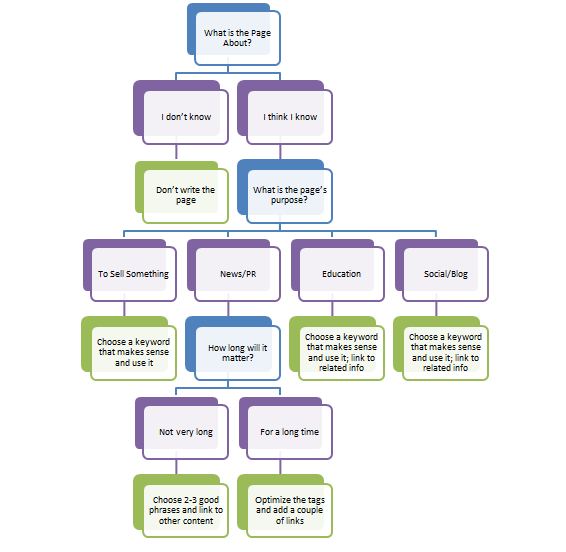
While we’ve been talking about how to optimize content quite a bit, there really are no guidelines out there for more broad questions you should be asking when going through the process of optimization. Jenny Halasz from Search Engine Land realized this, and created a flow chart for the optimization process, complete with what questions you should be asking yourself.

Optimization Flow Chart

“What is the page about?” – This is a really simple question, and if you can’t answer it, you probably shouldn’t be building the site. For your page to have any value, you have to know what it is about, obviously.

“What is the purpose of this page?” – Are you trying to create a blog post? Or maybe a sales pitch? How about a press release? No matter what the purpose is, you certainly need to have one, and be able to identify it while working on the page. Thinking about this before hand will help you put your content into context.

“How long will this content remain relevant?” – Educational pieces stay relevant until more information is found. Depending on the field, this could be years or just a few months. Product pitches on the other hand, stay relevant until your next line is due to be released, which can last as much as a year or two. Either way, adapt your content to the time frame it will still be important.

“What makes sense for optimization?” – The previous questions should be considered when creating the page, but now we’re at optimizing the site for search. Are the keywords you’re using relevant? How are you handling linking? Make sure you actually consider these factors rather than “going through the motions.”

The flow chart and questions should help you focus your process to reflect your client’s needs. Every step needs to be planned, and every question should be answered. If you’re optimizing right, the answers should come to mind pretty quickly.


There is one simple color rule that has helped me endlessly in my designs, and I learned it in junior-high school. Unless you absolutely need to, never use black. It sounds strange to many, but it is a rule I live by now.

When you see dark things, it is common to assume they are black. It is actually very hard to find things that are pure black. It is possible, but most of the common things you will think of aren’t. Roads, for example, are not black no matter how recently they were paved.

Not even shadows are black. Any good painter knows this. Shadows are tints of a background color, and they are pretty much never actually black. They also reflect what type of light is being cast.

Now the reason it is important to note how hard it is to find a pure black is because pure black always overpowers other colors by comparison. It just does not naturally sit with most color palettes.

This goes double for web design. Even in apps or sites that seem to have black as a prominent part of the color scheme actually use dark grays, which are muted so they sit better in the composition.

Ian Taylor Storm, co-founder of Segment.io, also warns about the importance of saturation. Adding some color to grays helps liven them up a little. If you have a really dark gray, saturate it really heavily. Light grays will only need around 3%-5% usually.

The design for Facebook is a great example of this idea. All of the grays are saturated with the trademark Facebook Blue. The same goes for Facebook’s apps.

There is always a time and place for pure black, but it should be a rare occasion. Usually, a more natural color will suit your needs much better.


The overlap between SEO and content strategy often ends up turning content creation into a marketing ploy, and little more. The blogs cite industry folks and data, and offer tips that are either glaringly obvious or recycled to the point of redundancy.

Guillaume Bouchard from Search Engine Watch has another idea for content creation. Think about what people want, not what “works” within the market. What works changes as fast as the industry can, while what people want stays relatively consistent. Long term success comes from reading what your visitors want.

For SEO professionals, you can follow the 70/20/10 model for a simple model for content creation.

The 70/20/10 model goes like this:

  • 70 percent of content should be low-risk
  • 20 percent should try to improve on what already works
  • 10 percent should be high-risk experimentation

The model comes from Coca-Cola, and can be transferred to SEO pretty easily. Link baiting is low-risk. Optimizing and trying to capitalize on some newer trends in the market covers trying to improve on what works, and that leaves 10 percent experimentation.

70 Percent: The Link Bait – Link baiting certainly has its pros and drawbacks, but for this model just think of it as content made with a purpose. It informs audiences, communicates complicated ideas, and establishes your reputation as an expert. This helps establish your brand in the industry. This acts as the mainstay of your content. Always available, but it can’t be all you have.

20 Percent: Optimize and Sharpen – For optimizing, look at what content is doing the best and what people are saying about your content. Try to improve upon what is doing best, and reinvigorating old debates with new information. Stay aware of trends and ideas in your industry, and react to them with content. This type of content creation helps keep you tuned to the changes in your industry, and keep you relevant, which will always translate to your audience.

10 Percent: Proactive and Reactive Experimentation – Time to have some fun. Experimentation requires really understanding your audience, and being confident enough to have an opinion. Think about fashion trendsetters. They see what is popular now, and act on their impulses in response. Content creation experimentation is all about seeing what is popular in the field, and making new content that people have never seen before.

This model isn’t something to keep set in stone, but it will help keep you relevant and interesting. Those are two things audiences always want.


It’s hard to keep up with Google’s constant adjustments, and AuthorRank is a future feature that isn’t as understood as it probably should be. Its history dates back to August of 2005 when Google filed a patent for “Agent Rank”.

This patent included ranking “agents” and using the public reception to the content they create to determine their rank. Basically, the more popular websites with positive responses would be higher in rankings than less-authoritive “agents”.

After the patent, “AgentRank” disappeared for a while, until in 2011 Eric Schmidt made references to identifying agents in order to improve search quality. A month later, they filed a patent for what is assumed to have become Google+, which acts as a digital signature system for identification, which can be tied to content. And that content can be ranked. Hello, AuthorRank.

It has yet to be officially implemented, but there have been rumors all year that AuthorRank is under development, and AJ Kohn has stated it could completely change the search engine game. It would act as a factor in PageRank, which makes high-quality content higher ranked.

Mike Arnesen at SEOmoz says it’s not a matter of “if Google rolls out AuthorRank, but when.” He also has some great suggestions of how to be prepared for when AuthorRank arrives. I highly suggest reading his extensive article, because I agree strongly with the idea AuthorRank will be here sooner rather than later.

With Google’s recent focus on social media, and the natural concept that people want to see quality content in their results, it is just a matter of time before AuthorRank is a serious concern to the SEO industry.