Tag Archive for: News

Years ago, all a local business had to do was build a lot of links and their business would show up on the first results page. SERPs have gotten much more competitive in that time, and Google has introduced a strict local algorithm, so now local SEO has become a unique sector that is often more difficult to implement than almost any other online marketing strategy.

You can always hire a company to take care of all of your SEO needs, but if you have a tight budget and are willing to get your hands dirty, there are steps you can take to try to get onto the coveted first page of local results, called the 7 Pack. You’ll recognize the 7 Pack as the listing of businesses directly under the map of the area. Search Engine Journal set out a five step plan to improve your local business rankings.

The first step is checking to see if your target keywords actually trigger the local algorithm. Usually simply including key phrase combinations such as the city and most important keyword should connect with the local search results, but sometimes this doesn’t work. If that is the case, then it would seem your SEO strategy should be less localized as Google doesn’t register your service as part of its local algorithm.

One of this biggest tricks for local businesses is knowing where to establish your company online. Google’s algorithm always gives preference to businesses located within the city limits searched for, often called the “centroid” bias. This means Google will rank businesses located closer to the heart of the city higher than those on the outskirts if all other factors are equal.

For businesses located in suburbs or just outside of city limits this is poses a big question. Most want to capitalize on the bigger market from the closest city than the small market in their local town, but trying to rank in a metropolitan area when you aren’t physically established within that boundary is a incredibly difficult task. You have to decide if you want to fight to get into the rankings for the city, and possibly only achieving the second or third page on the local listings, or you can aim to corner the market in your town and rank first every time for a smaller audience.

Deciding that move usually requires determining how competitive your niche is, and even businesses already well situated in a metropolitan market will be rewarded for investigating. The quickest way to find out how competitive your market is starts ith taking the #1 ranking in the 7 Pack and copying all of their information exactly as it is displayed in the search bar with quotation marks. This gives you an approximate estimate as to how many directories and citations you will need to outrank the top listing in the 7 Pack. You can do the same for the lowest ranking. Your results obviously have to outdo the lowest ranked business in the 7 Pack to overtake it, so exploring will give you an idea just how tall the SEO mountain you have to climb is.

Once you’ve done your research you can actually begin working on your local SEO, but the process will be much easier thanks to informed decisions only possible through understanding your local online market. Search Engine Journals last two steps can get you going on improving your local site’s ranking but nothing happens overnight. Local SEO is competitive and time consuming, but without it you are falling behind the times.
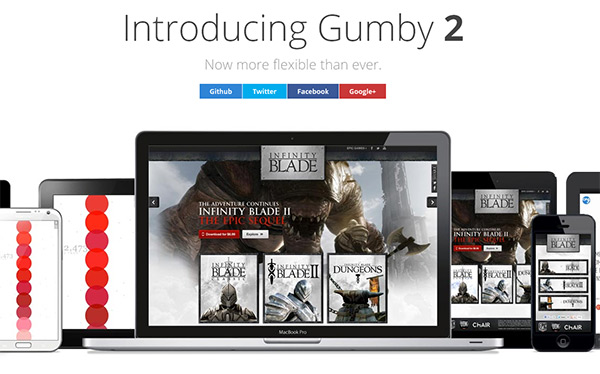

Gumby 2

A month after their last version of the responsive front-end framework, Gumby, was released, Digital Surgeons has launched a complete re-imagination in the form of Gumby 2. There are of course tons of new features, and it was rewritten in Sass to make the tool framework more customizable.

As Speckyboy Design Magazine tells it, the original version of Gumby came out of frustrations with trying to migrate to a responsive web design process. Gumby 2 takes their initial solution and makes it more efficient and useful for a variety of different front-end development problems.

One of the new changes in full integration with Google WebFonts which makes embedding custom fonts into your prototypes and sites a breeze. Rather than dealing with licensing and hosting issues, all you have to do now is drop a link or create a custom build. You can have all the typographic flair you have always wanted without all the old hang ups.

It also comes with a UI Kit so that you can build numerous UI elements quickly. Buttons, tabs, forms, and navigation can all be prototyped and customized to fit your site and Gumby 2 offers different styles so that you can pick what best suits your design.

Gumby 2 also helps you hop onto design trends such as Symbol or Icon Fonts. These fonts are sets of symbols to be used for navigation or general iconography. Instead of maintaining huge databases of different icons in various sizes, symbol fonts can be resized endlessly in the same way font characters can be. Gumby 2 comes with the symbol font Entypo by Daniel Bruce, which should cover all the needs of most websites.

Another useful trend that Gumby 2 integrates is responsive image capabilities so that mobile users and computer owners with high density displays see a pretty layout instead of pixelated, blurry images. Responsive frameworks tend to take care of all the layout needs, but they generally leave images and iconography behind. Gumby changes that by making the use of retina images intuitive with a simple attribute on an image tag.

While some frameworks may handle individual problems better, especially for more development minded people, Gumby 2 offers a wide solution for many problems which designers trying to transition to coding will doubtlessly appreciate. It saves time and helps ease you into the world of development without too much pain.

Source: Hannes Grobe

Source: Hannes Grobe

Compared to Panda’s regular changes, Google’s Penguin algorithm has been relatively static. Since its first introduction in April of last year, Penguin has only been refreshed twice, but there is an update coming soon and it appears this “next generation” of Penguin will have a major impact.

The first big Penguin update took the SEO world by surprise. It was originally referred to as the Web Spam Algorithm Update, and impacted over 3 percent of English searches. This change has the possibility of affecting just as many pages.

When the original update came out by surprise, many SEO experts and website owners claimed they were penalized unfairly, though the more done by the community the more it appears many of those were using questionable tactics. There were likely a very small number of site owners unjustly hurt, but the majority were simply erring on the wrong side of the line.

The possibility of having your website penalized has many in the community concerned about the new Penguin update, and while we don’t know too much about what the update holds for us, plenty of SEO writers are making predictions and suggestions to try to keep innocent site owners safe.

Search Engine Watch analyzed the types of data Google has been gathering and what the company has learned from the past year of spam filtering and through tools like the Link Disavow Tool.

Google’s new update is likely to be a more efficient, intelligent, and thorough algorithm to fight spam. As always, the best way to be sure you will be safe when Penguin rolls around is to be following Google’s Webmaster Guidelines and best practices for SEO. If you think you may be in the gray area, you can use Search Engine Watch’s analysis to see how to judge your site before Google judges it for you.

Source: Search Engine Watch

Source: Search Engine Watch

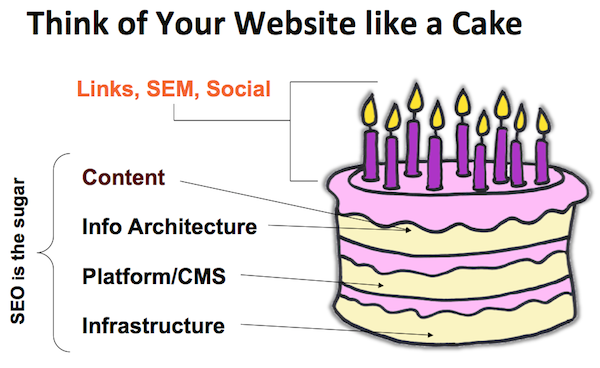
While there are always new, complicated, and exciting things happening in SEO to talk about, it is always good to get back to the basics occasionally and discuss what makes a great foundation for all of the more fancy aspects of SEO.

Carolyn Shelby, Director of SEO for the Chicago Tribune and 435 Digital, emphasized the need to not neglect the basics of SEO at the Introduction to SEO session at SES New York. She told the crowd, “skipping the basics and spending all your time and money on social and ‘fancy stuff’ is the same as skipping brushing your teeth and showering, but buying white strips and wearing expensive cologne.”

That session was aimed at newcomers, but her words are just as relevant to seasoned SEO experts. Just as your morning routine should always include brushing your teeth, your SEO strategy should always pa the proper attention to the basic SEO.

Getting back to the basics starts at the very top, with establishing exactly what SEO is. SEO aims to do two things: create an enjoyable user experience, and communicate with search engines so that they will view your site as valuable to users. Many forget those ideas in favor of trying to cheat the search engines, but those actions are to SEO what stealing is to shopping. You may get the end product you wanted, but if you use questionable or illegal means, you will just as likely be penalized.

Once you understand what you should be aiming to achieve through SEO, you have to understand what the search engines are actually looking for and not looking for.

Search engines judge websites based on a variety of different criteria but the most reliable factors all circle around user experience, reputation, and what content you give to user. Relevant content and seamless user experience establish value to your website, even if you’re just starting out. If you make sure those two elements are consistently worth the time of visitors, gradually you will build a reputation through authorship, and you will see your site getting closer to the top of rankings.

If you please users with your website and content, generally you will also please the search engines’ most basic wants. However, if you focus on the broad idea of what search engines are looking for and try to cheat your way to the top, you will instead be surprised to see the search engines penalizing you. Keyword stuffing and purchased links may have worked in the past, but Google knows how to spot them, and you will be cut from the SERPs before you know it.

Those guiding principles will get you a long ways in SEO, but there is always more to do. I only covered three of the eight topics Search Engine Watch talks about in their article about the basics of SEO, but their comment section shows there is even more that could be included in just the most basic elements of SEO. Start with making your website worthwhile to visitors, then expand your SEO repertoire, and you will see positive results.

There is a lot of fun in web designing, but creating web forms is not involved in any way. Not only are forms time consuming and insanely frustrating, but they also become a difficult task when you need things like conditional logic, multi-page forms, and payment integration.

Thankfully, there are always helpful tools out there to make the process a little faster and a lot less of a headache. Vandelay Design collected twelve options for making these forms, and they cover everything from the simple little forms to the complicated multi-page forms you always hate making.

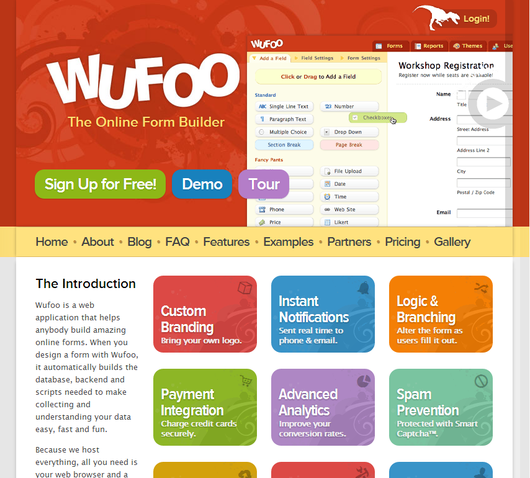
Wufoo is probably the most popular thanks to its easy to interact with user interface and wealth of features including custom branding, payment integration, and even file upload capabilities amongst many other options. It also has over 150 pre-built form templates, spam prevention, and user management.

Wufoo Screenshot

The cost is the main drawback for most of the tools, especially for more independent or low-budget designers. There is a free option for Wufoo, but it only allows for 1 user, 10 form fields, and 100 entries per month.

The paid plans range from $20 a month to $200. Most of the others are similar in cost, though it depends on what they do, and what you plan on using the forms for. Many are priced depending on the number of users, forms, form fields, and entries per month.

There is a unique entry on Vandelay Design’s list, in that there is a WordPress plugin. Gravity Forms offers most of the same form building features you’ll find in most of the other resources, but its all available from the WordPress dashboard of the sites you are working on.

One of the most best benefits to Gravity Forms is that forms can be created to insert form data into blog posts, such as setting up a form where users can submit news or pictures to be posted to your site. It’s also just nice not having to change tools or sites to manage your forms.

The best tool for you all depends on what type of work you have to do, and how much you are willing to spend to speed up your time spent making forms. Sure, you could make the forms on your own, but isn’t your effort better spent elsewhere?

Jquery-mobile-logo

jQuery Mobile just released their newest version as a stable release, working to completely incorporate responsive web design into its library. According to Web Designer Depot, jQuery Mobile 1.3 comes with several new widgets optimized for mobile devices including smooth panel overlays, dual-handle range sliders, and two different options for responsive tablets.

The new panel widget opens up many options such as allowing hidden information to be displayed is a smooth, attractive way. There are three transitioning modes, all controlled by a swipe of the finger, or press of a keyboard.

One of the most notable new features of the list view is autocomplete. When searching for your criteria, you simply have to start typing and it will do the rest for you, just like Google’s search bar does.
jQuery has been a favorite for simplifying complex JavaScript tasks, but it has had difficulty bringing that to mobile devices, especially with their separate implementations for different platforms which confused many designers.

Many have wondered whether they should be using responsive web design or jQuery Mobile, but the new version makes it clear that their answer is simply to use both at the same time.

App StoreMobile optimization has fallen out of popularity a little bit as the new responsive design trend makes the need for a secondary mobile website obsolete. Of course, there are many businesses that have opted to have a specific mobile website, but there is no denying that responsive design is gradually merging mobile and desktop optimization.

What responsive design doesn’t negate is the possible need for an app. There are over 600,000 apps in the Apple App Store alone, and more businesses are deciding to create an app for their products every day.

What many don’t realize is that apps require optimization just like websites. With the huge number of apps out there, you can’t simply get your app approved and expect to see a huge number of people downloading it.

Over the past few weeks, there has been a discussion about ASO (App Store Optimization) stemming from a Techcrunch article claiming ASO is the new SEO. We use apps more every day, relying on them for weather, news, entertainment, shopping, and organization, but I was initially skeptical as to whether ASO will ever achieve some sort of dominance.

Then I started considering my tablet usage throughout each day. I check a number of news sources including CNN and Vice, skim through the more lighthearted Buzzfeed and Cracked, and often browse Reddit. The only one of those activities I don’t do in an app is read news from Vice only because there isn’t one to use and I have checked more than once to see if an app existed (there is one for the iPhone however).

The thing is, I use these apps regularly in the morning and evenings when I’m away from work. For more casual viewers, these apps may not be used enough to justify the space they take up. Most of the apps I acquire either serve a distinct purpose, or allow me quicker access to content I would normally have to open in a web browser. The only type of apps I download without already being familiar with a company are tools.

None of this is to say apps do not have their purpose, or that optimization should be an important part of creating and managing an app, as well as reaching out to the public. However, there are many markets where the apps largely serve to make frequent visitors’ interaction with your content more efficient, and won’t reach as many uninitiated consumers as other markets would.

If you decide an app is an important product you release to the public however, ASO is practically required to keep your app from going nowhere. There are simple steps you can take such as making sure to clearly advertise the app on your website and sharing it on social media, but you can also do keyword research and find out what people are searching for.

While ASO certainly has its place, the debate over whether it will be the “new” SEO seems kind of silly to me. We may reach a point where it is important for every company to have an app, though I don’t think we are quite there. Even then, ASO will only be a small portion of what we do. SEO applies to every business online, and I don’t see it going away any time soon.

When you write about SEO regularly, it is easy to get caught up on the things that are changing and shifting, but we often forget about the old standards of SEO and how they might fit into the new climate.

If you take a look, you will see there aren’t many articles about the importance of quality title tags in the past months or even year, even though it is one of the most powerful elements on a page. Just the title tag alone can tell a search engine your relevance to a topic of search term, distinguish yourself to searchers, and even draw in visitors, all in a single line.

Crafting a great title is deceptively difficult. It would seem creating a single line statement of the purpose of your page should be quick and simple, but crafting one that will make your page alluring to both search engines and customers alike is a complicated trick.

First, you need to match the recommended guidelines, and good luck finding a consistent set. I have seen anywhere from 50 to 70 characters suggested as the maximum you should include in a title, but so long as you are around 60 characters there shouldn’t be much of a concern. Going over risks having the terrible ellipsis trailing your truncated title.

Of course, there is no evidence Google doesn’t see all the text in your title, even when it is obscured by the “…”, but why waste the text? Searchers won’t get the entire topic you are addressing, and the extra 15 characters a search engine sees likely won’t help you. Doing something like trying to stuff keywords in after the ellipsis would actually hurt you.

Once you’ve met the common guidelines, there becomes a problem. Everyone wants a simply formula that will work every time, and one simply doesn’t exist. Every website is different, and making a title tag that is correct for your brand depends on your message and what you want to emphasize.

An amazing amount of information can be coded into 60 characters. You can tell searchers the product of brand name, descriptors, price, and many other aspects of your page simply in one sentence with very careful word choice. For products, you want to fit in as many hard facts about the products as you can in that small space. Search Engine Journal suggests product name, number, size, color, and unique features could all be included in the title, while with blog posts you want to tell searchers what question or topic you will be addressing clearly.

Just because there isn’t a magic formula for titles, doesn’t mean you shouldn’t be concerned with them. A weak title tag will get your pages ignored by everyone that sees your listing, while a quality one will stop casual browsers and show them exactly what they were looking for. Stand out and make your titles fantastic.

We designers love free resources, so it is thankful that we love sharing tools we love almost as much as we like using them. There are entire blogs dedicated to covering new and interesting tools, as well as those whose only function is giving visitors free textures and code snippets to use.

Hongkiat.com offers much more than that, but they also do a monthly roundup of the latest and greatest resources out there to help you speed up your work without sacrificing customization. This month’s newest tools cover almost every aspect of development and design from estimating pricing rates for clients to responsive design and wireframing or prototyping.

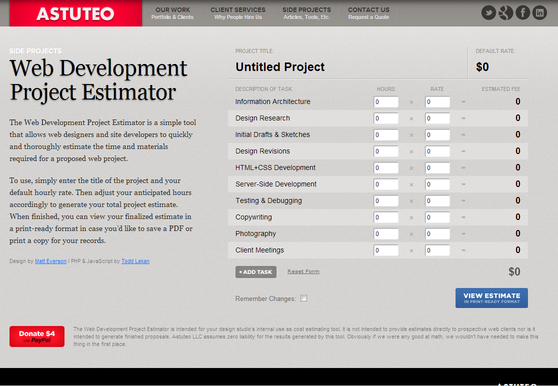
rsz_estimatorscreenshot


The tool that helps estimate service pricing rates is of particular interest to myself, because it is an area that rarely gets much attention from the free tools we pass around. Usually designers leave the business aspects out of the free resource arena.

This tool, however, helps the freelance developers who normally have trouble making cost estimates easily create a PDF with all of the items of your service, their price rate, and the overall estimate. It’s only drawback is it only uses limited forms of currency, so developers with an international client base may have issues with it.

On the actual creation side of things, we often end up investing hours just creating dummy images so that we can design prototypes to present to clients. Lorem Pixel provides a wide range of image categories for you to use as informed placeholders. This isn’t a creative commons photo website, but a way to generate images that illustrate how your site will look when it is finished.

There are also tools that help with predicting the output of systems like Sass, which isn’t always intuitive in its output. SassMe helps visualize Sass color functions immediately, as well as letting you to tweak the colors, while providing the new function for you to easily add to your Sass/SCSS stylesheet.

There will always be a wealth of new tools or brilliant updates to old resources that will keep making our jobs, at the very least, faster. They don’t always make your work necessarily easier however.

Despite everything that has changed in SEO over the years, keywords have always maintained their importance. A good SEO campaign can only be made from a foundation of the right keywords to work from. No matter how great the rest of your strategy is, it will be weakened by the wrong keywords, because they simply don’t have the potential for return that others do.

Selecting the right keywords can be an arduous task though. You have to gather data, and then analyze the massive amounts of information so that projections on returns can be made. Gathering all that data isn’t quick, and that means it is expensive.

Startups with limited budgets or without access to paid SEO tools just don’t have the resources to do the type of expansive data gathering that quality keyword selection requires. Or so it used to be. There are several free tools out there which can often do huge amounts of keyword research for you.

A single one of these tools may not be able to do the heavy lifting that the expensive top of the line programs offer, but by implementing a few of the free tools into your workflow you can cover almost all of the ground one expensive program would.

It will always take time and effort to analyze data for projections on return for specific keywords, but it is worth the effort. With just the three free tools Marc Purtell suggests over at Search Engine Journal, you will find you can more efficiently make informed decisions about your keyword selection, and soon you’ll be on your way to a better SEO campaign.