Tag Archive for: News

Blogger Portrait

Source: Marisa Vasquez

Content marketing is all the rage in SEO right now. As links continue to get devalued (though they can still be potent if gained properly), optimizers and marketers are moving their focus to the actual content you see on the page. This is potentially a great shift to providing consumers with real value, but generating content on a regular basis is costly and intensive. If you slack, it can be worthless at best, and damaging to your rankings at worst.

This isn’t to say you shouldn’t do it. But, content marketing has to be done right, with smart choices about how to spend your time and efforts. All it takes is some planning and extra thought that too many forget to do. If you think ahead, you can avoid most of the common content marketing mistakes far too many make. Jayson DeMers pinpointed some of those common mistakes, and if you know how to identify them, you can fix them.

1) Writing for the Wrong Audience

Every article or piece of content you put out there should be of value to someone, but that audience shouldn’t be arbitrary. As a business, you have a specific audience that you should be paying attention to. If you understand your audience, you can better choose topics and write in the appropriate tone for who you are trying to connect with. Home services such as plumbing and roofing have very different consumers and audiences than tech startups.

One of the most common ways to forget to write for consumers. We tend to get excited about the content we are putting out and the work we’ve put in – and that is great – but we also tend to geek out and write for those who are spending hours scouring blogs like us. We forget to communicate with the actual people needing their services. For every article, you need to ask, are we writing for our consumers or our peers?

2) Using the Wrong Metrics

Creating content takes a ton of time. You have to research, try to brainstorm unique topics, follow all the social media feeds. It would be tragic if all those efforts weren’t being properly measured and fine-tuned. However, getting started with the right metrics for your business at first can seem even more troublesome than making all that content.

Getting started, it is common to focus on measuring outputs rather than results. It helps ensure you follow through on your content marketing efforts and are achieving the basic creation aspect. But, once you’re in the flow of creating content you have to evolve your metrics to ensure they are actually achieving the larger desired results. You have to make sure you’re getting an actual return on your investment.

Not only do you want to make sure that you are strengthening your front on using the right keywords, you want to be checking on your conversions. You’re content isn’t successful if it isn’t helping direct people to the next step. Are you including clear calls to action? Are you getting people to make the next step you want? If not, you may want to change your strategy.

3) Failing to Focus on Branding

Content serves the purpose of making your brand trustworthy to consumers. Brand development can help build your brand as a leader in your market, or it can build the reputation of a service or product. Simply put, creating content allows you to build your brand as a leader in your industry to those who haven’t used your product or service yet. Writing as a leader or member of your business should showcase your expertise and make consumers trust you. The trick is doing it in a professional way, without being heavy handed.

Trying to make a hard sell with your content isn’t advised, so you have to achieve these goals much more subtly. The primary goal is educating and informing, but that has to be put in a package that will also strengthen your brand. It is a difficult line to walk, but with focus on your brand and the audience, you will find the proper mix.

SEO IconNewcomers to SEO can often feel intimidated by the complex, lingo-filled field of optimization. There are countless articles explaining seemingly complicated concepts, constantly changing practices, and constant warnings about the cost of making mistakes. It all makes SEO seem very high-risk and altogether frightening.

But, SEO doesn’t have to be that way. While you can dive straight into the rabbit hole and try to make sense of it all if you want, there are also many resources available to break it all down in simple terms, if you know where to find them. Pan Galactic Digital is one of those resources, as they regularly publish “SEO 101” articles trying to educate consumers, beginners, and anyone else interested.

SEO can seem unwieldy because it has to pay attention to the countless ranking signals that Google and Bing use to rank sites, but in all actuality, it all can be collected into two categories: on-page and off-page SEO.

On-Page SEO

On-page SEO is exactly what it sounds like. It is made off all the areas you can optimize directly on each individual page of your site, especially Content, Code, and Site Architecture.

You are most likely familiar with content, because it is what you interact with most often. Specifically, content is everything you read and all the images you see directly on the page. Are they high quality? Does the text inform and engage? Is the content using keywords you would want to rank in a search engine, but not overusing them so that it feels unnatural? High quality content offers value to the viewer.

You can also optimize some of the HTML code on your page around chosen keywords. Titles, Image Alt tags, and Headers can all be potentially optimized to help search engines understand what your site is and what it offers. However, just as with content, overstuffing these areas with keywords isn’t advised.

Lastly, you have your site architecture, or how your site is laid out through proper URL management and loading speed of webpages. You want to make sure search engines can easily access your site once they’ve found you. You will want your keywords to incorporate important keywords that are relevant to your content.

Off-Page SEO

Off-page SEO is everything that happens outside your site, which can actually be fairly out of your control if done properly. The most well-talked about example is linking. Links to your site from other sites have historically been highly favored by Google as a sign of a quality site. They act roughly like votes in favor of your site. But, these have been partially demoted because numerous optimizers would attempt linking schemes such as buying links or syndicating content on other websites in inappropriate ways. Don’t ever buy links or try to take advantage of a loophole to get them. They must be earned.

One of the quickest growing off-page SEO signals is social media. It isn’t entirely clear how much social media presence directly affects your rankings compared to how much it just brings you traffic, but its no argument that well managed social media is a great tool for your website and business presence.

Obviously, you can dig deeper into these two categories and find far more ways that Google and Bing decides where to rank your webpages, but those basic factors are by far the most important. If you can get a handle on everything above, you will be well suited for anything else you encounter moving forward.

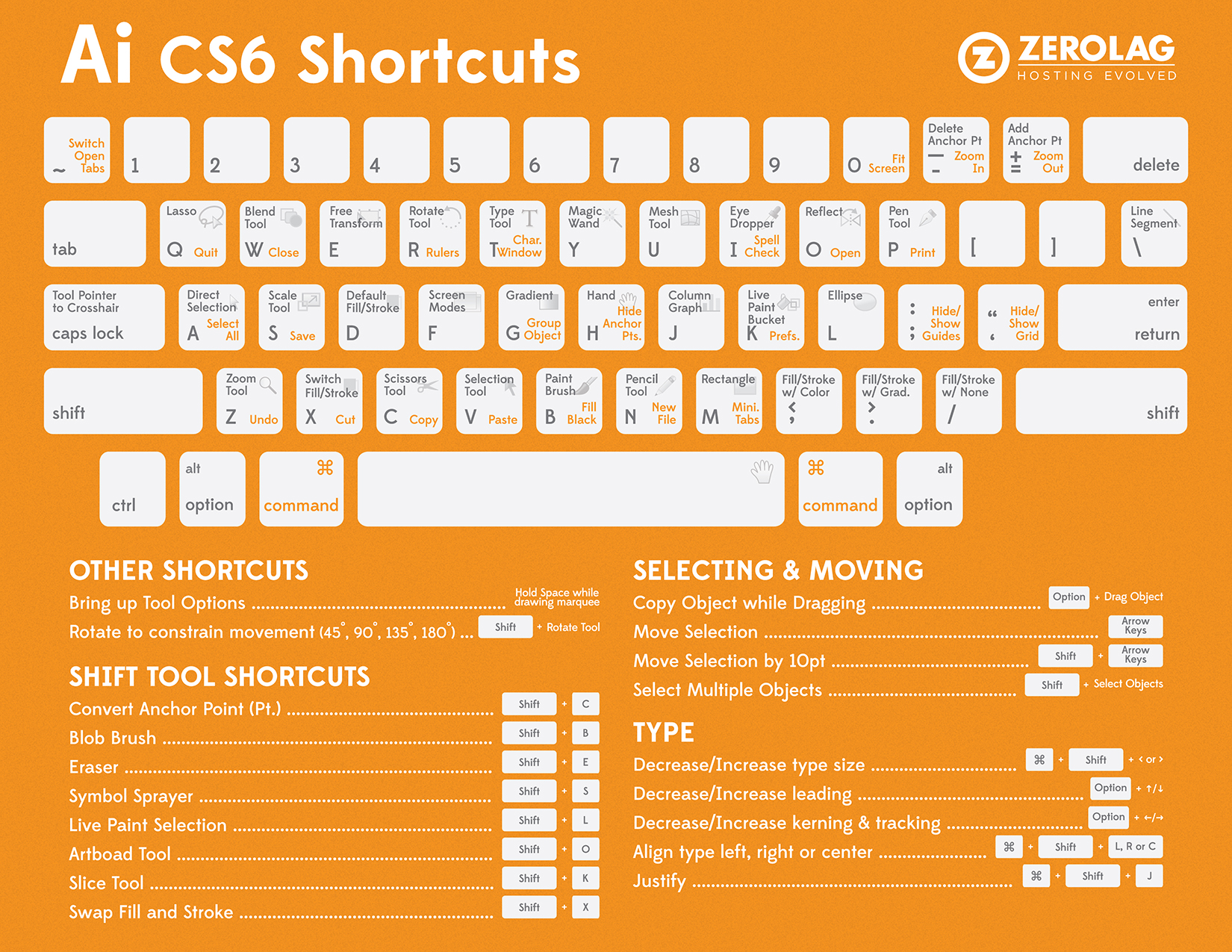
ZeroLag Illustrator Shortcuts

Adobe Illustrator is almost as important to web designers and creative professionals as Photoshop. For some, it is even more essential. Most of the veterans probably have every keyboard shortcut memorized, but when you’re getting started it can take quite a while to really get the shortcuts down. Thankfully, the folks at ZeroLag put together a cheat sheet so you can always quickly find the shortcut you need. Before long, you’ll know them like the back of your hand.

Before you can use the cheat sheet, you’ll need the key to understand the image. The grey text show Adobe Illustrator tool shortcuts, while the orange text stands for an action shortcut. The tool shortcuts only require you to press the corresponding key. The orange shortcuts require you to hold the Command key, then press the action shortcut indicated by the orange text.

There are also a multitude of shortcuts not shown directly on the keyboard. Some are listed below on the graphic, but over time you’ll find even more that wouldn’t fit. They are usually found through a combination of the Command or Shift button and a specific letter key.

It can seem overwhelming trying to commit all of these shortcuts to memory, but the ones you use regularly become second nature extremely quickly. For all the others, you’ll save more time by checking the cheat sheet rather than searching through all the menus in the program.


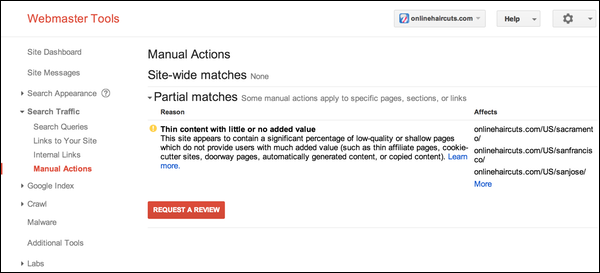
Manual Actions Viewer Screenshot

Google has long been alerting webmasters when they placed a manual action against the site, but last week they made it even easier to know for sure whether a site’s search rankings are being penalized with a manual action. The search engine has added a new feature to Webmaster Tools called the Manual Actions viewer.

The Manual Actions viewer is seen under the “Search Traffic” tab, and it is meant to act as a complimentary alert to the email notifications they already send out to websites receiving a manual action. With the new tool, webmasters don’t have to rely on waiting for an email. Instead, they can check their site’s condition any time.

According to Google, less than two percent of all domains within its index are manually removed for spammy practices, so most legitimate webmasters will never see anything within the tool other than a display reading “No manual webspam actions found.”

However, for those who get targeted for spammy practices, the Manual Actions viewer will show existing webspam problems under two headings titled ‘site-wide matches’ and ‘partial matches’. They will also include information on what type of problem exists from a list of roughly a dozen categories including ‘hidden text and/or keyword stuffing’, ‘thin content’, and ‘pure spam’.

For the partial matches listed in the tool, Google also gives access to a list of affected URLs for each type of spam problem. For example, if you have a notification for thin content, you will be able to see all the URLs targeted. There is a limit of 1,000 URLs per problem category, but that should be plenty for al but massive websites like YouTube.

Within the tool, there is also quick access to a new ‘Request a Review’ button that appears any time there are manual actions listed. When you click the button, a pop-up window opens which lets the webmaster give Google details on how you have resolved the issues.

Recently, Google updated the link schemes web page that gives examples of what Google considers to be spammy backlinks. The additions are pretty notable as article marketing or guest posting campaigns with keyword rich anchor text have been included. Advertorials with paid links and links with optimized anchor text in press releases or articles were also added.

With all the new additions, it can be hard to keep up to date with what Google is labeling spammy backlinks or backlink schemes. But, Free-SEO-News’ recent newsletter simply and efficiently lays out the 11 things that Google doesn’t like to see in backlink campaigns.

  1. Paid Links – Buying or selling links that pass PageRank has been frowned upon for a long time. This includes exchanging money for links or posts that contain links, sending ‘free’ products in exchange for favors or links, or direct exchange of services for links. It is pretty simple, buying links in any way will get you in trouble.
  2. Excessive Link Exchanges – While exchanging links with relevant other websites in your industry is absolutely normal for websites, over-using those links or cross-linking to irrelevant topics is a big sign of unnatural linking. Simple common sense will keep you from getting in trouble, just don’t try to trick the system.
  3. Large-Scale Article Marketing or Guest Posting Campaigns – Similar to the last scheme, posting your articles and guest posts on other websites it perfectly normal. However, doing it in bulk or posting the same articles to numerous websites will appear to be blogspam to Google. Also, if you do guest posts just to get keyword rich backlinks, you will see similar penalties. Only publish on other websites when it makes sense and offers value.
  4. Automated Programs or Services to Create Backlinks – There are tons of ads for tools and services that promise hundreds or thousands of backlinks for a low price and very little work. While they may do what they say, Google also easily spots these tools and won’t hesitate to ban a site using them.
  5. Text Ads That Pass PageRank – If you’re running a text ad on another website, you have to make sure to use the rel=nofollow attribute, otherwise it appears to be a manipulative backlink.
  6. Advertorials That Include Links That Pass PageRank – If you pay for an article or ad, always use the rel=nofollow attribute. Simply put, if you paid for an ad or article, it won’t do you any good and can bring a lot of damage if you don’t use the attribute.
  7. Links with Optimized Anchor Text in Articles or Press Releases – Stuffing articles and press releases with optimized anchor text has been a strategy for a long time, but Google has shut it down recently. If your page has a link every four to five words, you’re probably looking at some penalties.
  8. Links From Low Quality Directories or Bookmark Sites – Submitting your site to hundreds of internet directories is an utter waste of time. Most links won’t ever get you a single visitor and won’t help your rankings. Instead, only focus on directories that realistically could get you visitors.
  9. Widely Distributed Links in the Footers of Various Websites – Another older trick that Google has put the squash on was to put tons of keyword rich links to other websites in the footer. These links are always paid links and are an obvious sign of link schemes.
  10. Links Embedded in Widgets – It isn’t uncommon for widget developers to offer free widgets that contain links to other sites. It also isn’t uncommon for these developers to reach out to site owners and offer to advertise through these widgets. However, Google hates these links and considers them a scheme. I’d suggest against it, but if you do advertise through these widgets, use the nofollow attribute.
  11. Forum Comments With Optimized Links in the Post – It is very easy to get a tool that automatically posts to forums and include links to websites. It is a pretty blatant form of spam which won’t get any actual visibility on the forums and the links are more likely to get you banned than draw a single visitor.

There’s a pretty obvious underlying trend in all of these tactics that Google fights. They all attempt to create artificial links, usually in bulk. Google can tell the quality of a link and all of these schemes are easily identifiable. Instead, focus on building legitimate quality links, and use respected tools such as SEOprofiler. It will take longer, but you’re site will do much better.

Bruce Springsteen in Concert

Source: Craig O’Neal

Marketing is a tricky game. You aren’t just trying to broadcast your ads to everyone who can possibly see it. Instead, you want to get your message to interested parties. We want real leads and in PPC we want clicks that are going to lead to conversions. We are paying for those clicks after all.

To weed out the garden and keep your add showing up for irrelevant content or uninterested searchers, Google AdWords offers negative keywords. Not only can you designate the terms you want to bid on, but also the search terms that are likely to result in wasted clicks.

Some write off the importance of properly setting up your negative keywords. They underestimate how often people click the top results without actually checking to see what the result is, even when it’s an ad. Google doesn’t exactly try to obviously differentiate ads from regular results, and anyone can just click the top result. If your ad is irrelevant to them, you just wasted money on that ad.

Those who ignore or underestimate the importance of negative keywords tend to assume it is rare for searchers to blindly or accidentally click the top link, even when it’s not relevant to them. The group from Search Laboratory recently ran an experiment in the form of a Bruce Springsteen themed ad to show the exact opposite.

When Springsteen was set to perform at the Leeds Arena, they set up ads for the keywords ‘Bruce Springsteen’, ‘Leeds Arena’, ‘tickets’, and ‘reviews’ with a little play on the song title Born to Run. The ad was simple and clearly humorous, and it was very up front that the company is an SEO & PPC business.

They break down their results in a little more detail on their page, but simply put, the CTR was over 2% on an average position of three. It isn’t a perfectly scientific study of the effect, but it is pretty clear that they received quite a few clicks from people that were almost certainly not looking for PPC or SEO services. It highlights the need to get your negative keywords right and make sure your ads are shown to the interested markets, not just random people.

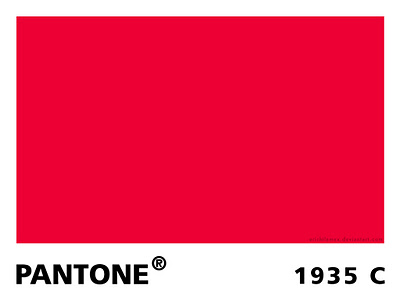
Pantone Red

Colors do more than most people give them credit for. In web design, they aren’t just physically helping define a page. They can set a mood, establish trust, excite viewers, and define your brand. Colors can help a company secure their professional image or severely damage it. Colors can be out of date, and they can be hip or trendy.

The key to understanding how colors function is to understand how we think about and respond to those colors. Onextra Pixel has been exploring colors and offering guides to help us understand the use of color in web design.

Red is a color with perhaps the strongest associations, possibly because it is such a bright, attention grabbing color. It is such a dominant color, it seems to always be extroverts favorite color.

These associations tend to be dramatic connections. Red is normally associated with passion, danger, sacrifice, blood, passion, fire, beauty, and anger. In contrast, in many cultures the color is associated with happiness and love.

Because of these dramatic associations, red is one of the most powerful colors for expressing moods or grabbing attention in all types of media. It encourages appetite, inspires activity, and evokes emotion all depending on the shade used. Pale shades like pink can be soft and feminine, while pure bright reds can be harsh, aggressive, and overbearing. Meanwhile, deep dark shades of red like crimson can evoke warmth and comfort or creepy sinister vibes.

As you can see, red is one of the most versatile colors on the spectrum. If you can choose the right shade for your design, you can create heightened emotion and attention with ease. Or, you can pair it with white and black to create a formal, professional perception.

Due to its incredible versatility red is obviously a popular color on the web and in all other kinds of design. Onextra Pixel has a showcase of websites using red in many different ways to portray a huge variety of moods and emotions.

Everything Design

Source: Everything Design

SEO Magnifying Glass

Source: Flickr

Search engine optimization (SEO) isn’t the easiest thing to get into, even though it is one of the most important things you can learn when starting an online business or building a website for your company. It isn’t that SEO is too difficult for most to learn, it is simply that most people in the industry have been working in it for so long that even the basic guides often come out overly complicated.

SEO is extremely important for bringing in new customers and being found online. In basic terms, SEO is notifying search engines to the existence of your site and telling them what its about. This way, search engines can rank the quality of sites and decide where you belong in the results. Of course, the higher you are in the search results, the more people will come to your site.

Daily SEO Tip categorizes SEO into four basic parts: keywords, content, links, and relevance. If you understand each of these components, you are well on your way to setting up your search engine optimization.

Keywords

Keywords act as the basic main ingredients of your website. The amount of keywords you have, their relevance, and how often you use them all play a role in a search engine determining your site’s quality.

  • Make sure all keywords you use are directly related to your service, brand, or product. Keep them specific to what you do, not just the broad industry you work in.
  • There is a practice called keyword stuffing that can get you into a lot of trouble. Keyword stuffing is the practice of overusing keywords in order to trick search engines. But, the search engines are very smart and will quickly see that you’re using words out of context or unnecessarily.

Content

Search engines are basically rating your website, and content is the main thing they are judging. The engines want to show searchers sites with valuable information. That doesn’t mean the content is selling to the user. It should be offering something of real value such as informative videos, up to date news, or helpful tutorials. Instead, the content establishes yourself as an expert in your field and raises your site’s reputability with search engines.

Linking

Ratings are partially decided based on how many inbound links a website has. They serve essentially as arrows directing the search engines to your site. It also follows the theory that if people are linking to your site there must be something of value there. It also shows that you aren’t an isolated spammy site in the internet ether, which is why you should also include links on any social media sites (aside from simply helping visitors find your business.)

Relevance

Relevance is less of a concrete component of SEO, but it is relevant in every facet of the work. Search engines spend the majority of their time fighting spam, and irrelevant content, keywords, or links are a huge red flag that a site may not be reputable. Search engines assume webpages deal with specific topics, be it news, jewelry, or a Buffy the Vampire Slayer fanpage. By keeping your content relevant to your topic, search engines know you are focused, professional and informative.

Conclusion

If you can get a hang on these four basic ideas, you will have a solid grasp on how SEO functions and how you can get your site showing up on search engines, bringing in new visitors and potential customers. SEO can be a broad, complicated topic, but the basics tend to always stay the same. Follow these principles, and you’ll be able to figure out the rest.

For the past couple of months, it has almost seemed like PPC didn’t exist outside of the new Adwords Enhanced Campaigns. But, the world did keep turning the entire time we were focused on the big transition, and plenty of new tools and features came out that deserve way more attention than they got.

Now that everyone is settling into the new form of campaigns, it is time to go over everything we missed while we were distracted. Frederick Vallaeys from Search Engine Land (and former Google AdWords employee) did just that by exploring the new reports in AdWords that can help guide your optimization and maybe save you some stress and money.

Impression Share Reports at the Keyword Level

Impression share (IS) is a useful metric which tells you how often your ads are being shown when a query matches your targeting. If the targeting is matching and a local user searches for one your keywords, you obviously hope they are being shown your ad in that relevant moment, especially for keywords that are performing well according to your KPI.

Previously, IS was only available at the campaign and ad group levels, and was difficult to figure out if there was a specific keyword dragging you down or performing extremely well. Now, Google notifies you exactly what keyword has a low IS and allows you to make the changes necessary without hurting your other keywords in the ad group.

Top Movers Dimension Report

The top movers report shows the most likely causes for any huge declines based on the change report and makes it quickly clear what budget changes had occurred. Rather than having to research and experiment to figure out the cause of any anomalies in campaign performance, the report quickly tells you what you need to know so you can skip forward to repairing any mistakes.

New Keywords Below First Page Bid Filter

The AdWords interface has shown the keywords whose max CPC is below the first page for a long time, but there was no easy way to filter or sort the view to focus solely on keywords. Now, Google has added a filter which helps you get started optimizing and boosting impressions. Few users go past the first page, so staying falling off will lose you a lot of impressions.

Date Comparisons

Google has always made it reasonably easy to make changes and attempt to constantly improve your performance. They have even openly advocated for ongoing optimization and testing. But, actually measuring the results has never been particularly easy and nets you a lot of useless data. Now, with new Date Comparisons combined with the Top Movers report, you can quickly spot issues with an account and perform before-and-after comparisons

Google is great for searching for quick and concise information, such as what you might find on Wikipedia or IMDB. If you have a simple question with an objective answer, the biggest search engine is the perfect tool. But, as anyone who has tried to do actual research for academics or work will tell you, Google is not so great with providing lots of in-depth content.

You might find news, or maybe a couple books and articles on Google Scholar, but the main search results on Google can be limiting. You are getting the results for the people with the best short answers for your questions. Now, Google is trying to change that as they recognize roughly 10% of searches and people (their estimate) are looking for more comprehensive information.

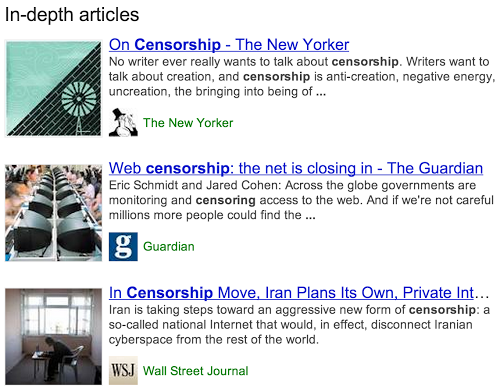
Google has announced that over the next few days they will be rolling out “in-depth articles” within the main search results. Now, when searching for broader topics that warrant more information such as stem cell research or abstract topics such as happiness or love, Google will feature a block of results in the middle of the page like below.

In-Depth Articles Screenshot

Source: The Official Google Search Blog

This is yet another way Google is forming results intuitively tailored to fit the type of information you are searching for. As a Google spokesperson told Search Engine Land, “Our goal is to surface the best in-depth articles from the entire web. In general, our algorithms are looking for the highest quality in-depth articles, and if that’s on a local newspaper website or a personal blog, we’d like to surface it.”