Tag Archive for: Google Search

After months of rumors and speculation, Google’s AI-powered generative search experience is here – sort of. 

The new conversational search tool is available to users as a Google Labs experiment only accessible by signing up for a waitlist. That means it is not replacing the current version of Google Search (at least, not yet), but it is the first public look at what is likely to be the biggest overhaul to Google Search in decades. 

Though we at TMO have been unable to get our hands on the new search experience directly, we have gathered all the most important details from those who have to show you what to expect when the generative search experience becomes more widely available. 

What The AI-Powered Google Generative Search Experience Looks Like

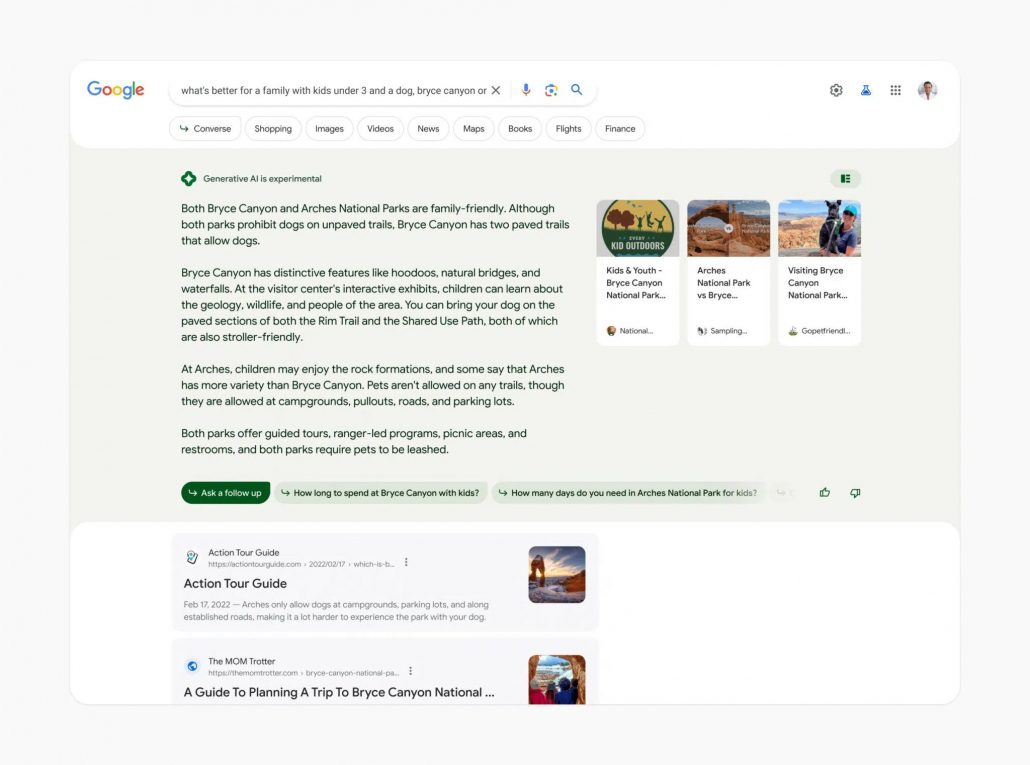
The new Google search experience is present at the very top of Google search results, giving context, answering basic questions, and providing a conversational way to refine your search for better results. 

Notably, any AI-generated search information is currently tagged with a label that reads Generative AI is experimental.

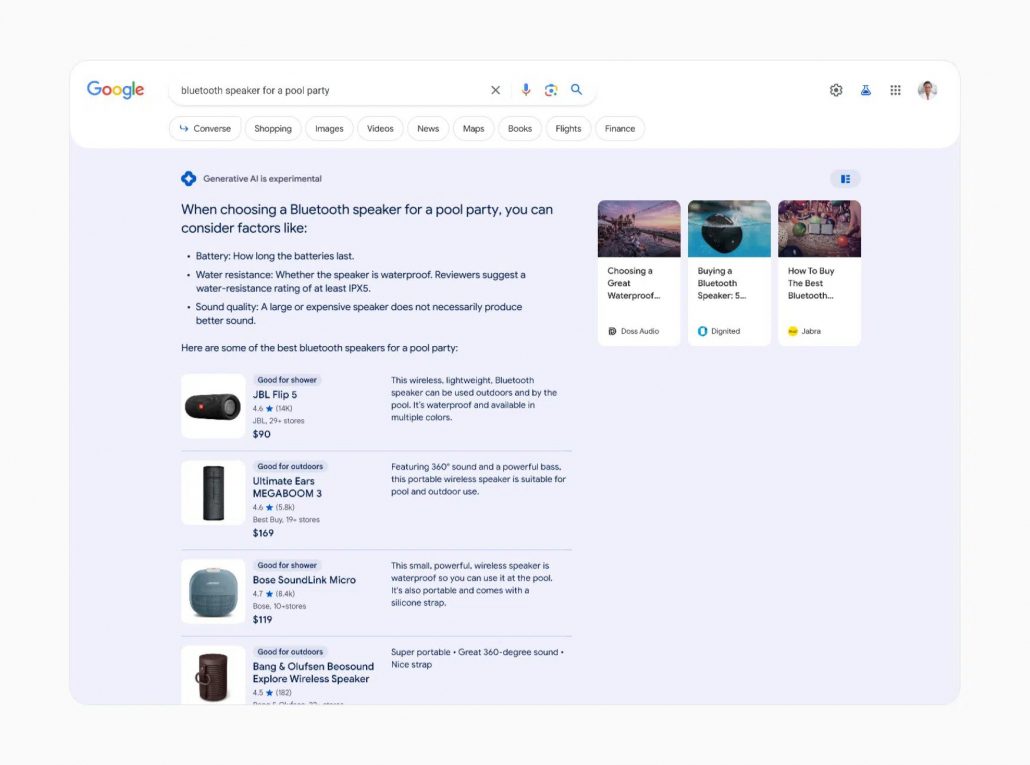
Google will also subtly shade AI content based on specific searches to “reflect specific journey types and the query intent itself.” For example, the AI-created search results in the shopping-related search below are placed on a light blue background. 

Where Does The Information Come From?

Unlike most current AI-powered tools, Google’s new search experience cites its sources. 

Sources are mentioned and linked to, making it easier for users to keep digging. 

Additionally, the AI tools can pull from Google’s existing search tools and data, such as Google Shopping product listings and more. 

Conversational Search

The biggest change that comes with the new AI-powered search is the ability to follow up queries with follow-ups using context from your previous search. As the announcement explains:

“Context will be carried over from question to question, to help you more naturally continue your exploration. You’ll also find helpful jumping-off points to web content and a range of perspectives that you can dig into.”

What AI Won’t Answer

The AI-powered tool will not provide information for a range of topics that might be sensitive or where accuracy is particularly important For example, Google’s AI tools won’t give answers about giving medicine to a child because of the potential risks involved. Similarly, reports suggest the tool won’t answer questions about financial issues.

Additionally, Google’s AI-powered search will not discuss or provide information on topics that may be “potentially harmful, hateful, or explicit”.

To try out the new Google AI-powered generative search experience for yourself sign up for the waitlist here.

To understand and rank websites in search results, Google is constantly using tools called crawlers to find and analyze new or recently updated web pages. What may surprise you is that the search engine actually uses three different types of crawlers depending on the situation with web pages. In fact, some of these crawlers may ignore the rules used to control how these crawlers interact with your site.

In the past week, those in the SEO world were surprised by the reveal that the search engine had begun using a new crawler called the GoogleOther crawler to relieve the strain on its main crawlers. Amidst this, I noticed some asking “Google has three different crawlers? I thought it was just Googlebot (the most well-known crawler which has been used by the search engine for over a decade).”  

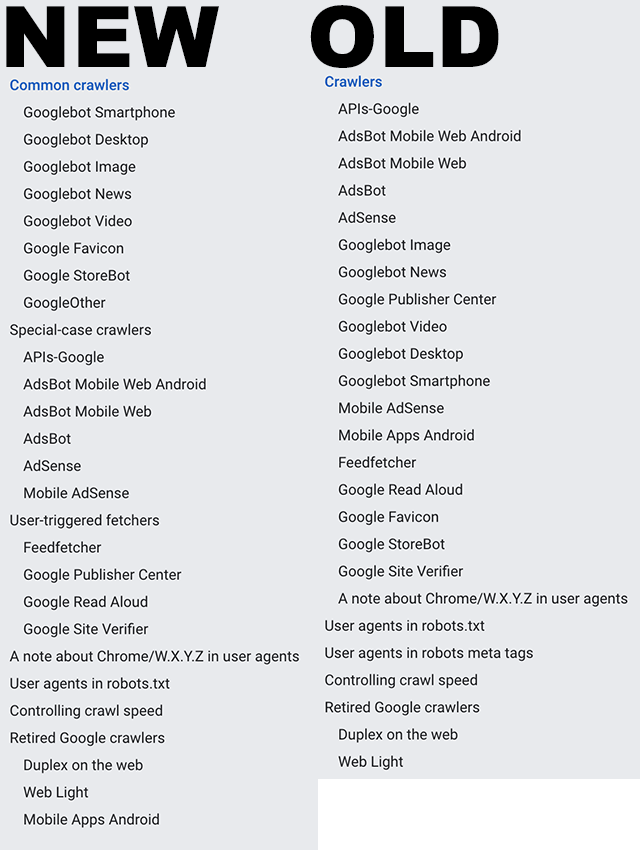
In reality, the company uses quite a few more than just one crawler and it would take a while to go into exactly what each one does as you can see from the list of them (from Search Engine Roundtable) below: 

However, Google recently updated a help document called “Verifying Googlebot and other Google crawlers” that breaks all these crawlers into three specific groups. 

The Three Types of Google Web Crawlers

Googlebot: The first type of crawler is easily the most well-known and recognized. Googlebots are the tools used to index pages for the company’s main search results. This always observes the rules set out in robots.txt files.

Special-case Crawlers: In some cases, Google will create crawlers for very specific functions, such as AdsBot which assesses web page quality for those running ads on the platform. Depending on the situation, this may include ignoring the rules dictated in a robots.txt file. 

User-triggered Fetchers: When a user does something that requires for the search engine to then verify information (when the Google Site Verifier is triggered by the site owner, for example), Google will use special robots dedicated to these tasks. Because this is initiated by the user to complete a specific process, these crawlers ignore robots.txt rules entirely. 

Why This Matters

Understanding how Google analyzes and processes the web can allow you to optimize your site for the best performance better. Additionally, it is important to identify the crawlers used by Google and ensure they are blocked in analytics tools or they can appear as false visits or impressions.

For more, read the full help article here.

Google has officially launched a new dashboard page dedicated to notifying users about any issues occurring with Google Search.

The dashboard, available at status.search.google.com, will highlight any outages occurring to Google’s search engine, along with problems crawling, indexing, or serving pages to Search.

As the company said

“As we head into 2023, we want to introduce another tool for the public to understand the most current status of systems which impact Search – crawling, indexing, and serving.”

Of course, Google’s search engine is one of the most reliable online services around, though outages do occur and other issues do pop up from time to time. 

The announcement goes into further detail:

“This dashboard reports widespread issues occurring in the last 7 days, with some details and the current status of the incident. A widespread issue means there’s a systemic problem with a Search system affecting a large number of sites or Search users. Typically these kinds of issues are very visible externally, and internally the SREs’ monitoring and alerting mechanisms are working behind the scenes to flag the issues.”

“Once we confirm with SREs that there’s an ongoing, widespread issue in Search, we aim to post an incident on the dashboard within an hour, and consecutive updates to the incident within 12 hours. Unlike with a traditional automated dashboard, our global staff reports these updates. The start time of the incident is generally when we managed to confirm the issue.”

Most importantly, you will now be able to immediately identify if sudden drops in traffic or other problems are related to your site or Google’s systems. In the past, the only way to confirm any ongoing problems with Google’s search engines was to contact the company directly.

It’s time for Google’s annual report of the top search trends of the past year and this year’s list is a little different.

Along with the usual list of top queries from the U.S. and around the world, the latest search trends report lets you refine the search to see what the most popular search trends were in your local area.

By entering a US city or zip code, Google will filter the results to show the top search trends from that area. You can also view these details by clicking on a specific city on the map.

These local search trends include the top 10 search queries along with notes on anything unique in the city’s search behavior. 

First, let’s go over the biggest search trends from across the country, then we will get to Tulsa’s top search trends further down below:

Google’s Year in Search 2022

Top US Searches of 2022

  1. Wordle
  2. Election results
  3. Betty White
  4. Queen Elizabeth
  5. Bob Saget
  6. Ukraine
  7. Mega Millions
  8. Powerball numbers
  9. Anne Heche
  10. Jeffrey Dahmer

Top Near Me US Searches of 2022

  1. Gas prices near me
  2. At home COVID test near me
  3. Voting near me
  4. Early voting near me
  5. PCR test near me

Top “How to help” US Searches of 2022

  1. How to help Ukraine?
  2. How to help Ukrainian refugees?
  3. How to help abortion rights?
  4. How to help Ukraine army?
  5. How to help Uvalde?

Top Near Me Searches in Tulsa, OK in 2022

  1. Gas prices near me
  2. Cheap gas near me
  3. At home covid test near me
  4. Temp agencies near me
  5. Primary care physician near me
  6. Loan companies near me
  7. Gyros near me
  8. E85 gas near me
  9. Car shows near me
  10. Concerts near me

Interesting Facts about Tulsa’s Online Searches in 2022

  • Tulsa, OK was one of only 2 places that had gyros as a top trending “near me” search, with the other being Lincoln, NE.
  • Tulsa, OK was the only place in the US that had husky-corgi mixes as the top trending animal
  • The top trending recipe search for the Tulsa area was for making quick pancakes.
  • Tulsa searched for country music more than any other genre.

For more, explore Google’s Global Year in Search and Local Year In Search.

Google has confirmed it is finally bringing near-endless scrolling to its desktop search results. Not only will this make the desktop search experience more similar to the mobile search experience, it will also make users more likely to see and engage with more search results. 

The new continuous search experience is currently rolling out for desktop search results in the United States and is likely to be expanded to other markets in the coming months.

As the search engine confirmed in a statement to Search Engine Journal, this is not quite endless scrolling. Instead after approximately six pages worth of URLs before showing users a prompt allowing them to see “more results.”

“… we’re bringing continuous scrolling to desktop so you can continue to see more helpful search results with fewer clicks. It’s now even easier to get inspired with more information at your fingertips.

“Now, when you scroll down you’ll continue to find relevant results so that you can discover new ideas. When you reach the bottom of a search results page, up to six pages of results will be automatically shown until you see a “More results” button if you wish to continue further.”

While users may like this because it brings a more seamless experience and gives them more options without interruption, this also gives Google more space to include snippets, ads, rich media, and other features without completely crowding out organic search listings.

Brands languishing past the first page of search results will likely see a slight boost in traffic as their visibility increases.

On the technical side of things, very little will be changing. There’s no need to change optimization strategies and this update will not affect reporting in Google Search Console because this tool tracks ranking positions, not what page you appear on. 

Google is rolling out several new updates and features for Google Search aimed at making it easier for users to find the content they are looking for.

Among the announcements, the search engine revealed new ways to use augmented reality (AR) and Google Lens to shop for products and find information like how to get a dish you’ve been craving from a nearby restaurant. 

Below, we will go over the announcements one by one to break down the details and when you can start using these tools to help users find your products and services.

Introducing Multisearch For Food

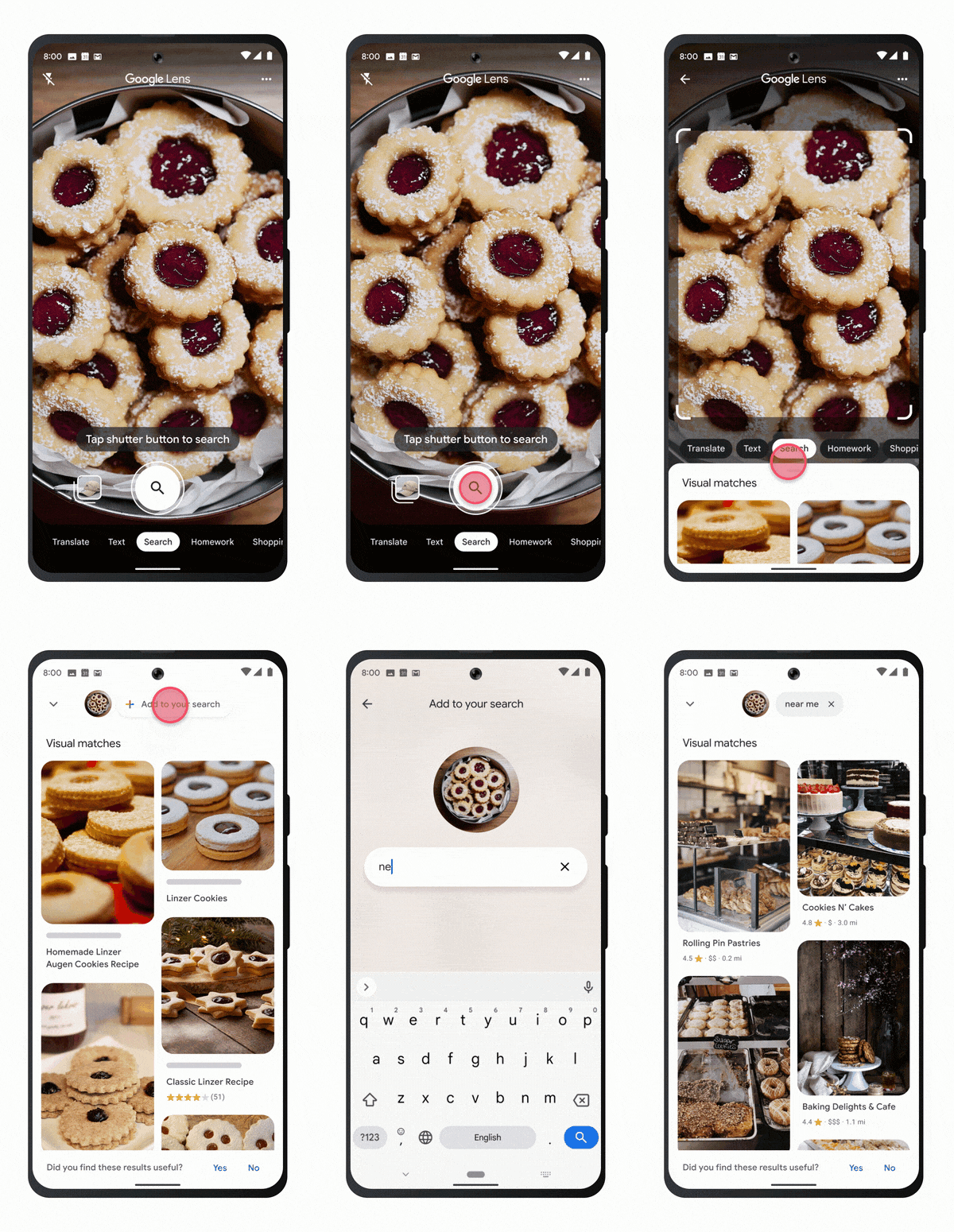
Google is working to unite its search tools including Google Lens and Maps so that users can seamlessly combine types of searches into one powerful search.

For example, using multisearch, you can now take a picture of a meal in Google Lens and add a text modifier such as “near me” to discover what restaurants serve that meal.

“This new way of searching will help me find local businesses in my community, so I can more easily support neighborhood shops during the holidays,” said Cindy Huynh, Product Manager of Google Lens.

This feature is rolling out for all English-language U.S. users today.

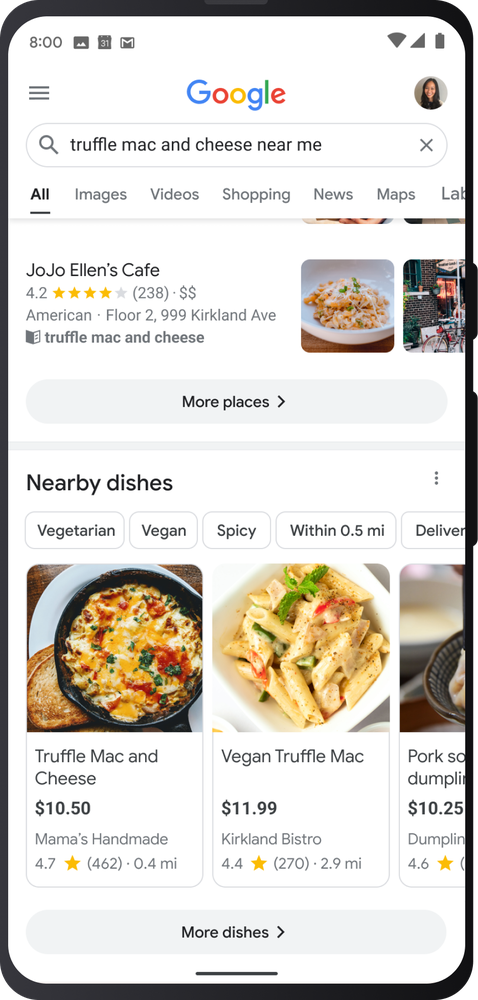
Search For Specific Dishes

Along with the announcement above, Google revealed that users can also simply search for specific dishes by name to find information including who serves this dish, pricing, ingredients, and more

As Google’s Sophia Lin says:

“I often crave comfort food this time of year — like truffle mac and cheese — but I don’t always know where to find it. Lucky for foodies, starting today, you can now search for the exact dish you’re craving and see all the places near you that serve it.”

AR Shopping Tools for Shoes and Makeup

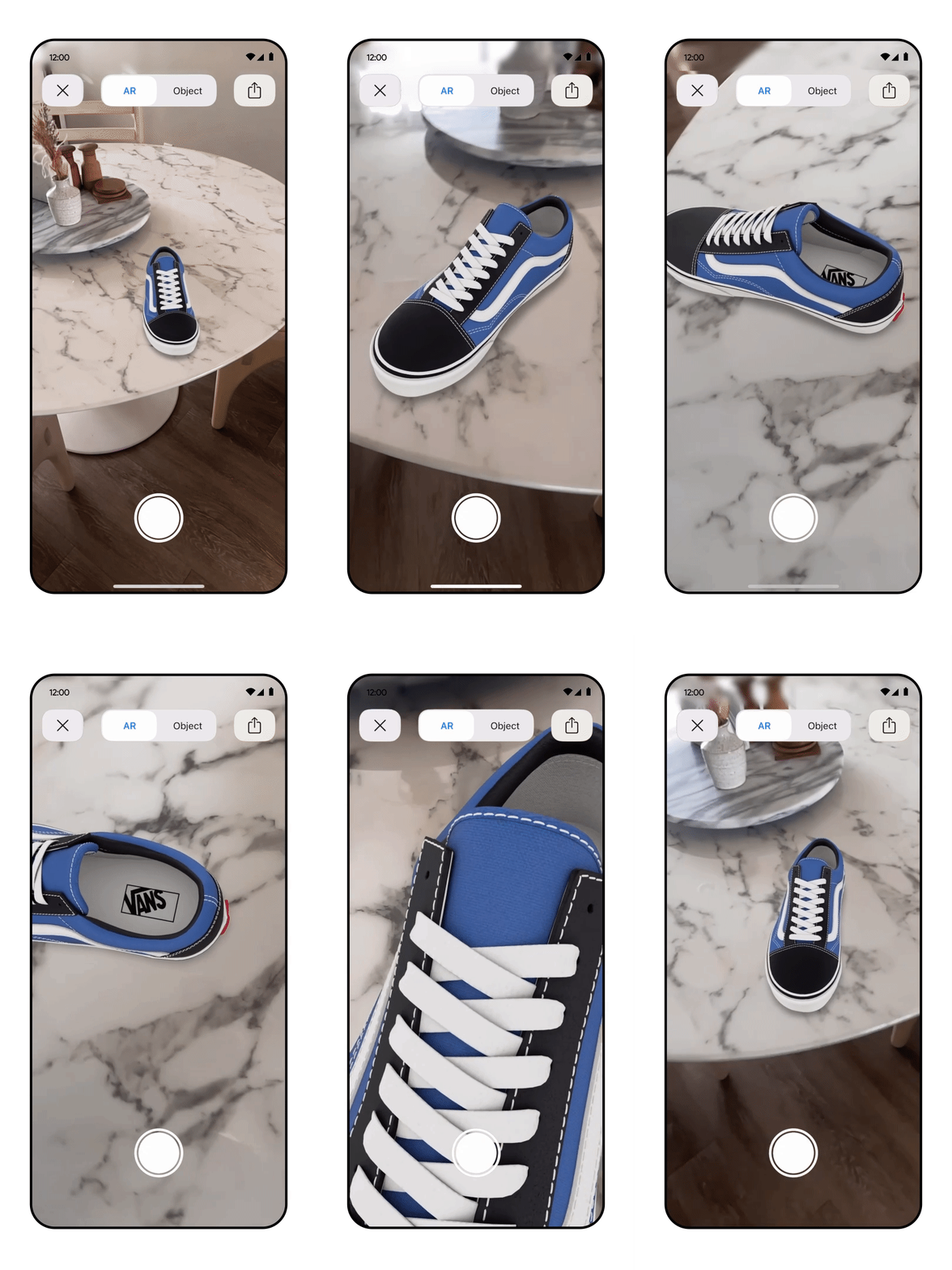
Seeing how new products will look once you leave the store has always been difficult for consumers, but Google is using augmented reality to visualize potential product purchases before you buy.

The first way Google is doing this is by allowing you to see potential show purchases in your living space. 

Starting today, shoppers can not only see high-quality 3D models of shoes. They can spin them around, zoom in on details, and even see the shoes as they would look in your typical surroundings.

Importantly, this is available for any brand with 3D assets of their shoes or home goods.

Additionally, Google has upgraded its AR shopping tools for makeup to include a broader range of skin tones and models with a more diverse set of features. 

The search engine has added over 150 new models with a diverse spectrum of skin tones, ages, genders, face shapes, ethnicities, and skin tones to test cosmetics on.

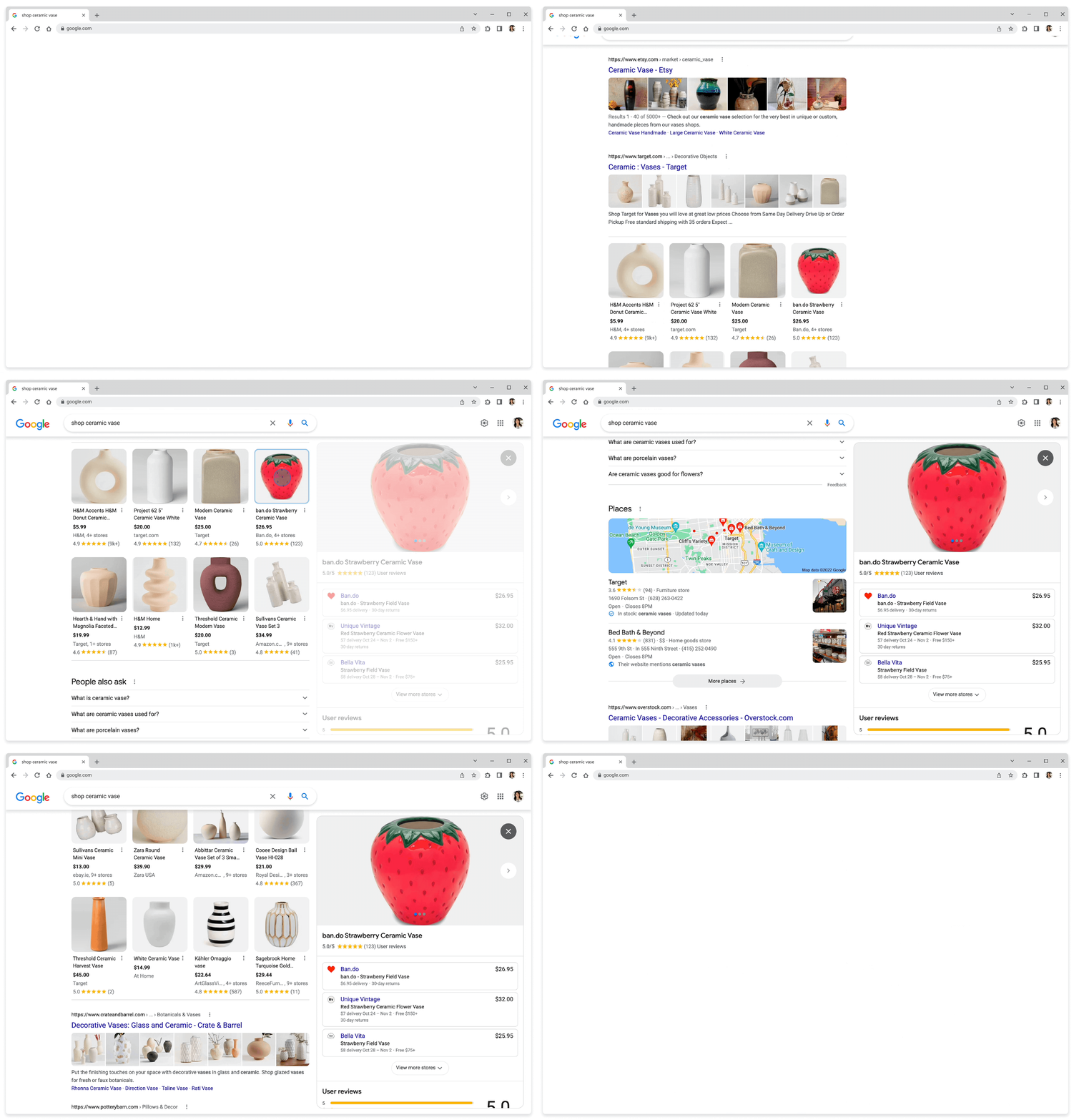
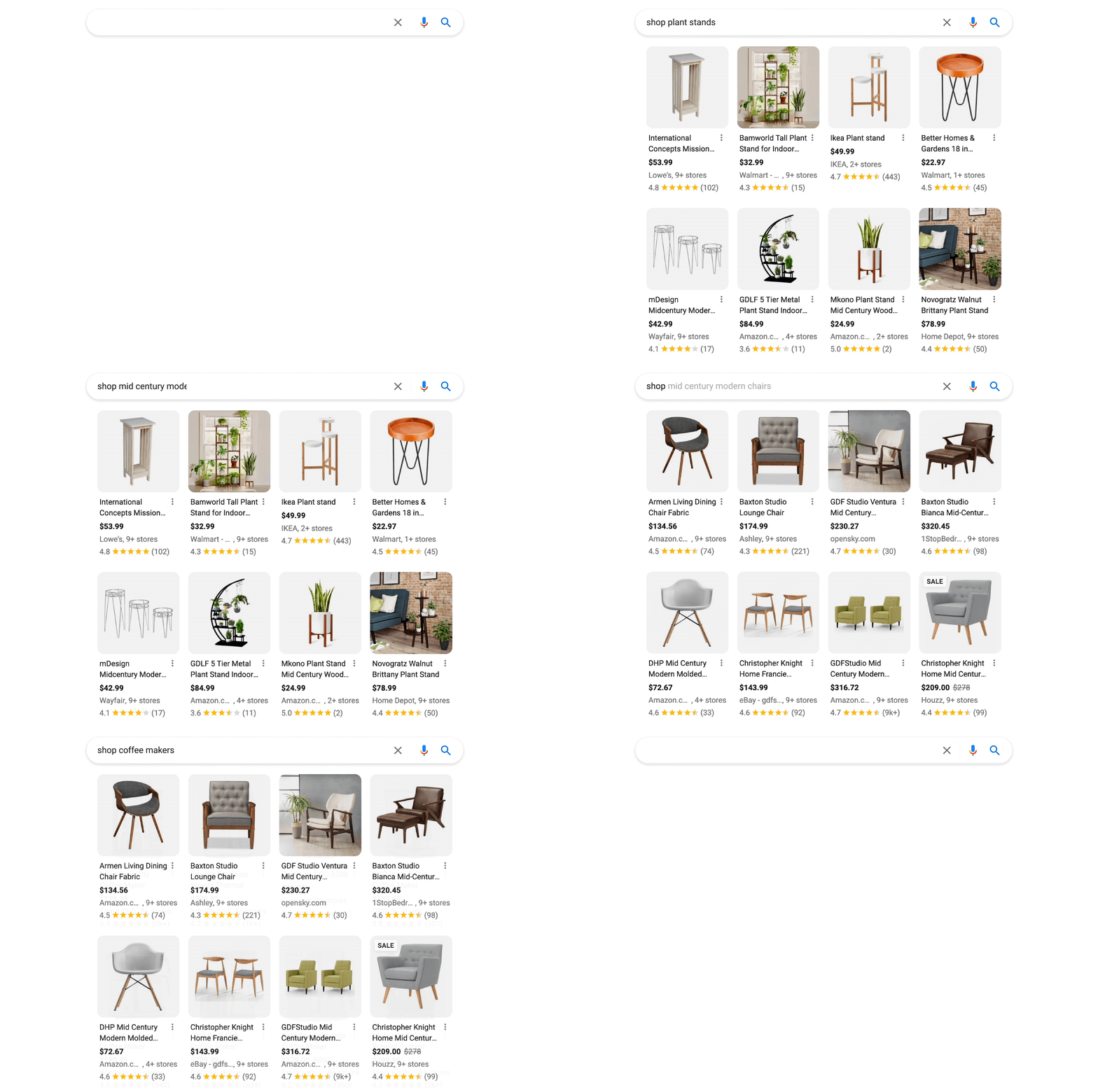
Google is updating its online shopping features on desktop with a new focus on visual elements including an increased focus on product images.

The company released a screenshot as an example so you can see how product search results start with a row of thumbnail images.

As users scroll down the page, they will also see details about pricing, user reviews, and ratings for specific products included in the result,

When clicked on, the product listings bring up a panel with more information and links to purchase the product from different retailers.

Most importantly, the panel does not interrupt your browsing process and users can immediately resume shopping from where they left off.

As before, users can also filter product results using a number of categories including brand, type, retailer, and discounted products.

The announcement says about the overhaul:

“Whether you’re looking for clothes, electronics, beauty products or home goods on desktop, you’ll see a more visual feed of shopping results that includes products, brands, articles and videos from across the web.”

Additionally, Google says these product results and search filters are all dynamic, so they will continuously be updated to include the newest products, popular retailers, and up-to-the-minute discounts.

The new Google shopping update is already rolling out to all users and should be available to everyone within the next few days.

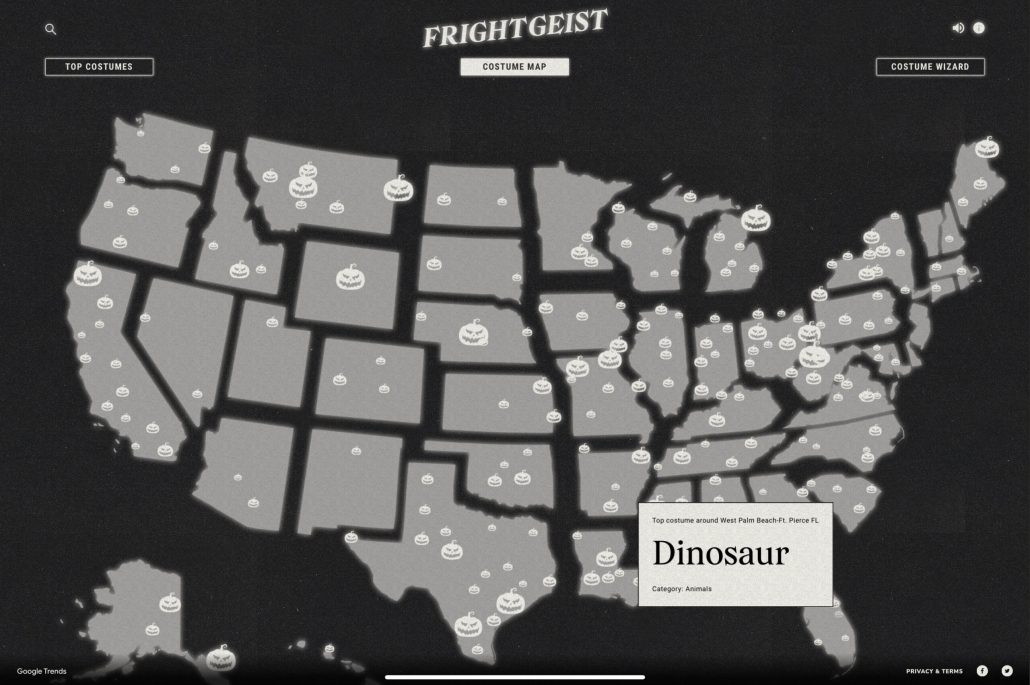
With Halloween fast approaching, Google has updated its Frightgeist website with all the latest search trends for this year’s spooky holiday.

The Halloween Frightgeist site has tracked the biggest holiday search trends annually, with a primary focus on Halloween costumes.

Notably, the tool allows you to go beyond the national search trends to find out details for a specific city or state. 

For example, it appears fairy costumes are particularly popular this year in Tulsa, as the leading costume-related search.

As Google says about the Frightgeist page:

“Every year, trillions of searches take place on Google, and Google Trends gives us an unparalleled look at what the world is searching for.”

“With Frightgeist, we went on a hunt to find the most popular Halloween costumes of 2021. Pulling from the top 500 costume searches in the United States, Frightgeist used Google Trends to tell people what costumes were trending around them and help them find a costume that was sure to turn heads.”

Below, we are going to cover the top costume search trends both nationally and in the Tulsa area, and a little bit more of what you can do with this data.

Top National Halloween Costume Ideas in 2022

  1. Witch
  2. Spider-Man
  3. Dinosaur
  4. Stranger Things
  5. Fairy
  6. Pirate
  7. Rabbit
  8. Cheerleader
  9. Cowboy
  10. Harley Quinn
  11. Clown
  12. Vampire
  13. 1980s
  14. Hocus Pocus
  15. Pumpkin
  16. Chucky
  17. Doll
  18. Angel
  19. Batman
  20. Bear

Top Halloween Costumes In Tulsa Oklahoma for 2022

  1. Fairy
  2. 1980s
  3. Spider-Man
  4. Chucky
  5. Spider

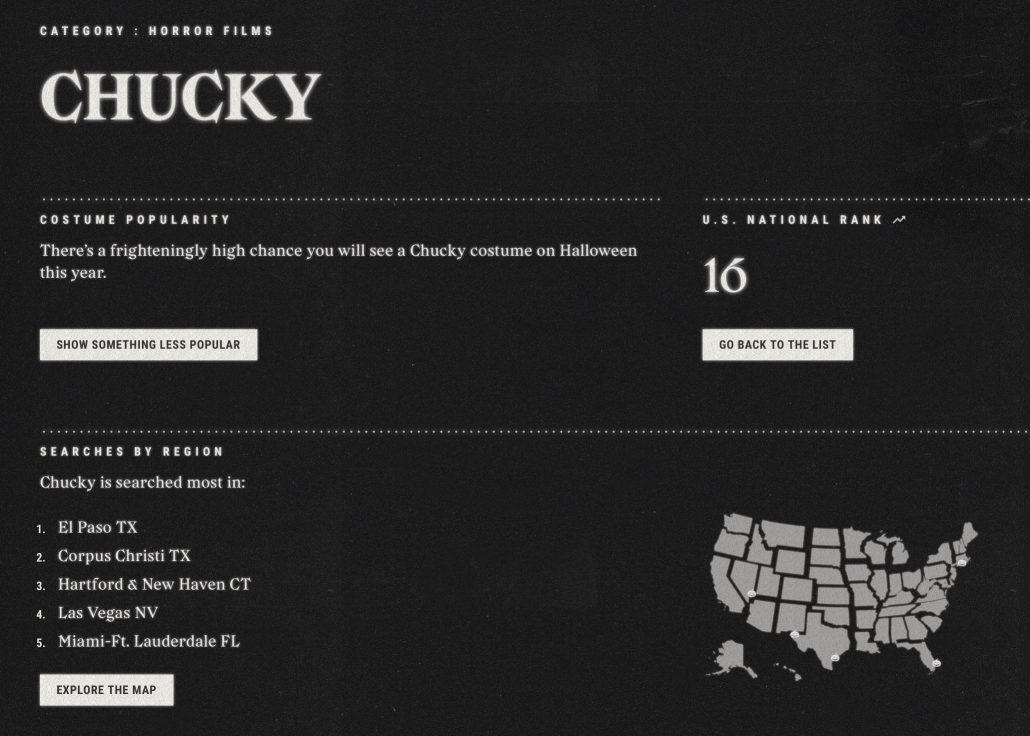
The Frightgeist site also allows you to see more details about each trending costume idea, including where it is most popular across the country, how it has performed in past years, and more.

Lastly, the site includes a costume selection wizard you can use to brainstorm what to wear this Halloween. The costume wizard lets you adjust sliders for spookiness and uniqueness and toggle between classic and modern costumes that are trending locally or nationally.

As expected, Google’s Search On conference this week brought tons of new announcements and previews of new features coming to the search engine. Though most of these features are not publicly available yet, they show that Google is intent on revamping many aspects of its search engine to make searching easier and more engaging.

Below, we are going to talk about the 5 most exciting and essential changes that both users and companies hoping to improve their online visibility should be aware of.

Google Search Shortcuts

Over the past decade, Google has steadily expanded the ways users can search for information beyond just entering a text query.

You can upload an image to find other similar images, take a pic of an equation to get help solving it, or turn on the microphone to help identify a song playing – just for a few examples.

The problem is that Google has not always done the best job of promoting these new ways to search or making them easily accessible to users.

Now, that is all changing as Google is adding advanced shortcuts on the front page of the Google Search app.

You can see what this looks like in the screenshot below or, if you have an iOS device, you can see the feature for yourself by simply opening the Google app.

In-Search-Bar Results

Typically, users have to at least enter their query before they have the chance to click on a relevant result. Coming soon, however, that won’t always be the case.

Google announced that it will soon be delivering results to users even as they are still typing in the search bar.

You can see what this might look like in the example below, where Google delivered a link to a location page directly within the search bar:

For now, it appears Google will be limiting this feature to just one result in a search bar, though we will know more when it rolls out later this year.

Enhanced Query Refinements

Along with the results like described above, Google is also adding new ways to refine your search query for the most useful results.

As you are typing a query into the mobile search bar, the search engine will start populating the bar with options to make your search more specific.

For example, when searching for queries like “best Mexico cities”, Google will suggest refinements like “to visit”, “to retire”, or “for families”.

More Prominent Web Stories

Google is making web stories a bigger part of mobile search by giving them a more prominent place in mobile search results.

As the company said in an announcement:

“So we’re also making it easier to explore a subject by highlighting the most relevant and helpful information, including content from creators on the open web. For topics like cities, you may see visual stories and short videos from people who have visited, tips on how to explore the city, things to do, how to get there and other important aspects you might want to know about as you plan your travels.”

One Page For Text, Image, & Video Search Results

Instead of making users switch between web, images, or video result tabs when searching, Google is unifying them all into one endless search result feed on mobile. 

“We’re also reimagining the way we display results to better reflect the ways people explore topics. You’ll see the most relevant content, from a variety of sources, no matter what format the information comes in — whether that’s text, images or video.”

When users would typically encounter the end of a search page, they will be given the option to either show more results or continue scrolling vertically to explore a more specific search – as seen below:

Though Google has not announced exact dates to expect these updates, the company says they will be rolling out to mobile search in the coming months.

A new video from Google focuses on helping e-commerce brands stand out on the search engine, including specific strategies for ensuring your listing is eligible for search features that make your listing more prominent and visible.

For starters, the video lists three general guidelines for making your products stand out:

  1. Images help visitors understand your products
  2. Product reviews and star ratings increase trust in your brand
  3. Pricing and availability information allows shoppers to choose the best seller for their needs

With that in mind, Google’s Alan Kent then breaks down six ways to make your site more visible on the search engine.

1) Title Tags

As one of the first things any searcher will see, title tags are crucial for helping searchers understand your web pages. This is why site owners should take extra care when preparing the titles for their pages – especially product pages.

“A good title link can greatly help users understand your offering, bringing quality traffic to your site. … Low-quality title links can harm a users’ impression of your site.”

While Google will rewrite title tags if it believes the existing titles do not adequately describe the related page, it is better to deliver informative titles on your own.

Kent also advises against adding time-sensitive product details like pricing or availability in titles because they may be outdated by the time this information is updated in search results.

2) High-Quality Images

Improving the quality of your product images can make shoppers feel more confident about your products and their potential decision to purchase. 

As Kent says, “we’ve observed that users generally respond well to high-quality images and recommend that key images be at least 1200 pixels wide.”

Once these images are in place, Kent suggests checking the Max Image Preview metadata as that provides Google with guidance on how to handle images within search results.

Additionally, best practices indicate you should use product structured data to allow Google to pick the best images to display in search results.

Lastly, he provided some broad guidance for product photos, encouraging e-commerce brands to focus on creating product photos that best help shoppers understand their products. For example, you might highlight different angles or provide size comparisons within product photos.

3) Share Rich Product Data

Google uses structured data to more easily understand web pages and enable them to be shown as rich results or “special presentation treatments”. 

Specifically, Kent emphasizes that these details should always be included in structured product data:

  • Product Title
  • Description
  • Images
  • Ratings
  • Price
  • Availability

Kent also encourages brands to regularly use the Search Console URL Indexing tool and Rich Results Test tool to ensure you don’t have any issues with structured data on your site.

4) Share Price Drop Data

Google uses special price drop presentations to highlight special deals in search results. Still, e-commerce brands must share pricing information with the search engine and include the Offer property in the product structured data to be eligible.

However, there is no guarantee your listing will be shown in a special price drop presentation once you’ve provided these details.

5) Identify Products You Sell

Use accurate product identifiers – such as GTIN identifiers – along with Google Merchant Center data and structured product data to make your site eligible for product carousels.

6) Create a Business Profile Listing

Kent advises brands to create a Google Business Profile via the Google Business Profile Manager if their shop also has a brick-and-mortar location. 

This enables your site to be included in local search results which makes your physical locations more visible in search.