Microsoft is overhauling its Bing search engine’s mobile experience with new features, better formatting, and integration with mobile apps for Skype and Edge.

The news came from Microsoft’s Global Head of Marketing, Divya Kumar, who showcased the new mobile experience and upcoming features in a blog post. 

Previewed Features Are Arriving This Week

First, Kumar announced that several features previewed in May will be launched over the next week. These features include:

  • Richer video experience on mobile and desktop
  • Knowledge Cards
  • Including graphs in search results
  • Improved Formatting
  • Better social sharing abilities

Along with these updates, Kumar says that chat history will be coming to desktop over the next week after already arriving on mobile. To access your chat history, hit the clock icon in the top right of an existing chat.

New Updates To Bing

The bulk of the announcement is dedicated to highlighting upcoming features for users on mobile devices.

For starters, Microsoft is premiering a Bing Chat widget that can be directly added to iOS or Android home screens – launching the new Bing Chat tools will always be possible with just a tap.

Additionally, Divya Kumar says that Bing is implementing the ability to continue a conversation across different platforms if you are signed in. For example, a user might start a conversation on desktop, but they will be able to pick up where they left off if they decide to move to a mobile device. 

Microsoft is also working to improve language support for non-English users with better voice input.

Third-Party App Integration

Microsoft has integrated its AI tools into its mobile keyboard app, SwiftKey to make drafting new messages efficient and intuitive.

Additionally, the company is bringing  Bing’s AI abilities to Skype by making the new Bing experience available from within any group chat. Just tag Bing in the chat to access the tools. 

Why It Matters

Bing has been pushing to change its status as a search engine through its diverse AI tools and major updates to all of its services. According to the announcement, it seems to be working.

The company says it is seeing 8x the number of daily downloads since it launched the new AI-assisted Bing and they expect to see further growth as they develop these tools and products further.
After months of rumors and speculation, Google’s AI-powered generative search experience is here – sort of. 

The new conversational search tool is available to users as a Google Labs experiment only accessible by signing up for a waitlist. That means it is not replacing the current version of Google Search (at least, not yet), but it is the first public look at what is likely to be the biggest overhaul to Google Search in decades. 

Though we at TMO have been unable to get our hands on the new search experience directly, we have gathered all the most important details from those who have to show you what to expect when the generative search experience becomes more widely available. 

What The AI-Powered Google Generative Search Experience Looks Like

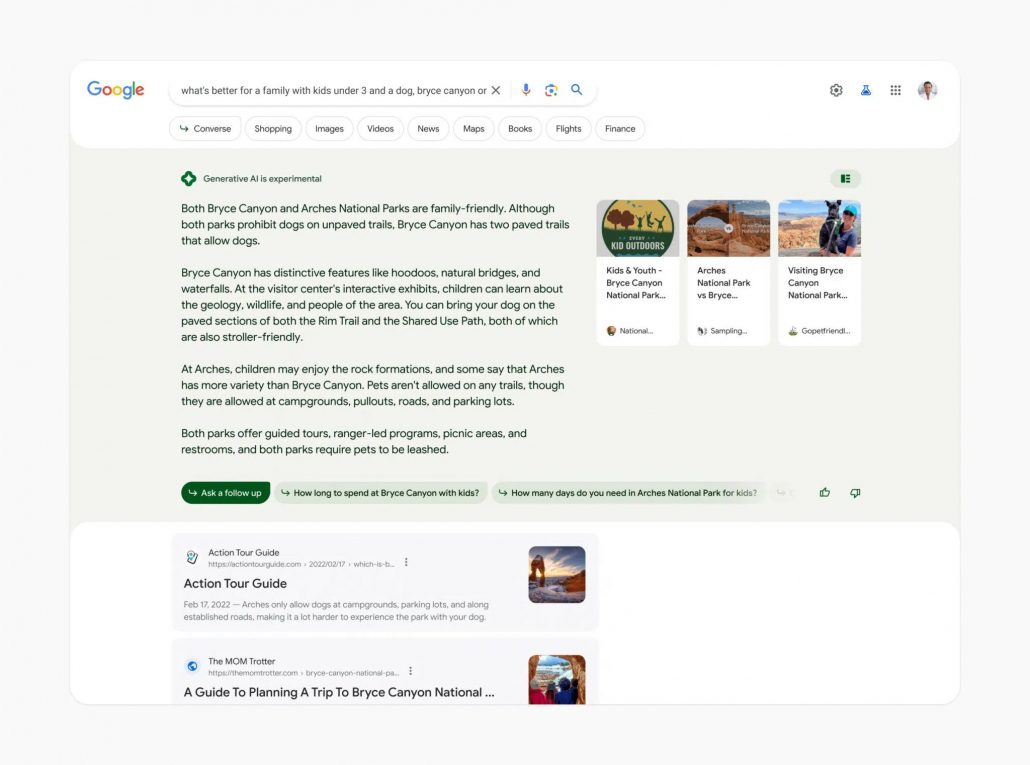
The new Google search experience is present at the very top of Google search results, giving context, answering basic questions, and providing a conversational way to refine your search for better results. 

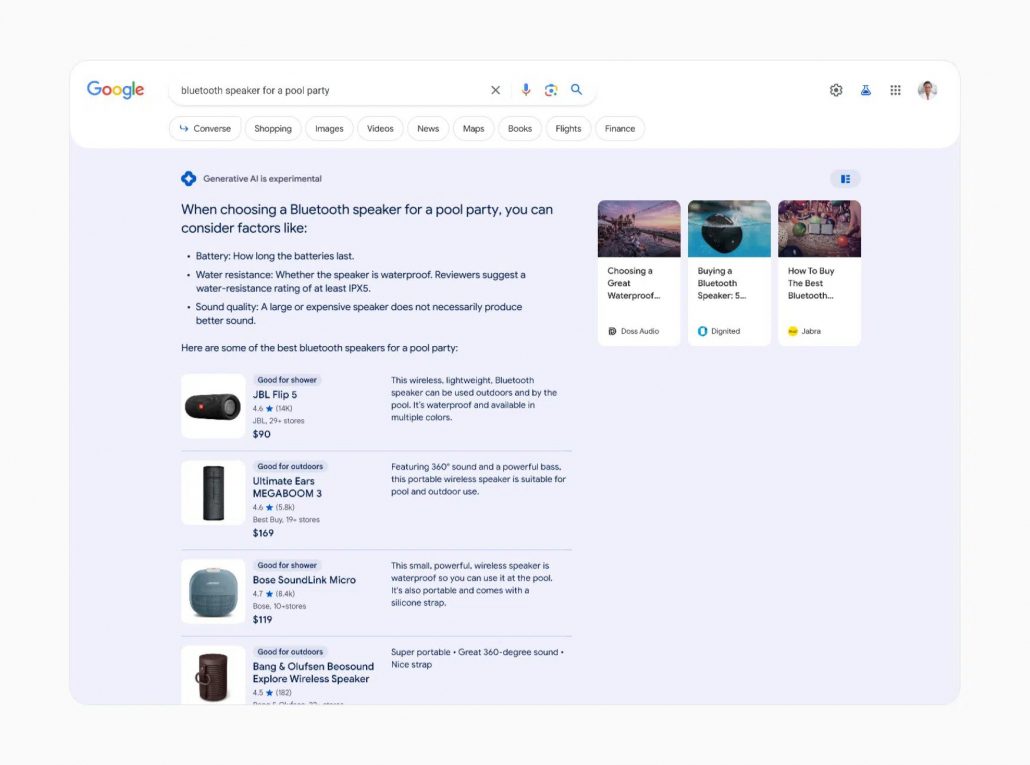
Notably, any AI-generated search information is currently tagged with a label that reads Generative AI is experimental.

Google will also subtly shade AI content based on specific searches to “reflect specific journey types and the query intent itself.” For example, the AI-created search results in the shopping-related search below are placed on a light blue background. 

Where Does The Information Come From?

Unlike most current AI-powered tools, Google’s new search experience cites its sources. 

Sources are mentioned and linked to, making it easier for users to keep digging. 

Additionally, the AI tools can pull from Google’s existing search tools and data, such as Google Shopping product listings and more. 

Conversational Search

The biggest change that comes with the new AI-powered search is the ability to follow up queries with follow-ups using context from your previous search. As the announcement explains:

“Context will be carried over from question to question, to help you more naturally continue your exploration. You’ll also find helpful jumping-off points to web content and a range of perspectives that you can dig into.”

What AI Won’t Answer

The AI-powered tool will not provide information for a range of topics that might be sensitive or where accuracy is particularly important For example, Google’s AI tools won’t give answers about giving medicine to a child because of the potential risks involved. Similarly, reports suggest the tool won’t answer questions about financial issues.

Additionally, Google’s AI-powered search will not discuss or provide information on topics that may be “potentially harmful, hateful, or explicit”.

To try out the new Google AI-powered generative search experience for yourself sign up for the waitlist here.

Google Discover will not show content or images that would normally be blocked by the search engine’s SafeSearch tools. 

Though not surprising, this is the closest we have come to seeing this confirmed by someone at Google. Google Search Liaison Danny Sullivan responded to a question on Twitter by SEO Professional Lily Ray. In a recent tweet, Ray posed the question:

“Is the below article on SafeSearch filtering the best place to look for guidance on Google Discover? Seems that sites with *some* adult content may be excluded from Discover entirely; does this guidance apply?”

In his initial response, Sullivan wasn’t completely certain but stated: “It’s pretty likely SafeSearch applies to Discover, so yes. Will update later if that’s not the case.”

While Sullivan never came back to state this was not the case, he later explained that “our systems, including on Discover, generally don’t show content that might be borderline explicit or shocking etc. in situations where people wouldn’t expect it.”

Previously, other prominent figures at Google including Gary Illyes and John Mueller had indicated this may be the case, also suggesting adult language may limit the visibility of content in Discover. 

For most brands, this won’t be an issue but more adult-oriented brands may struggle to appear in the Discovery feed, even with significant optimization.

One of Google’s most visible spokespeople, John Mueller, made a rare appearance on Reddit to answer a series of “dumb” SEO questions covering everything from geotagging images to how often you should blog.

In a thread on the r/BigSEO subreddit called “incoming dumb question barrage”, a user asked a series of five questions:

  1. Should we be geotagging images. Does Google even care?
  2. Blogging. If we do it, is it everyday or once a week with some seriously solid stuff?
  3. Google Business Profile posting: Everyday, once a week, or why bother?
  4. Since stuff like Senuke died 10 years ago, is it all about networking with webmasters of similar and same niche sites for links?
  5. Piggybacking off #4, what about PBNs? Are they back? If so, does it have to be a group of completely legit looking websites vs some cobbled together WP blogs?

Mueller provided a series of candid answers which we will get into below:

Geotagging Images

Here Mueller kept it short and sweet: “No need to geotag images for SEO.”

How Often Should You Blog?

As always, Google won’t provide a specific post frequency that is “best” for SEO blog content. Rather, Mueller says to post “as often as you have something unique & compelling to say.”

However, the Google Search Advocate admits that more frequent posting can more traffic if you are able to maintain the quality of your content. 

“The problem with trying to keep a frequency up is that it’s easy to end up with mediocre, fluffy content, which search engine quality algorithms might pick up on.”

Additionally, he indicates that those who are using AI to create a lot of content quickly are unlikely to be rewarded.

Google Business Profile Posting Frequency

Unfortunately, this is not Mueller’s area of knowledge. His answer was a simple “no idea.”

Outdated Linkbuilding Strategies

The last two questions are devoted to asking if older methods for link building were still relevant at all. Clearly, this tickled Mueller as he largely dismissed either approach. 

“SENuke, hah, that’s a name I haven’t heard in ages, lol. Sorry. Giggle. I have thoughts on links, but people love to take things out of context to promote their link efforts / tools, so perhaps someone else will say something reasonable, or not.

“OMG, PBNs too. What is this thread even. Now I won’t say anything without a lawyer present.”

No Shortcuts To Online Riches

Of course, there is an underlying current connecting all of these questions. Mueller takes note of this as well, saying:

“Reading between the lines, it seems you want to find a short-cut to making money online.”

The truth is, there are no real shortcuts to online success these days. However, there are a lot of questionable people willing to take your money to provide tools and courses that often get you nowhere. 

“Unfortunately, there’s a long line of people trying to do the same, and some have a lot of practice. Some will even sell you tools and courses on how to make money online (and *they* will be the ones making the money, fwiw, since people pay them for the tools and courses). The good tools cost good money, and they’re not marketed towards people who just want to make money online — they’re targeted at companies who need to manage their online presence and report on progress to their leadership chain.”

At the same time, Mueller encourages individuals such as the person who started to thread to keep learning and practicing SEO:

“… learn HTML, learn a bit of programming, and go for it. 90% of the random tricks you run across won’t work, 9% of the remaining ones will burn your sites to the ground, but if you’re lucky & persistent (is that the same?), you’ll run across some things that work for you.

“If you want to go this route, accept that most – or all – of the things you build will eventually blow up, but perhaps you’ll run into some along the way that make it worthwhile.”If you want to go this route, accept that most – or all – of the things you build will eventually blow up, but perhaps you’ll run into some along the way that make it worthwhile.

“And … after some time, you might notice that actually building something of lasting value can also be intriguiing [sic], and you’ll start working on a side-project that does things in the right way, where you can put your experience to good use and avoid doing all of the slash & burn site/spam-building.”

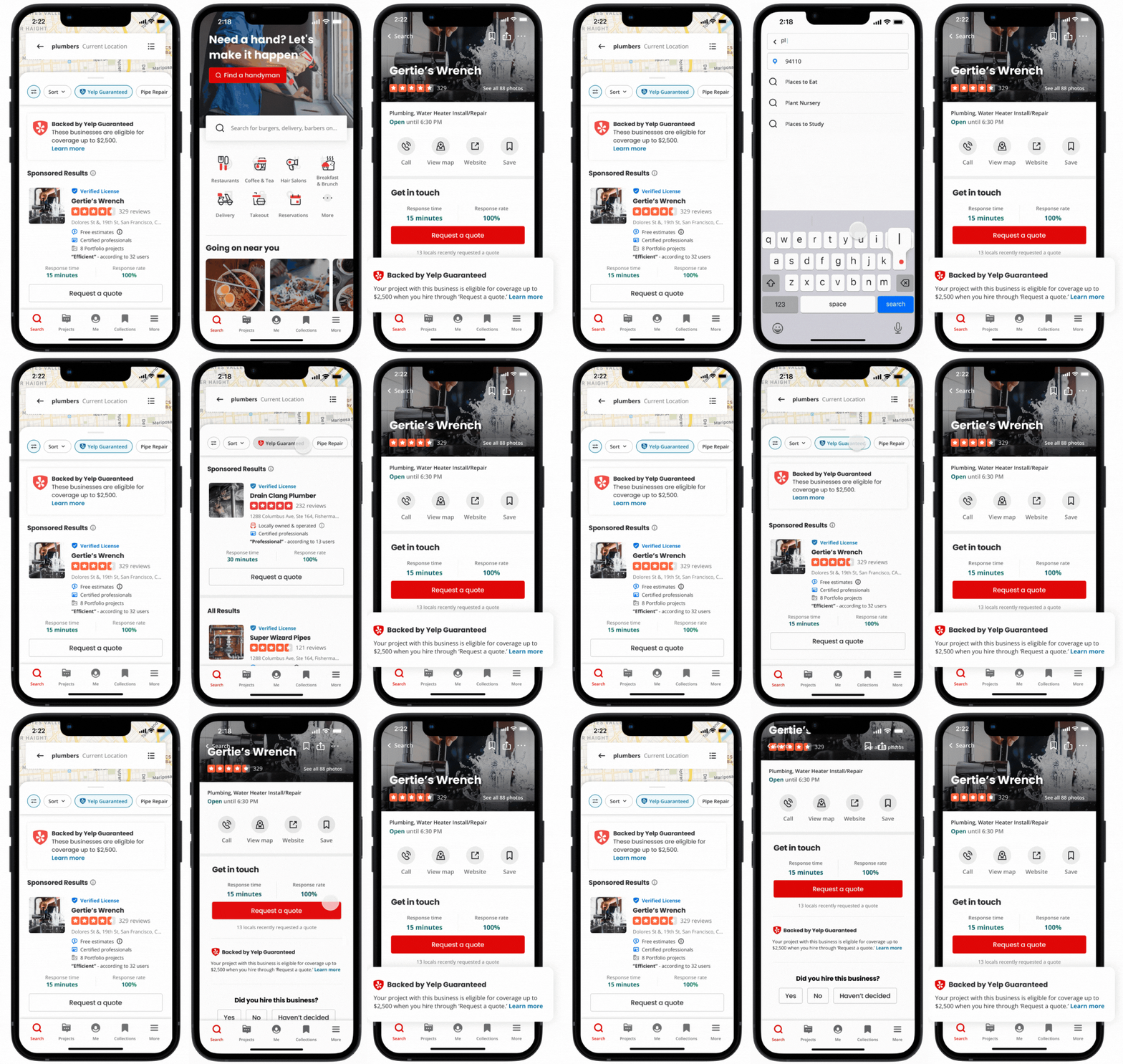
Yelp has revealed 3 new features aimed to make it easier for brands to connect with customers and to improve user trust in the brands they find on the platform. 

These three features, which include a satisfaction guarantee program, implementing AI to deliver a better search experience, and more immersive videos, make up what Yelp is called its “most significant update in years.”

Below, we will explore each new feature and when you can expect to see it for yourself:

Yelp Guaranteed

What is it?: Yelp Guaranteed is a new customer satisfaction program that guarantees up to $2,500 back if you are not happy with home improvement work done by a verified business. Specifically, the announcement says that you’’ be able to submit a claim if you have problems resolving an issue directly with the business. 

Additionally, the company says verified businesses will receive a badge and may be prioritized in future search results on the site. 

When will you see it?: This program is gradually rolling out to both users and businesses in San Francisco, New York City, Chicago, Seattle, and Washington D.C. though the announcement says they hope to expand the program nationwide soon. 

To be a part of the Yelp Guaranteed program, your business must be a Request a Quote-enabled advertiser in these industries:

  • Movers
  • Plumbers
  • HVAC
  • Contractors
  • Landscapers
  • Electricians

Yelp says it hopes to be able to include other markets in the near future.

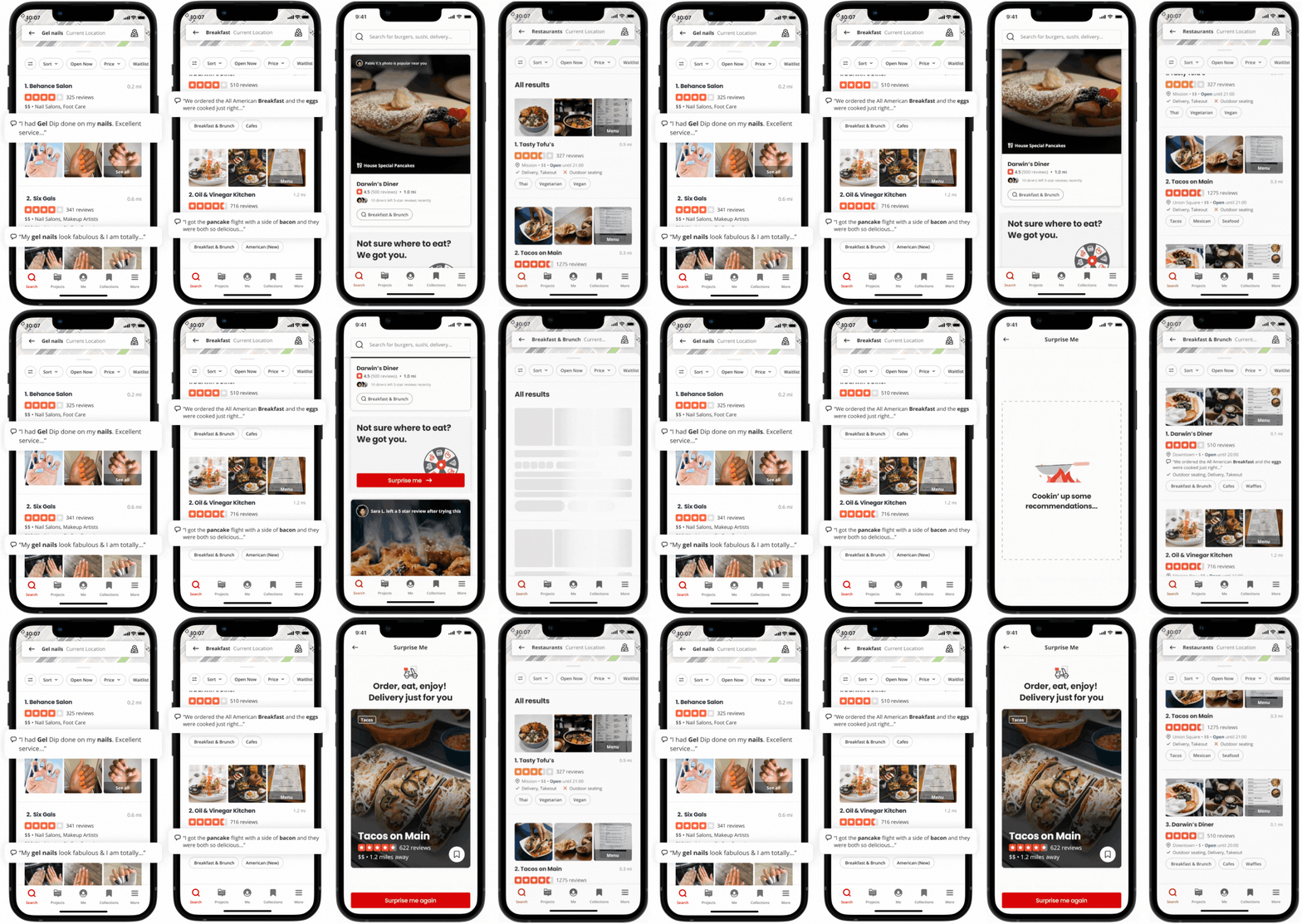
Enhancing Yelp Search With AI and Large Language Models

What is it?: Yelp is in the process of improving its search tools to include a slew of new abilities using AI trained with Large Language Models. Through this, the company has been able to better understand search intent and deliver  more precise and personalized results,

The first wave of these AI-enabled features to be revealed includes highlighting the most relevant parts of reviews for your needs, providing search suggestions based on search intent, clickable category tags, and even a way for the site to “Surprise Me” with dining suggestions.

When will you see it?: The first wave of these AI-powered search features seems to be rolling out to users across Yelp now, though the announcement suggests you can expect to hear about more AI-led features soon.

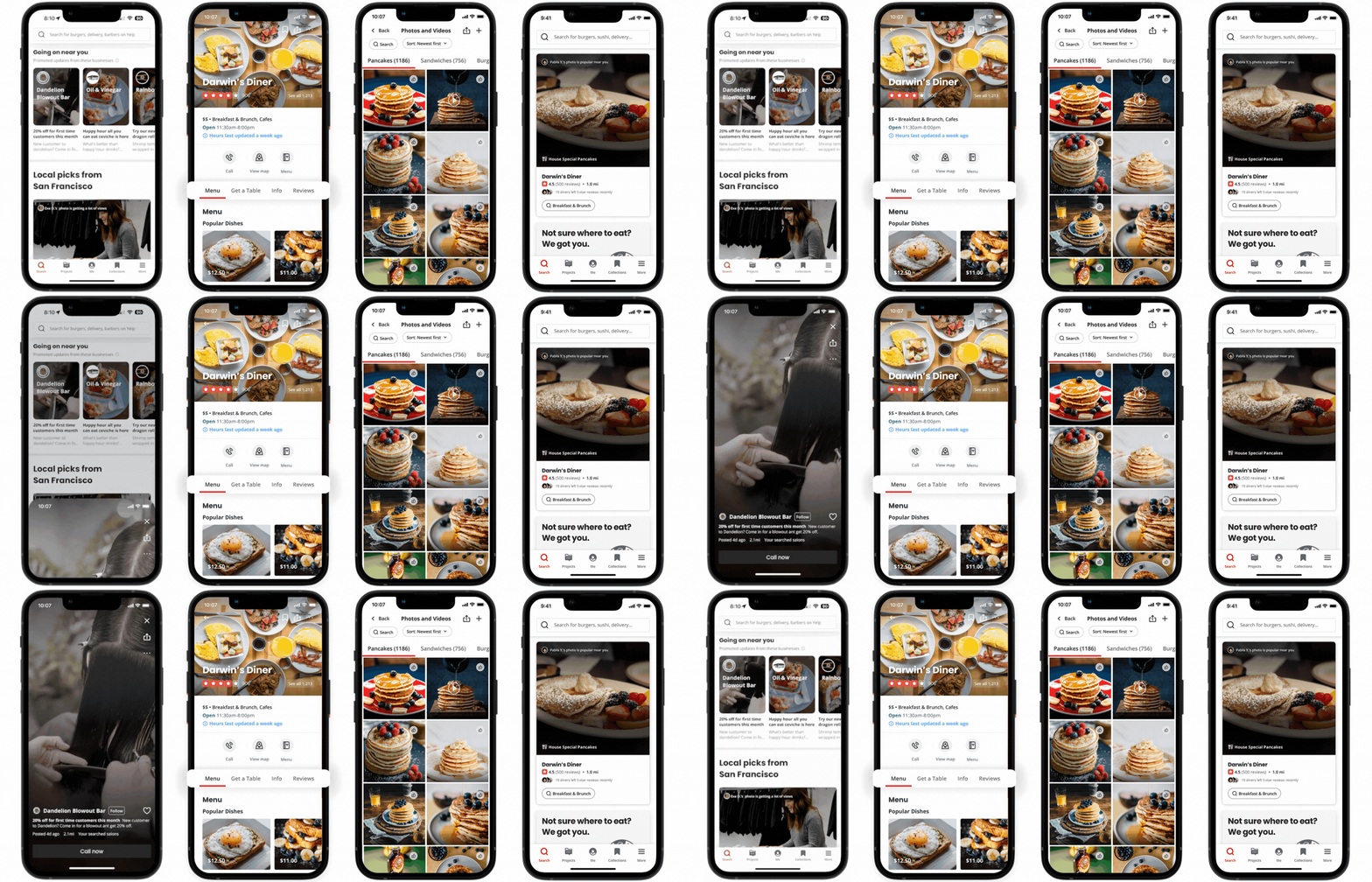
New User Engagement Features

What is it?: Yelp is using new visual and interactive features to make its platform more engaging and encourage users to share their own opinions and reactions. It will do this by introducing new reactions, new ways to share media in reviews, and providing ideas for generating more effective and informative reviews.

Specifically, the announcement highlights these three new features:

  • You can now include high-resolution videos up to 12 seconds long along with your text reviews and uploaded pictures.
  • Yelp will now suggest topics users may want to discuss when writing a review. Such as “food,” “service,” or “ambiance.”Once a reviewer has covered these topics, Yelp will mark each topic with a green checkmark. 
  • Respond with reviews with a wider range of review reactions beyond just “Useful,” “Funny,” and “Cool.” Now, users can select from more options including “Helpful,” “Thanks,” “Love This,” and “Oh no.”

For more about Yelp’s biggest update in years, read the full announcement here.

To understand and rank websites in search results, Google is constantly using tools called crawlers to find and analyze new or recently updated web pages. What may surprise you is that the search engine actually uses three different types of crawlers depending on the situation with web pages. In fact, some of these crawlers may ignore the rules used to control how these crawlers interact with your site.

In the past week, those in the SEO world were surprised by the reveal that the search engine had begun using a new crawler called the GoogleOther crawler to relieve the strain on its main crawlers. Amidst this, I noticed some asking “Google has three different crawlers? I thought it was just Googlebot (the most well-known crawler which has been used by the search engine for over a decade).”  

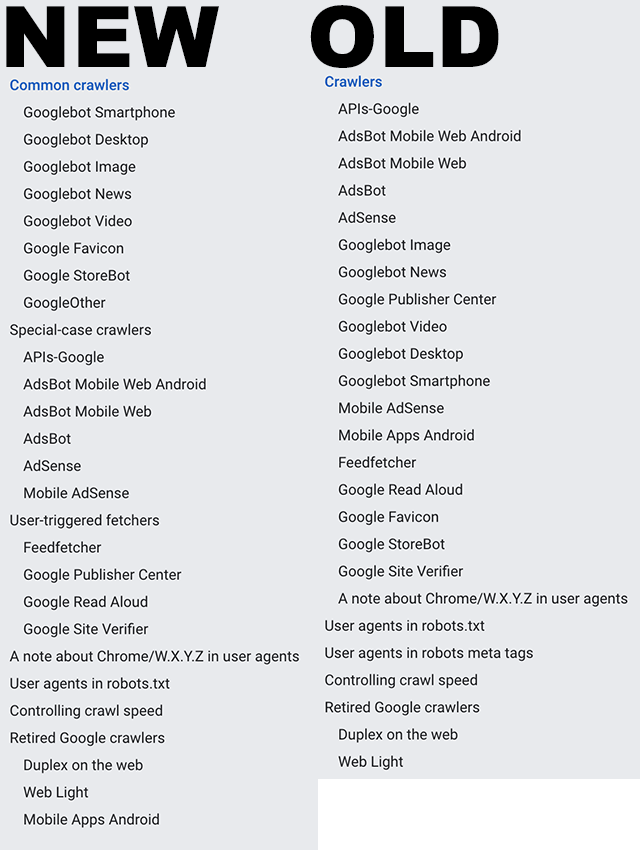
In reality, the company uses quite a few more than just one crawler and it would take a while to go into exactly what each one does as you can see from the list of them (from Search Engine Roundtable) below: 

However, Google recently updated a help document called “Verifying Googlebot and other Google crawlers” that breaks all these crawlers into three specific groups. 

The Three Types of Google Web Crawlers

Googlebot: The first type of crawler is easily the most well-known and recognized. Googlebots are the tools used to index pages for the company’s main search results. This always observes the rules set out in robots.txt files.

Special-case Crawlers: In some cases, Google will create crawlers for very specific functions, such as AdsBot which assesses web page quality for those running ads on the platform. Depending on the situation, this may include ignoring the rules dictated in a robots.txt file. 

User-triggered Fetchers: When a user does something that requires for the search engine to then verify information (when the Google Site Verifier is triggered by the site owner, for example), Google will use special robots dedicated to these tasks. Because this is initiated by the user to complete a specific process, these crawlers ignore robots.txt rules entirely. 

Why This Matters

Understanding how Google analyzes and processes the web can allow you to optimize your site for the best performance better. Additionally, it is important to identify the crawlers used by Google and ensure they are blocked in analytics tools or they can appear as false visits or impressions.

For more, read the full help article here.

Microsoft Advertising has begun alerting users that it is cutting support for Twitter across its platform starting April 25, 2023.

This means you will no longer be able to include Multiplatform Smart Campaigns or manage your Twitter account through the Digital Marketing Center (DMC). That includes being unable to schedule, create, or manage tweets and tweet drafts will be removed from the platform on that day.

Additionally, advertisers will be unable to view or track past tweets’ performance and engagement on the platform.

Why This Matters

This is notable for a few reasons. 

DMC is one of the leading tools used to manage multiple social media accounts from one location, including the crucial ability to respond to DMs from all major social networks without signing into multiple accounts and pages. 

This is because the tool is offered for free to all advertisers on Microsoft Ads and is integrated with Microsoft’s other social and paid ad tools for businesses. Once removed, this will create a significant hurdle for many advertisers wanting to manage social ads and engagement efficiently. 

This is also a major loss for Twitter, which has struggled to bring back advertisers since the takeover by Elon Musk. Estimates indicate that up to half of Twitter’s biggest advertisers have left since his purchase of the company.

Just this week, Musk has been making appearances at major marketing and advertising conferences in a bid to attract brands back to Twitter, but the loss of access through major social ad tools will only make Twitter a harder sell to the brands which have already left.

Meanwhile, Microsoft generated over $12 billion dollars in revenue for digital ads last year and is poised to make even bigger gains this year.

Typically when a site starts ranking worse for one keyword, the effect is also seen for several of the other keywords it ranks for. So what does it mean when a website only loses rankings for one keyword? According to Google’s Gary Illyes, there are a few reasons a site might experience this rare problem. 

In a recent Google SEO Office Hours episode, Illyes addressed the issue while answering a question from a site owner who had effectively disappeared from the search results for a specific keyword – despite ranking at the top of results consistently in the past. 

The Most Likely Culprit

Unfortunately, the most common cause of an issue like this is simply that competitors have outranked your website, according to Illyes:

“It’s really uncommon that you would completely lose rankings for just one keyword. Usually, you just get out-ranked by someone else in search results instead if you did indeed disappear for this one particular keyword.”

Other Potential Causes

If you believe the drop in rankings for a specific keyword is the result of something other than increased competition, Illyes recommends investigating if the issue is isolated to a specific area or part of a larger ongoing global problem. 

“First, I would check if that’s the case globally. Ask some remote friends to search for that keyword and report back. If they do see your site, then it’s just a ‘glitch in the matrix.’”

Those without friends around the globe can effectively accomplish the same thing by using a VPN to change their search location.

On the other hand, if your site is absent from results around the globe, it may be indicative of a bigger issue – potentially the result of changes to your website:

“If they don’t [find your website], then next I would go over my past actions to see if I did anything that might have caused it.”

Lastly, Gary Illyes offers a few other potential causes of a sudden ranking drop.

Technical issues such as problems with crawling or indexing can prevent your website from appearing in search results. 

Sudden changes to your backlink profile – either through mass disavowing links or through the use of low-quality or spammy links can also trigger issues with Google. If you are hit with a manual penalty for low-quality links, it is highly likely your site will stop ranking for at least one keyword (if not several).

To hear the full discussion, check out the video below:

If you’ve ever wanted to know the secret to get the best response on LinkedIn Ads, Vidmob’s recently released report on global advertising trends on the platform may be exactly what you’re looking for. 

The report breaks down every element of LinkedIn ads to show which visual elements, text, and creative strategies performed the best on the platform for driving B2B engagement. 

The findings come from over 800 million ad impressions tracked by brands paying for video ad campaigns on LinkedIn within North America and the EMEA region (Africa, Europe, and the Middle East). 

What Elements are Most Effective?

The report says video ads containing the following elements performed better than those that did not:

  • Videos that display messaging in the first quarter of the video saw a 149% boost in views through the first 25% of the ad.
  • Ads that are 7-15 seconds long received a 54% lift in engagement rates.
  • Videos with high text contrast saw a 102% lift in views through the first 25%.
  • Videos featuring a person within the first quarter received a 175% increase to views through the opening 25%
  • Ads that include the phrase “Get a Quote” received 33% higher click-through rates.
  • When ads show a brand logo within the first 2 seconds, they see a 17% increase to click-through rates.

Key Takeaways

From all the data and findings, Vidmob has made 5 key points advertisers should be aware of:

Video: “While short and sweet is the usual go-to for video length, for awareness plays in the tech industry, audiences are engaged with mid-length content too.”

Color: “Don’t shy away from bright hues in upper funnel assets.”

Terminology: “Make use of Tech industry jargon and relevant imagery in creative assets, such as ‘Data,’ ‘Leader,’ ‘Expert,’ and ‘Demand.’”

Functional Benefits: “Focus on functional benefits and how the products or solutions can add efficiencies for the audience.”

Branding: “Make sure some reference to the brand appears upfront in the first 3 sec of the creative.”

For more interesting findings about the best elements to use at each stage of the customer awareness journey, download the full report from Vidmob here.

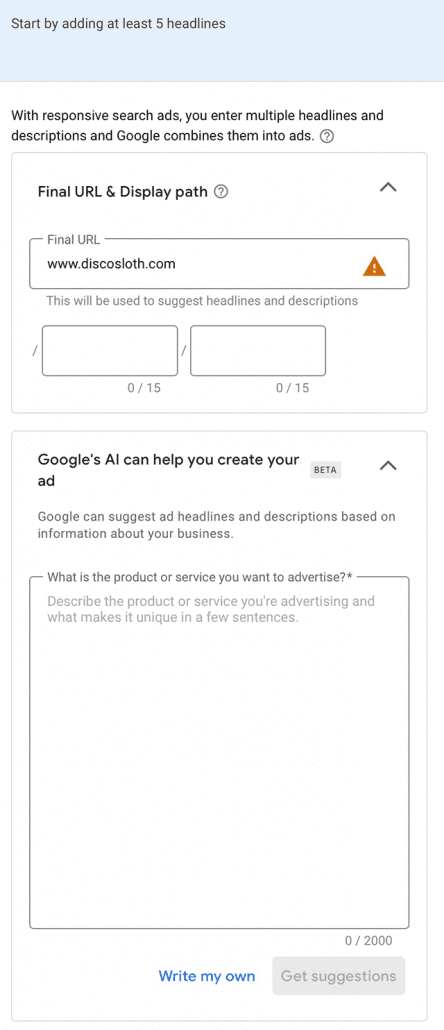
The rise of AI continues as Google Ads has started testing using artificial intelligence to help advertisers create the message for their ads. 

The feature seems to be a very limited test that uses AI to generate suggestions for headlines and description texts. Notably, when Google Ads Liaison Ginny Martin confirmed that the ad platform is testing AI tools, it is “unrelated to Bard”, Google’s recently released AI system. 

From user reports, the AI tool helps to create responsive search ads within Google Ads. 

Responsive search ads are a type of ad option that already uses machine learning to optimize your ad for those who see it using a premade set of headlines and descriptions. 

In this small beta test, users can instead let AI create headlines and descriptions suggestions based on information about your business. Specifically, the prompt asks you to “describe the product or service you’re advertising and what makes it unique in a few sentences.”

You can then select from the suggestions Google offers or decide to write your own.

It is unclear how soon you can expect to see this feature rolled out to more advertisers but it shows that Google is seriously working to utilize AI technology in every area of its platform, including Google Ads.