Social media has exploded over the past five years, especially for the marketing of businesses. Why? The simple answer is because it’s free. But, while it is free to use, in order to be successful on social media, you have to invest a lot of your own time and effort.

There are opportunities for you to get all of those ‘Likes’ and followers you desire overnight though. Ellen Gipko, at Search Engine Journal, discovered multiple freelance job postings in search of, or offering, ‘Likes’ or followers for a price.

While having more ‘Likes’ than the competition may initially draw people in, they aren’t sticking around if your page is a ghost town. And what good are 500 Twitter followers if they don’t interact with you and create an interesting, entertaining forum?

There seems to be no evidence that having a boat-load of “REAL USA LIKES” on your Facebook page improves your SEO rankings either.

So while you may be jealous that your main competitor’s profile boasts more ‘Likes’ than yours, remember that old saying: C.R.E.A.M. or Content Rules Everything Around Me. If you put in the leg, er finger work, you’ll get the ‘Likes’ and followers and have a reputation to grow on your success.

Technical debt is a common issue in the start-up ecosystem, and it has been well discussed. When scaling your product and engineering, sacrifices must be made for the sake of speed, but they almost always cause problems later. What most start-ups fail to realize is that this problem occurs in almost every aspect and form of business practice.

Rand Fishkin uses a story to illustrate this point. A man named Heaton sees a job ad on a website that looks perfect for his skill set. He applies and, 4 days later, gets an email asking to talk over the phone. The hiring manager loves Heaton and emails him 2 days later inviting him to meet with the whole team. 10 days later, Heaton meets for a full interview and is introduced to 4 of the 6 other teammates. The other 2 are out, so Heaton is scheduled to come back 3 days later. When he comes in, he gets a written offer.

Unfortunately, Heaton had interviewed at a big corporation the day after he had applied for this opportunity with a start-up. They immediately sent him an offer with plenty of time to consider. On the last day he was allowed by this offer, Heaton accepted. This day happened to be the day before he was offered a job with the start-up, which Heaton would have preferred to work at. Heaton assumes any company that takes 23 days to get back in touch for an important position already has too many issues anyhow.

In reality, they are hiring because they have a huge issue. There’s no HR or hiring function, so they had to ask the CEO to make the hire, in addition to an already difficult future. Most in this position haven’t had to fire before, so they may not realize how important it is to be fast with responses when hiring. Also, each individual only feels like they’re taking a couple days with their responses. But these few days individually add up quickly, which led to Heaton’s problems.

Only after losing Heaton does the start-up realize it has this issue and tries to solve it.

Problems like technical debt happen in every aspect of business where a start-up can take a shortcut. Not every problem goes unaddressed or scales badly, but enough issues do create an inflection point that costs money.

If you are a start-up or are joining one, be ready for these types of problems. It is always difficult to try to fix problems once you are already moving, but you will have to. Also, if you are interested in a start-up from the outside, empathize with their problems and know they may not be as messed up as it appears. They may just be dealing with start-up debt.


Facebook CEO Mark Zuckerberg announced at the TechCrunch Disrupt conference last week that his company “burned two years not working on mobile.” As Carly Page reports, he even went as far as to say “Now we are a mobile company” and “we are going to make a lot more money than on desktop.”

Zuckerberg, however, dispelled rumors that Facebook would move into the hardware game by releasing their own mobile phone.

There could be a search function implemented into Facebook in the near future though. Facebook is currently seeing about a billion search queries per day, which is understandably enough to make even a wealthy man like Zuckerberg take notice.


Technical SEO can be interesting, but no one likes coming across the same problems time and time again. That’s why it’s shocking how many websites are struggling with the same issues.

Here are some of the most frequent issues that can found while doing a site audit. We also have the solutions, so you can be prepared if you come across any of these issues.

1) Uppercase vs. Lowercase URLs – This happens most often on sites that use .NET. The server is configured to respond to URLs with uppercase letters and doesn’t redirect or rewrite to lowercase versions. This issue is slowly disappearing because search engines are improving a lot at recognizing canonical versions and disregarding copies. Just because it is going away doesn’t mean this issue should be ignored. Search engines still make mistakes doing this, so don’t rely on them.

Luckily, there is a an easy fix for this issue in the form of a URL rewrite module, which solves the issue on IIS 7 servers. There is a convenient option inside the interface that allows you to enforce lowercase URLs. If you do this, a rule is added to the web config file and this problem is gone.

2) Multiple Versions of the Homepage – If you are auditing a .NET website, go check to see if www.example.com/default.aspx exists. Most likely, it does. The page is a duplicate that search engines often find via navigation or XML sitemaps. Other platforms will instead make URLs like www.example.com/index.html or www.example.com/home. Most contemporary search engines automatically fix the problem, but why not make sure there isn’t an issue to be fixed?

The best way to solve this problem begins with doing a crawl of the site and exporting it into a CSV filtered by META title column. Do a search for the homepage title and you’ll quickly spot duplicates of your homepage. An easy fix for these duplicates is to add a 301 redirect version of the page that directs to the correct version.

You can also do a crawl with a tool like Screaming Frog to find internal links that point to the duplicate pages. Then, you can edit the duplicate pages so they direct to the correct URL. Having internal links that go via 301 can cost you some link equity.

3) Query Parameters Added to the End of URLs – This issue is most common on database driven eCommerce websites because there are tons of attributes and filtering options. This means often you will find URLs like www.example.com/product-category?color=12. In that example, the product is filtered by color. Filtering like this can be good for users, but bad for searches. Unless your customers do not search for the specific product using color, the URL is probably not the best landing page to target with keywords.

Another issue that tends to show up on tons of crawls of sites is when these parameters are combined together. The worst is when the parameters can be combined in different orders but return the same content, such as:

www.example.com/product-category?color=12&size=5 

www.example.com/product-category?size=5&color=12

Because both of these have different paths but return the same content, they are seen as duplicate content. It is important to remember Google allocates crawl budget based on PageRank. Make sure your budget is being used efficiently.

To begin fixing this issue, you need to address which pages you want Google to crawl and index. Make this decision based on keyword research and cross reference all database attributes with your core target keywords. You need to figure out what attributes are keywords used to find products. In figuring this out, it is possible to find high search volume for certain keywords, for example “Nike” = “Running Shoes.” If you find this, you want a landing page for “Nike Running Shoes” to be crawlable and indexable. Make sure the database attribute has an SEO friendly URL and ensure that the URLs are part of the navigation structure of your site so that a good flow of PageRank users can find the pages easily.

The next step depends on whether you want the specific attribute indexed or not. If the URLs are not already indexed, add the URL structure to your robots.txt file and test your regex properly to make sure you don’t block anything accidentally. Also, make sure you use the Fetch as Google feature in Webmaster tools. Remember, however, if the URLs are already indexed, adding them to your robots.txt file will not remove them.

If the URLs are indexed, unfortunately you are in need of the rel=canonical tag. If you inherit one of these situations and are not able to fix the core of the issue, the rel=canonical tag covers the issue in hope that it can be solved later. You’ll want to add this tag to the URLs you do not want indexed and point to the most relevant URL you do want indexed.

4) Soft URL Errors – A soft 404 is a page that looks like a 404 but returns a HTTP status code 200. If this happens, the user sees something resembling “Sorry the page you requested cannot be found”, but the code 200 tells search engines that the page is still working. This disconnect can be the source of the issue with pages being crawled and indexed when you don’t want them to be. A soft 404 also means real broken pages can’t be found.

Thankfully, this problem has a very easy fix for any developer who can set the page to return a 404 status code instead of a 200. You can use Google Webmaster tools to find any soft 404s Google has detected. You can also perform a manual check by going to a broken URL and seeing what status code is returned.

5) 302 Redirects Instead of 301 Redirects – Because users won’t be able to tell there is even a problem, this is a pretty easy problem for developers to make. A 301 redirect is permanent. Search engines recognize this and send link equity elsewhere. A 302 redirect is temporary and search engines will expect the original page to return soon, which leaves link equity where it is.

Find 302s by using a deep crawler like Screaming Frog. It allows you to filter by 302s, which you can then check individually. You can then ask your developers to change any that should be 301s.

6) Broken or Outdated Site Maps – XML sitemaps may not be essential, but they are very useful to search engines that make sure they can find all the URLs that matter. XML sitemaps help show the search engines what is important. Letting your sitemap become outdated causes them to contain broken links and miss any new content and URLs. Keeping sitemaps updated is especially important for big sites that add new pages frequently. Bing also penalizes sites with too many issues in their sitemaps.

Audit your current sitemap for broken links. After, speak to your developers about updating your XML sitemap and make it dynamic so that it updates frequently. How frequently depends on your resources, but doing this will save you a lot of trouble later.

It is very possible you will come across other issues while doing an audit, but, hopefully, if you come across any of these, you are now prepared to fix the problem.


For more Technical SEO Problems, read this article by Paddy Moogan at SEOmoz.

A specific question that all business owners with a LinkedIn profile will have to find an answer eventually is, should I accept a LinkedIn invitation from a competitor? Lori Ruff at Integrated Alliances find that the answer is not as simple as yes or no.

Before making your decision, think about your competitor’s reasoning for sending you the invitation. Also, remember your reasons for having a LinkedIn profile to begin with.  If this person doesn’t help you meet your goals and doesn’t offer you any advantages, there’s no reason to connect with them.

However, keep in mind that your competitors likely encounter the same day-to-day problems you do. Afterall, they’re in the same business. Don’t be too hasty when deciding whether to accept that invite.  Down the road, your choice could come back to haunt you.

So, should you accept your competitor’s invitation?  Unfortunately, the answer to this one seems to be a resounding ‘maybe’.


Where is your phone? If you’re reading this, there is a good chance it’s in your hand. Over the past few years, Internet users have made a huge shift to mobile browsing as tablets and smart phones have made it easier to access the web while running errands, dining out or even talking with your friends.

This is why it’s important to make sure your website is optimized for mobile browsers. With almost fifty percent  of your audience using mobile devices as their primary way to browse the web, not having a mobile optimized website can cost you serious traffic and money.

So what do you do if you don’t have an optimized site for smart phones and tablets?

Well first, don’t just create a miniaturized version of your site. Users don’t want to be forced to try to pinpoint tiny buttons with their clumsy fingers and they definitely don’t want to read walls of text. Even more important is making sure the site loads quickly. Over half of all mobile users expect websites to load as quickly, if not even faster, on their mobile devices as they do on their computers. To make your site load quickly, make your mobile homepage streamlined with only essential content with minimum JavaScript and CSS files.

When optimizing your site for the Internet, it is also important to make sure your website works properly on every device. Ensuring your site supports every mobile operating system protects every visitor from having a bad experience with the site.

If you don’t already have a developer with experience in mobile sites, it’s time to get one. If anything, it is a little late. Your competition most likely already has an optimized version of their website for mobile devices and if your site isn’t ready for mobile browsing, your customers will leave you for your competition.  While it may seem daunting and costly to update your site for mobile surfing, making sure your customers have a pleasant experience with your site will save you much more money.


If you haven’t seen the political quiz website ISideWith, you really should give it a look. It won’t change how you’re going to vote in November, but it is a perfect case study in great viral marketing because, as Rand Fishkin points out, it has two important psychological triggers.

First, sharing is simple and obvious. They have made it easy for you to share the quiz on almost any social site with bright and attractive buttons. They even tell you how many people have taken the quiz because of your sharing. Showing how your sharing has influenced others plays on your ego and the desire to know how many people care about what you share.

Second, they ask you how your results made you feel. When you give them feedback, they create a ready-to-share Facebook post for you. By allowing you to not just share your results, but customizing it with your own reactions, ISideWith plays on the way people use Facebook to share how they feel. People don’t always share what they are doing or interested in, but most people share how they feel. Capitalizing on emotions is a smart way to make people want to share your content.

The site isn’t perfect – no site is – but it takes advantage of the emotions people invest in politics to make their content as shareable as possible, thereby maximizing the chances of going viral. By knowing the psychologies of your audience rather than just their activities, you can make them want to share your site with the world.


Marketing your business online is a great way to build and grow your audience. In order to do that effectively, you need to network. Specifically, you need to make connections to bloggers and other content publishers. Sonia Simone at CopyBlogger has 10 steps to do just that, without turning in to someone people dread talking to.

1. Make Something Noteworthy

One great project brings influential people to you. If you’re doing something unique or game-changing, networking will be a snap. That probably sounds difficult, and it is. That’s why we aren’t all millionaires.

2. Be Positive

This isn’t just about the power of positive thinking, but rather about your positive online persona. Share helpful content and make friends through social media.

Being the bad guy could get you noticed, but it doesn’t make people want to do business with you.

3. Have an Opinion

Whatever your area of expertise is, be an expert on it. Stay current and be informed at all times, in order to contribute intelligently to discussions in your area.

4. Twitter

The Twitterverse is a popular spot for bloggers and content creators to congregate. What do you have to lose by attempting to connect with them with your own great content or intelligent questions? They’re a simple ‘@’ away.

5. Change Forums

Find the spot where the majority of your audience spends their time and deepen your Twitter connections there. Whether it’s Facebook, Google+ or another venue, you’ll sound more intelligent and competent than you did in 140 characters or less.

6. To the Real World

Soldify your online connections with real world meetings. Business connections are just like dating: face-to-face > online.

7. No Whining

Remember the step about being positive?  That means you don’t use your social media accounts to complain…about anything.  Try to read your posts from an outsiders point of view and be sure it’s engaging and positive.

8. Don’t be a Teenage Girl

OK, if you are a teenage girl with a successful business, congratulations to you. My point here is don’t talk about people behind their back, or in this case, online. No good can come of it, but plenty of bad can and probably will.

9. Don’t be a Geeky Fan

You will probably encounter some people who are both influential for your business and who you admire. Just be cool about it. Don’t gush over them. Rather, try to find a common ground by being enthusiastic about your shared interest, which also happens to be the area your business operates in.

10. Be Prepared for Twists

It’s great to set goals for yourself, but failure to reach those specific goals doesn’t necessarily constitute failure. Generally, if you are working towards the right goals and doing things the right way, you’ll have success. Just know it might not be the success you originally planned for.


McAfee’s Most Dangerous Celebrities Study results have been released for this year and the news is bad for Harry Potter fans. Emma Watson is the most dangerous celebrity to search for.

The title was held by Heidi Klum last year, but she has dropped off of the list. Searching Watson’s name has a 12.6 percent chance to leading to dangerous sites that offer spyware, adware, viruses and all other sorts of dubious content.

Also of note in this years’ list is the lack of men. The entire top ten are female. The only man to appear in the top 20 is Jimmy Kimmel, who was ranked number 13. Last year only two men appeared on the list.

The message is clear; if you’re searching a female celebrity, be careful what you click on.


For more information, read Matt Mcgee’s article at Search Engine Land.

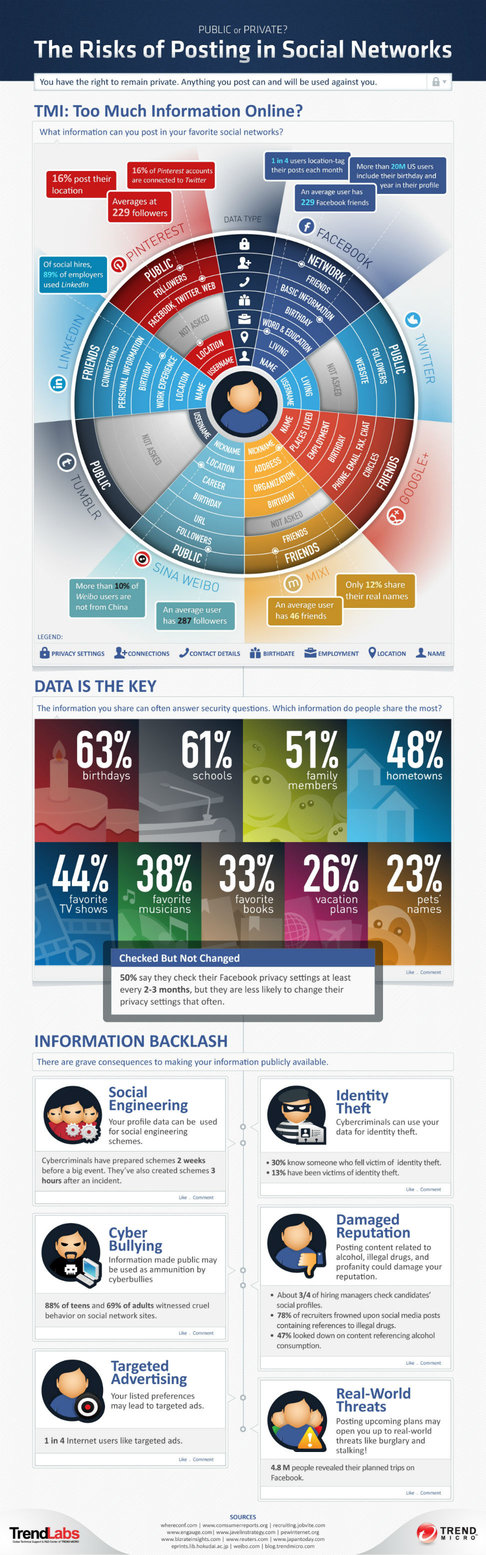
“Social engineering” is a term for the hackers patrolling social media sites looking to steal your personal information. Think of the secruity questions sites like banks use in case you forget your password. Now think, are the answers to my security questions available to the public on Facebook or another social media profile?  More often than not, people allow their maiden name, pet’s name or birthday to be shared without ever considering the possible ramifications.

As Andrea Smith reports for Mashable, Trend Micro’s Titanium Internet Security 2013 is one anti-virus software that also protects you against hackers on social media.  Not only does it show you exactly what is being shared with the world on your account, but it also highlights suspicious links and advises you to avoid them.  You didn’t think all those ‘too good to be true’ deals and offers your friends were claiming were completely legitimate, did you?

There are also parental controls to keep children safe online.  No need to friend your kids, as if they’d let you.  Instead, it monitors posts for keywords to ensure that nothing fishy is happening on Junior’s account.

The included infograhpic includes the results of Trend Micro’s Annual Consumer Security survey and highlights the dangers of your social media activity.