Tag Archive for: News

Some people think that no matter what URL structure you have, search engines will be able to make complete sense of it and be able to index the site. While this is true, to an extent, they then use this idea to say that there is no such thing as SEO-friendly URL structure. Clearly, they missed part of the point of using “friendly” URL structure.

While making sure a site is crawlable and loads fast enough are important to an SEO, because they require both to do their jobs, SEO is more focused on getting people to the site, ranking that site as high as possible, and getting a solid ROI.

Web developers are the other people working on a site that are concerned with URL structure, but they are usually those thinking any URL structure will work. They have different focuses than SEOs and as long as the URL is indexable, they have been successful in that aspect. In other words, what web developers consider to be an alright URL structure may not work for the SEO working on the site.

There are a few simple rules to making a SEO-friendly URL structure. Firstly, the URLs should be straightforward, with absolutely as few redirects as possible. Making everything organized helps keep the site structure more cleaner and keep visitors from getting confused. You should also make the URLs meaningful. Keywords, or just in general some form of language, is better than seemingly nonsensical numbers and punctuation. Most importantly for SEOs, it is important to know which URLs are most important, and which need to be hidden from search engines.

Alesia Krush explains SEO-friendly URL Structure at Search Engine Journal, but most importantly she shows how you can achieve it on your site in just five easy steps.

WordPress has gone from a simple blogging platform into one of the most popular tools for sharing a variety of different web content. We use it, and chances are so do many other websites and blogs you visit. Whole sites can be run with the platform, but WordPress’ heart will always be with blogging.

With the huge rise in popularity, and extensive fleshing out of WordPress, the bar has been risen in regards to what visitors demand of a blog’s look and layout. Ugly layouts diminish credibility in the eye’s of the viewer, plus no one wants to stay on a blog long enough to read even the best content if it hurts their eyes or sense of taste. If you are new to blogging, but want to get your page up to the level visitors desire, Jo Stevenson offers a few tips for how to get the jump on WordPress blogging.

One of the key moments in establishing how well your blog will look comes with choosing a template. Pretty much no one builds their blog from the ground up. There is a whole community out there dedicated to creating and sharing templates, often for free, and unless you have been coding for years, this will be almost any blogger’s first stop. The trick is finding one that suits the content and focus of your blog. News or politics blogs should look formal and authoritative, while cooking blogs might be a lively green or warm red palette with welcoming fonts.

Once you have a template, it is time to begin refining the structure of your blog. Directing the reader’s eye where you want it to go is essential in keeping their interest, and if the wrong thing dominates the screen, the reader may not be able to find the content you want them to see. Stevenson suggests video-heavy blogs would likely benefit from single column formats, while text-laden blogs would likely benefit from giving the copy room to breathe with a two or three column layout.

Most important for making a blog with a look that fits it perfectly is to learn to code, even if you just learn a little bit. Just a small amount of HTML and CSS knowledge will help you customize a template to make it your own, and eventually you may learn enough to design an entire site from scratch.

High Voltage

For companies looking for an SEO, the process can be confusing. There is a lot of jargon that the uninitiated business owner likely doesn’t know, and the field is absolutely full of companies offering what initially look like the same thing. But, as they say, the devil is in the details.

There are certain things the uninformed local business owner can keep an eye out for to help the process. Stoney deGeyter knows these warning signs as well as anyone, as he writes about small business SEO all the time, and has seen more than a few SEOs offering questionable or outdated methods.

Some SEOs will advertise that they can get you ranked on a selection of websites like MSN, Ask.com, or AltaVista. The more search engines they can get you on, the better right? Nope. I personally have seen sites offering to get you on MSN rankings which is an immediate red flag considering MSN isn’t a search engine anymore. It changed to Bing years ago. Ask.com is the fourth most used search engine and it only pulls in around 3-percent of all searches. The point is, if they can’t get you on Google or Bing, they won’t actually be able to help you much.

Another misleading promise is to get your site the number one spot in the rankings, no matter what. If this was possible, SEO would be stunningly easy, but it is not possible and SEO is far too competitive and complex for any guarantee of this kind to be anything but a bluff. SEO companies have no direct control over where search engines rank sites. Our job isn’t to achieve a certain ranking, but to get your page ranking as high as possible over numerous keywords in a competitive market. A good SEO should certainly be able to raise your ratings, but you can’t expect to get the top ranking for “local restaurant” just because a company promised it.

One way to tell if an SEO is out of touch with the current SEO climate is to look to see if they advertise search engine or directory submission services. This went out of vogue in 1998, but there are still companies proclaiming their services as if they are useful. Aside from Pay-Per-Click, and Pay-To-Be-Included type results, the only way to get your site found is to design it to be found. There is a reason Google doesn’t have a submission option. They haven’t been needed in years.

There are tons of other warning signs to watch out for, and deGeyter shares four more in his article. Unfortunately, SEO has just enough bad eggs that uninformed local business owners are often taken advantage of with false promises or downright ineffective methods. Some are actively trying to pull one over on innocent business owners, some are just out of touch with current SEO, but either way they aren’t worth your dollar.

Magazine DesignSometimes I find myself, as well as plenty of others, writing about web design as if it is entirely separate from other mediums. Sure, there are plenty of things that distinguish web design, such as coding and even specific layout patterns for the internet, but there are a lot of principles of layout and design that can be easily transferred onto every medium.

Cameron Chapman got her start in magazine publishing, but she is now a web and graphic designer and prolific blogger. She knows better than anyone that good design rules can often transcend the medium they were established in and help designers across the board. She used her experience in magazine publishing to choose a few design principles that almost any design grad has heard and shows how easily they can be applied to web design.

The first principle seems to be common sense, but a simple background makes reading easier. This is why magazine background colors are almost always white, or at the very most a simple solid color. Readers give up if text is hard for them to read, but yet some less well known websites still present their text over busy images or colors without enough contrast to offset the text. Even if your page’s background is a large image, it is easy to offset your text with a simple text box to deliver your message.

Some websites have numerous pages that all look like different versions of a website. The “about” page may be professional looking and understated, while their “services” or “product” pages are vibrant and sometimes cluttered. If you look at a magazine, every page or section retain several cues from other areas of the magazine. Fonts remain the same, layouts are fairly standardized, and images are shown in the same style. While each page of your site can be a little different from others, it is important to establish consistency by presenting the bulk of your information in similar formats.

One of the most important rules that websites break all the time is clearly marking advertising. In magazines, it is tradition to clearly separate the advertising from the actual content. Even if the advertising is designed to match the style of the magazine in some ways, as some magazine ads have begun doing, there are clear labels added to ensure readers know where the articles end and the ads begin. The same should be implemented in web design, but some sites allow their ads to either be entirely intrusive or sometimes indistinguishable from the content. When readers can’t tell if you are selling them something or delivering them information, they stop trusting your content.

There are plenty of other design rules that web design can learn from, and Chapman explores more of them in her article for Web Designer Depot, but she doesn’t want you to focus on the specific rules she outlines. The most important thing she hopes for you to understand is that any design rule you learn should be at least experimented with in other mediums. Sometimes it won’t transfer well, but most of the time it will make your site look better.

DocumentsOne of the best parts of the SEO online community is how happy everyone is to share their knowledge, tips, strategies, and tools for others to use. Maybe it is because some of the best SEO practices actually involve sharing information, and we all get into a habit of being genuinely happy to help others out, or maybe nearly everyone in SEO is just happy to share the knowledge, but for all SEO’s problems, lack of information isn’t one of them.

While blogs tend to be the go-to source for public sharing of information, there are also lots of documents passed around “behind the scenes” through Google Documents. It isn’t that they are secretive, but most of these documents are only found by those who directly ask experts for information, or those who explore some of the more technical minded blogs. Search Engine Journal isn’t where you would normally expect to find many of these documents, but Benjamin Beck shared some of the most helpful Google Docs that he has found while working in SEO.

One Google Doc by Annie Cushing is a well organized list for just about every tool out there for keyword research, SEO analysis, and numerous other areas of SEO you will ding helpful. Other documents, like the one from Stoked SEO help make link prospecting easier by scaling the prospecting on queries that have initial positive results. No matter what your needs are, there is likely a document in Beck’s list that will help.

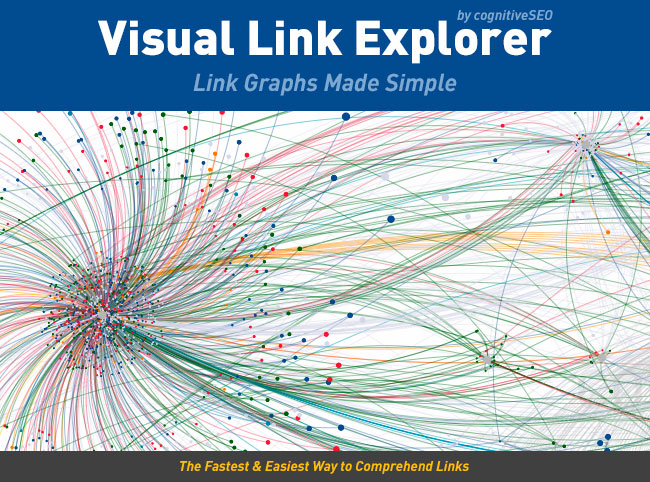
Visual Link ExplorerSometimes it helps to step back and get a more visual idea of your link profile, but until now the only way to do this was to export all of your links to Excel and create a bunch of charts. CognitiveSEO has released the Visual Link Explorer to make the whole process easier and let you see your link profile all at once in a visually comprehensive way. It can also be used to help easily explain a profile to clients or even help figure out why you were penalized by Google. You can view competitors backlinks to analyze them and stay ahead of your closest competition.

One of the things this visual tool is best at is showing the importance of deep links and homepage links. It is always hard to explain to clients why it is a bad idea to direct all links to the homepage, and the way the Visual Link Explorer depicts your links is perfectly suited for showing how building a deep link profile as well boosts you site’s overall authority.

Judging overall link quality is also made incredibly easy and quick. In this tool, the lowest-quality links are placed closer to the center of the clusters of dots while the best link are portrayed with larger dots further away from the center.

There are a ton of other ways you can use the Visual Link Explorer to analyze your link profile, and any SEO worth their salt understands the importance of a your profile. Kristi Hines has more ideas for how the tool can be used at Search Engine Journal, but needless to say, I think it is a must have.

Web design relies on the resources of others. Without them, we could still make good looking pages, but it would take exponentially more time. Of course there are textures, fonts, images, and any other visual aspect you want to incorporate for free or cheap use, but we also use time savers behind the scenes.

This isn’t to say we rip off people. It is always best to notify the owner of any resource when you use it, and it is better to use as much original content as possible. Using boring standardized icons won’t ever have the same effect as specialized icons that fit the page they are made for.

Frameworks are what we use behind the scenes, and they are packages made of a structure of files and folders of standardized code used to build websites. They help get you started without making you spend hours typing in code that is normally extremely similar to others such as gridding systems. All websites have a similar structure, and these frameworks allow you to use a “standard” version of that structure and modify it as you need to.

Awwwards has an article explaining the different types of frameworks you might use on a new site, and a collection of great packages to get started.

A recent Google Webmaster Hangout seems to have implied that Google is pushing out Penguin Updates without announcing them. Penguin has only been officially updated twice after its initial release, and the last update was in October 2012. In the video, John Meuller from Google makes it appear that Google has been updating Penguin on a regular basis but has not announced them all. The comments come at around the four minute mark in the video below.

When asked for clarification by Search Engine Land, Meuller says that he was referring to general “link analysis” refreshes, but does not include the Penguin algorithm. They also confirmed the last update was the one announced in October.

One of the reasons some questioned if Penguin was being refreshed is Panda, the update always mentioned in association with Penguin, has been updated on roughly a monthly basis. Google didn’t confirm another update is coming, but the updates have been coming steadily, and there are signs a new one should arrive in the next few days.

Responsive design is definitely the most talked about web design method right now, especially when discussing designing for mobile. It isn’t the only option though. There are three real options currently and each has its own pros and cons to them. Choosing the way you interact with mobile customers should reflect the type of business you are running and what you hope to accomplish.

Source: Flickr

Responsive Design – Though it is well covered, responsive websites are those that adapt to different sized screens across all platforms, from mobile to tablet to desktop. The idea is that you only build one website for everyone rather than different sites for all different devices. That time you would have spent designing sites for different platforms will have to be spent testing your one site on all of the devices. It also removes some of the ability to customize sites for certain devices.

Mobile Sites – A mobile site is optimized for that specific section of on-the-go customers. The sites are usually minimal, with large, finger-friendly buttons, and they load faster than responsive sites. This allows more direct control of how sites appear on different devices, but more importantly, the content selected to appear is tailored for the mobile demographic accessing it.

Native Mobile Apps – If you own a smartphone, you know what an app is. They are specific to their platforms so they have the benefit of being able to curate mobile content like websites do while further focusing on the differing needs of different platform users.

All three have their merits. Responsive websites create a sense of consistency and deliver the full experience of a desktop website in an accessible form for a specific device. Some hail it as a time saver, which isn’t quite true, but it does allow you to spend equal time on a site for all devices. Mobile sites and apps load faster and cater to specific audiences, while allowing them to act immediately.

Diksha Arora compares the three against each other at Vandelay Design. If you don’t know what is best for your business, she can help you identify your needs.

It is impossible to understate just how quickly SEO changes and how important it is to keep up. Strategies change, and search engines update countless times. Google’s Penguin and Panda updates are clearly the most talked about, but Google has had plenty of other updates with less catchy names throughout the last year, like the Knowledge Graph (okay, that one has a catchy name too).

Penguin and Panda changed the landscape of searching completely and strategies have had to adapt to them quickly, though SEOs not taking advantage of gray area SEO tactics like link buying were mostly unaffected. That doesn’t mean that they don’t have to follow the new guidelines as well.

Most of these guidelines are more broad however, but Don Pathak, writer for Search Engine Journal, tried to simplify and explain them, and in doing so came out with a few specific points.

Many writers, usually with vested interests, have argued that SEO success can’t be done with just great content, and it is true to an extent that the internet is competitive to the point where great content doesn’t quite get you to the top search result. However, Google has also made it very clear that it wants to favor the quality of content over SEO tactics. Keeping a site fresh and relevant will give you as much of a boost as any behind the scenes tweak can.

The new Google also favors locality, so if your business has a local presence in a marketplace, optimizing for that location will help customers find your service. You can get started by simply establishing a local profile on Google Places for Business, and encourage customers to give you reviews on the site.

SEO will likely always concern itself with the technical dealings behind the curtain of a website, but Google wants to give preference to those who operate valuable and well made websites, not those manipulating every loophole to get the market advantage. As with anything run mostly through algorithms, there will always be “hacks” or weaknesses, but rather than exploiting them as they open, it is better to just create a website with real value.