Tag Archive for: Google

Google does, in fact, have a customer support line: 866-2GOOGLE.  However, this line is intended primarily for AdWords, and encourages all other questions to be handled online (somehow that doesn’t surprise me).

One thing that happened sometime earlier this year is that Google stopped personally supporting most AdWords accounts.  So if you call in, indicate you are calling about AdWords help, and put in your account number – chances are you’ll get a message that will tell you they no longer offer personal support, to go online to find your answers in the AdWords online support.

However – if you have certain elements meeting a particular criteria in your account, you can still get personal support.  From what I’ve been able to find out from Google, this criteria is based primarily on ad expenditure.  That is to say – Google takes care of their big spenders, the advertisers who in turn take care of Google.  By giving them a ton of money.

This is not the happiest of news for all AdWords users, but hopefully it does clear things up.  As far as I can tell, if you have an AdWords Client Center account set up (have Google AdWords Qualification, etc.), they will also offer support.  I do not know if this is purely because you have that type of an account or because you are in charge of so many clients that spend a combined amount above their “trigger” figure.  I personally am able to get through to customer service, for one of these reasons or the other.

To sum it up – if you want Google support for AdWords, your best bet (unless you’re spending thousands a month or have a Client Center account) is to just go to their support center online, the AdWords Help Center.  They do have a lot of information there that covers most topics, so for the most part this is a great resource.  Although, admittedly, not as nice (for some people) as being able to just ask someone to help you out in real-time.  But you can ask through their contact forms online, if you can’t find your solution in their help center.

Most people nowadays use Google as their primary search engine.  Well, something not everyone realizes is that when you’re logged into your Google account, Google keeps track of all searches you do with their search engine.

What this is intended to do is to enhance your experience with Google (although many people have conspiracy theories as to what their purpose really is).  The results are varied, but Google will keep track of every site you visit and display that on their search results, in addition to adjusting the order of the search results for you based on which sites you showed a preference for.

So that means if you visit one site several times while logged in and found them through Google, the next time you do the same search that site will be quite a bit higher on the results pages.

For any SEOs, this means it will not show accurate search results for keywords you do searches on.  Which is not something SEOs want to happen, if they’re looking for accurate results.

To get around this, you want to use Google when you are not logged in to your Google account.  Only then will it show unadjusted search results, which may still vary based on which server serves up your own results.  But it will not be affected by Google’s personalization of your own search results.

Whether or not they still track you based on IP address is something I’ll leave up to the conspiracy theorists, but for those of you who want a more objective search result, I recommend staying logged out of Google unless you need one of their services at that time.  Or else use a different computer/browser to do your Google searches that you want raw unaltered search results with.

Google has a ton of different tools available inside of the Google interface.  You can check to see all the pages on a single site, you can look through specific title tags, and with the “link:” command you can see links to a particular page or site.

However, this command is by no means the main tool you should use to get backlinks.  There are several holes in this command, and Google themselves advise to take it with a grain of salt.  SEOmoz has a great post about several misconceptions on this command.

So how do you get a decent report on backlinks?  There’s no perfect tool, but the two I’d recommend using are the Google Webmaster Tools and the Yahoo Site Explorer.  Both give a much better amount of information than the “link:” command and can give you a better concept on just what kind of backlinks a site has.  Which, as we all know, is indicative of the quality of SEO for a particular page.

More people are learning about the changes that came with the latest Google AdWords update.  One example that I think is a major one is the update combining Google AdWords with Google Local (also posted on DailySEOTip), but there are a few other changes that are visible.

One of the other changes that I haven’t touched on yet is the adding of the Google Merchant account details to AdWords ads.  This can actually add product listings into your Google AdWords ad.  Videos are also being seen inside ads, as well.

Images of all of these can be found in a post on Search Engine Land.  For a lot of people, the way to take advantage of these are very easy, and are very worthwhile.

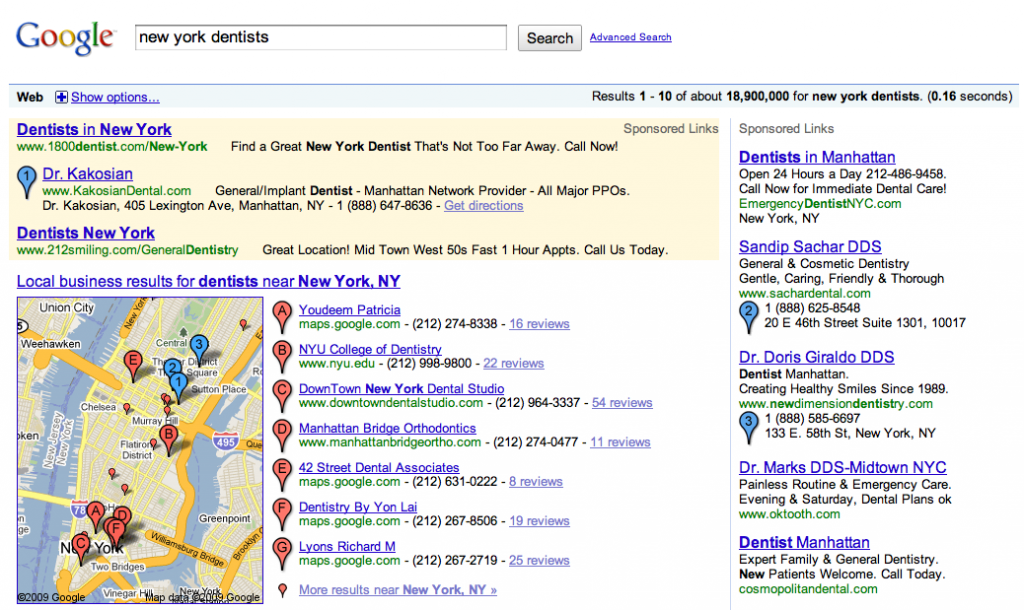
Google AdWords has had an update recently, and it now appears you can actually advertise and have your address appear on Google Maps with your ad:

Example of AdWords on Google Maps

Example of AdWords on Google Maps

This involves having Google Local set up (also known as Local Business Center).  If you don’t know how to do this, you can check out my earlier post on putting your business on Google Maps.

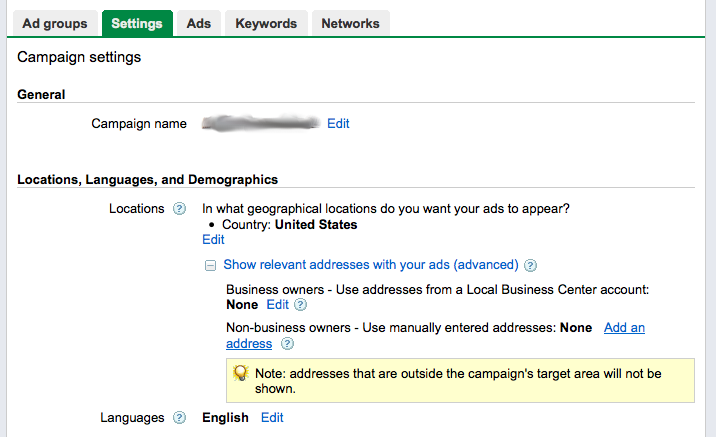
Once you have a business account set up and associated with the same address you have on your AdWords account, you can get your ad to show up on Google Maps by editing your Campaign settings and then under Locations, open the “Show relevant addresses with your ads (advanced)” option.

AdWords Campaign Setup

AdWords Campaign Setup

Here the easy way to do it is to choose the first option, which is to select your Google Local Business Center account, which will put your address information into your ad and also put a matching blue “pushpin” on Google Maps for you.

The alternate choice you have (if you don’t have an associated Google Local account set up) is to put in the address and phone number manually, in the second option here.  This will also display this information with your ad.

Keep in mind, the only way this will work is if the keyword that is being searched on is relevant to the locality your address is in.  For example, a city name.  (Just the way Google Maps normally appears in search results.)  If your keywords match this type of query, then your address and phone number will appear with your ad, in addition to a little point on Google Maps.  And this is great news for anyone who does local advertising.

It appears Google and YouTube are starting to put in something new – automated captioning.  This will help a lot for people who are unable to receive the audio for either physical or mechanical reasons.  It’s going to start with English only, but they will be using voice recognition software to turn the audio into legible captions.

There is word that this update may affect SEO, but I have my curiosities about this.  It can only truly affect SEO if the captions are somehow written into the page code.  We can only see if this is the case once this new development in YouTube goes live.  We’ll see how it turns out.

So the Associated Press has stepped up and actually scanned a full book to be available for search (Sarah Palin’s book, to be specific).  The funny thing about this is that they have openly protested Google doing the same thing with story headlines and summaries as going beyond fair use.

Who’s in the right?  Is this something that’s going to blow up in the AP’s… face?  More details from Danny Sullivan here.

So it seems like some security guys have found a few new attacks, posted as image links on blogs.  These posts are engineered to end up on high Google results, but point to malware sites.  It apparently doesn’t work on up to date server software, so keeping your updates current is a good idea.

You can get more details here and here.

So Google made a few major updates this last weekend to AdWords.  I manage several different accounts, so I’ve seen first-hand what kind of impact this has had.

First of all, they updated the AdWords Editor – a great tool, by the way, I highly recommend it.  You can find it here: AdWords Editor.  But yeah, they made a few tweaks, in particular I noticed changes to the Campaigns tab.  You can now affect the ad schedule from here, location changes, so forth.  And if I remember right, the “Keyword Opportunities” option in the Keywords tab is new, as well.  It’s the Google machine offering suggestions on keywords that might be relevant to your ad group.

The other big change I saw was Quality Score.  The Quality Score on a lot of my keywords dropped.  In some cases, heavily.  Google is getting tighter when it comes to looking at relevance between keywords, ads, and landing pages.  In particular, the landing page.  The average QS used to be around 7, you had to be pretty far off to drop much below that.

Well now I’m seeing an average closer to 5, and only very relevant pages are getting 7 or higher.  A page has to be completely relevant and contain a lot of solid info (as well as be on a high quality site) to get a 9 or 10 now.

Not sure how this will affect advertisers, but it may be interesting to watch.  It does mean that I’ll have to be a lot more careful with the quality of pages I point my ads to.  I recommend you do the same.

Google Caffeine is finally going live, apparently after the holidays.  Caffeine is the latest update to the Google algorithm, which makes a few people nervous  They’re starting with a single data center update, but Matt Cutts says they’ll be rolling it out fully by the end of the holidays.

http://www.mattcutts.com/blog/google-caffeine-update/