It’s been mentioned previously that AdWords has been going through some serious changes.  Well, it appears that they are also stepping up in their quality check on their advertisers.  Google has taken action by banning some of their advertisers that don’t meet up to standards – permanently.

This is quite major news for several advertisers.  These bans are hitting hard, and the first major revision on AdWords users and who Google will accept was done yesterday, December 3rd.  The Search Engine Roundtable has more information and a good copy of the ban letter that they published today.

Google does, in fact, have a customer support line: 866-2GOOGLE.  However, this line is intended primarily for AdWords, and encourages all other questions to be handled online (somehow that doesn’t surprise me).

One thing that happened sometime earlier this year is that Google stopped personally supporting most AdWords accounts.  So if you call in, indicate you are calling about AdWords help, and put in your account number – chances are you’ll get a message that will tell you they no longer offer personal support, to go online to find your answers in the AdWords online support.

However – if you have certain elements meeting a particular criteria in your account, you can still get personal support.  From what I’ve been able to find out from Google, this criteria is based primarily on ad expenditure.  That is to say – Google takes care of their big spenders, the advertisers who in turn take care of Google.  By giving them a ton of money.

This is not the happiest of news for all AdWords users, but hopefully it does clear things up.  As far as I can tell, if you have an AdWords Client Center account set up (have Google AdWords Qualification, etc.), they will also offer support.  I do not know if this is purely because you have that type of an account or because you are in charge of so many clients that spend a combined amount above their “trigger” figure.  I personally am able to get through to customer service, for one of these reasons or the other.

To sum it up – if you want Google support for AdWords, your best bet (unless you’re spending thousands a month or have a Client Center account) is to just go to their support center online, the AdWords Help Center.  They do have a lot of information there that covers most topics, so for the most part this is a great resource.  Although, admittedly, not as nice (for some people) as being able to just ask someone to help you out in real-time.  But you can ask through their contact forms online, if you can’t find your solution in their help center.

It seems like the focus for a lot of internet marketers is finding that top trafficked keyword.  However, this can be a mistake by not focusing on the true marketing involved.  In some cases, the top traffic keyword is not one that will bring conversions.

Putting focus purely on the traffic numbers for keyword research is the reason many internet marketers are not able to pull the profit numbers many others do.  Making sure you focus on the consumer and their intent more than the pure traffic size is key.

This can be done more quickly using PPC, but at a price.  And in SEO, solid keyword research must be done to target proper keywords – a mistake here will cost a lot of time and money.

Evan LaPointe goes into a bit more detail about all of these factors at Search Engine Land.  At any rate, it’s good to remember that the focus should be on the human experience, not just the analytics numbers.

More people are learning about the changes that came with the latest Google AdWords update.  One example that I think is a major one is the update combining Google AdWords with Google Local (also posted on DailySEOTip), but there are a few other changes that are visible.

One of the other changes that I haven’t touched on yet is the adding of the Google Merchant account details to AdWords ads.  This can actually add product listings into your Google AdWords ad.  Videos are also being seen inside ads, as well.

Images of all of these can be found in a post on Search Engine Land.  For a lot of people, the way to take advantage of these are very easy, and are very worthwhile.

Pay for link building?  What?  Yes, the different ways people do their link building vary from totally free to exorbitantly expensive, but one method a lot of people have not really considered is actually sending traffic that will build links to pages that deserve them.

There are different ways to use PPC to target your landing pages, but if you have good enough content you can use the traffic you attract to help create more links.  The cost will vary based on the keyword you choose, but in some cases this can be very beneficial for your SEO.

Julie Joyce at Search Engine Land has 8 tips to help you fine-tune this approach.

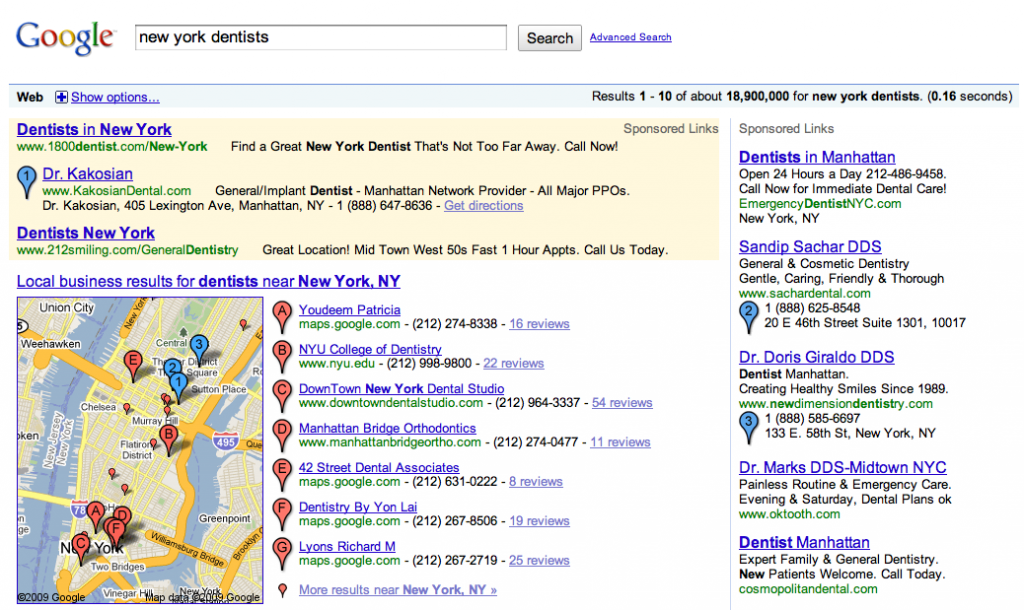
Google AdWords has had an update recently, and it now appears you can actually advertise and have your address appear on Google Maps with your ad:

Example of AdWords on Google Maps

Example of AdWords on Google Maps

This involves having Google Local set up (also known as Local Business Center).  If you don’t know how to do this, you can check out my earlier post on putting your business on Google Maps.

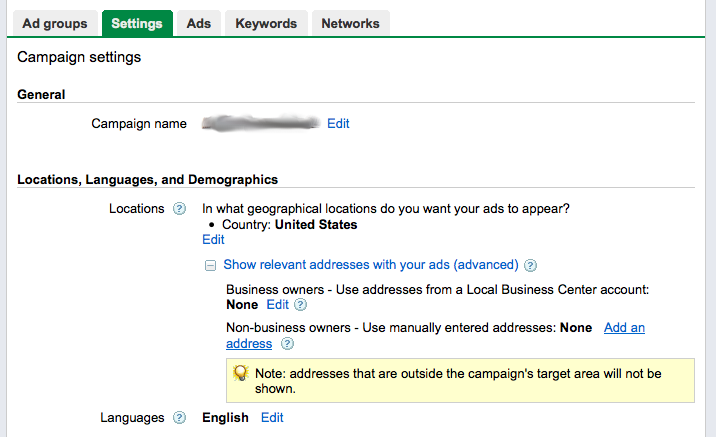
Once you have a business account set up and associated with the same address you have on your AdWords account, you can get your ad to show up on Google Maps by editing your Campaign settings and then under Locations, open the “Show relevant addresses with your ads (advanced)” option.

AdWords Campaign Setup

AdWords Campaign Setup

Here the easy way to do it is to choose the first option, which is to select your Google Local Business Center account, which will put your address information into your ad and also put a matching blue “pushpin” on Google Maps for you.

The alternate choice you have (if you don’t have an associated Google Local account set up) is to put in the address and phone number manually, in the second option here.  This will also display this information with your ad.

Keep in mind, the only way this will work is if the keyword that is being searched on is relevant to the locality your address is in.  For example, a city name.  (Just the way Google Maps normally appears in search results.)  If your keywords match this type of query, then your address and phone number will appear with your ad, in addition to a little point on Google Maps.  And this is great news for anyone who does local advertising.

It looks like with the latest AdWords update, they’re starting to put any local advertisements in Google AdWords into Google Maps.  You can see images of some examples of that here, in Search Engine Land.

The ads appear almost the same as Google Local listings, only with blue numbered pushpins instead of red lettered pushpins.  I’ll most definitely have to look further into AdWords to see exactly how to take advantage of this new update.

When doing SEO, one of the most underutilized tools I know of is actually Google AdWords.  The benefits of how running an AdWords campaign can help SEO in various ways are numerous, and a lot of straight SEOs aren’t even aware of it.

Dave Davis of Redfly is a PPC pro, and he covers the crossover nicely in this post.

So Google made a few major updates this last weekend to AdWords.  I manage several different accounts, so I’ve seen first-hand what kind of impact this has had.

First of all, they updated the AdWords Editor – a great tool, by the way, I highly recommend it.  You can find it here: AdWords Editor.  But yeah, they made a few tweaks, in particular I noticed changes to the Campaigns tab.  You can now affect the ad schedule from here, location changes, so forth.  And if I remember right, the “Keyword Opportunities” option in the Keywords tab is new, as well.  It’s the Google machine offering suggestions on keywords that might be relevant to your ad group.

The other big change I saw was Quality Score.  The Quality Score on a lot of my keywords dropped.  In some cases, heavily.  Google is getting tighter when it comes to looking at relevance between keywords, ads, and landing pages.  In particular, the landing page.  The average QS used to be around 7, you had to be pretty far off to drop much below that.

Well now I’m seeing an average closer to 5, and only very relevant pages are getting 7 or higher.  A page has to be completely relevant and contain a lot of solid info (as well as be on a high quality site) to get a 9 or 10 now.

Not sure how this will affect advertisers, but it may be interesting to watch.  It does mean that I’ll have to be a lot more careful with the quality of pages I point my ads to.  I recommend you do the same.

As anyone who’s done any serious work with Google AdWords knows, Quality Score plays a major role in ad expense in AdWords. Understanding how it works and improving it can reduce your costs by major levels.

To start, what exactly is Quality Score?  Quality Score is a figure between 1 and 10 set by Google.  It’s set uniquely for each keyword in your AdWords account.  1 is very, very bad, and 10 is as good as it gets.

So how’s this number set and what effect does it have?  The exact way it’s set isn’t really known for sure, except by those who wrote the algorithm in Google.  But the basics of it are known.  By understanding exactly what goes into the score, you can then increase your QS (Quality Score) for any of your keywords.

The main part of the QS is based on the relevance the keyword has to the page that the ad in your ad group is sending the user to.  If you’re bidding on the keyword “dog food” and are sending them to a page about diesel engines, chances are your QS will be a 1 and you’ll have to pay at least $10/click.  Google likes relevance, because it makes visitors happier with what they’ve found.

So basically, the more relevant your landing page is to the keywords in that ad group, the higher your Quality Score will be.  Ideally, the keywords you’re bidding on actually appear somewhere on the landing page.  This will help a lot, but is not the only part of a good QS.

To get a solid QS, you need to also have a solid web SITE.  Not just the landing page, but it appears that the whole site has to meet certain needs.  I’ve actually talked directly to Google about this (through AdWords reps) to make sure of this – but there are a few things you want your site to have to get a good QS: A contact page, a privacy policy, and at least three pages of solid content.  The contact page means that there’s really someone there to talk to, that it’s not all automated.  This means, in Google’s eyes, a higher quality site.  The privacy policy is just to cover everyone’s butts and is just a good idea.  And the pages of content just shows that there is actual material on the site and it’s not a single page affiliate redirect for pure profit.

Google cares about the quality of the site – this is why the QS is called Quality Score.  So as long as you have a good, high quality site, and the page you’re sending the searcher to matches with what they’ve typed in, you can get very high QS’s.

On average, a basic QS will start at 7.  If you have the keywords you’re bidding on specifically mentioned on the page, this score begins to go up.  How this can affect cost is amazing.  I have some examples:

  • On one of my client’s AdWords campaigns I have an ad group with a mix of keywords.  In this ad group the lowest QS is 7.  The CPC for the keywords with the QS of 7 is ranged, but the higher costs are around $0.20-0.50.  I have several keywords in this ad group with a QS 10, and the highest CPC for ANY of these is… $0.01.  You can do the math on how much this can save.
  • On another client’s account I have an ad group with mixed keywords.  I’m paying a default of $0.30/click on these keywords.  For the keywords with a QS of 7, the average position is 3-3.5.  For the keywords I have the QS of 10 with, I’m paying no more, but the average position is 1.5.  This means I can drop my CPC for the QS 10 keywords and pay much less for the same position as the other keywords.
  • And for a third client who has an AdWords campaign with particularly pricey keywords, I have one ad group with a mix of keywords.  The keywords with a QS of 7 require a price of $1.50-2.50 per click to appear on the first page.  The keywords with a QS of 10 have a first page bid of $0.55-0.85.  This is about one third of the cost.

Now that you have an idea of what kind of impact a proper QS has, you should be motivated to make sure you’re sending searchers who type in certain keywords to the appropriate pages.

To check and see what the QS is for your keywords, you want to go in to customize your columns in your ad group.  In the new beta AdWords interface, you click on the button on the far right above your keywords inside of the ad group that’s labeled “Filters and views” and then click “Customize columns”.  Here you’ll activate the “Quality score” column and then arrange it to where you want it.

If you still are using the older AdWords interface, then when you’re inside the ad group, you click on the “Customize columns” text on the far right side, above the keywords.  Then click on “Show Quality Score”.  In this interface the QS column will show things like “Poor”, “OK”, or “Great”.  To get the exact figure for your QS, mouse over the icon with a magnifying glass and a triangle right by each keyword.  Then a display will come up giving you the exact figure of the QS for that word, as well as information about whether or not your ad is showing for that keyword, and why.

By properly breaking your keywords into appropriate ad groups, you can put up ads to send the visitors to appropriate pages.  This will help your conversions, reduce your cost by increasing your Quality Score, and also help you customize your ad copy appropriately to increase your CTR.  Trying to increase your QS is good for various reasons, but I’d highly recommend understanding all of this to improve your AdWords experience.