
Tag Archive for: google ppc

Google recently announced a major change to its ad platform that opens up some of its most powerful advertising tools for smaller businesses. The company has lowered its minimum audience size requirement to just 100 active users across all networks, including Search, Display, and YouTube. 

By decreasing the audience size from the previous minimum of 1,000 users, Google has opened the door to brands with smaller audience sizes to use remarketing and customer list targeting. 

New Minimum Limits

Now brands can use audience segments with as few as 100 users across all networks. This new limit is set across all networks and applies to both remarketing lists and customer lists, making it easier for small brands to reach more accurate audiences with their ads. 
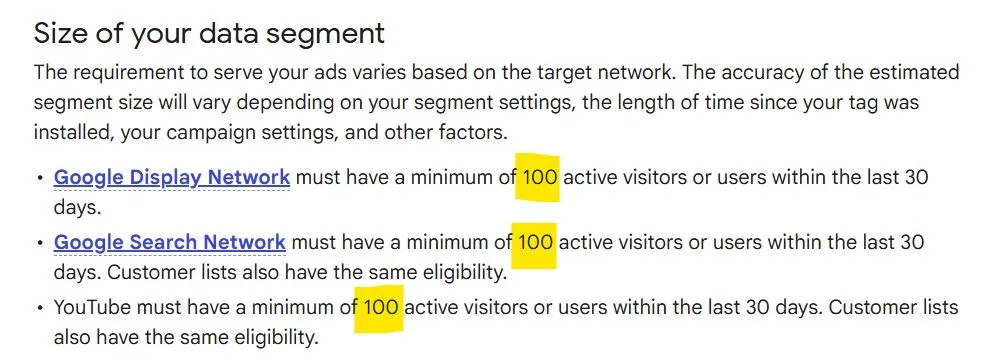
The 100-user threshold also applies to Audience Insights, allowing brands with small audiences to better understand their performance and audience. Previously, Audience Insights could not provide reliable data for audiences with less than 1,000 people. 

Opening The Door For Smaller Advertisers

This change removes a significant barrier for smaller brands and niche advertisers. While these advertisers could use Google’s Ad platform already, they were previously locked out of many of the most effective tools and advertising methods. 

Now, smaller brands can power remarketing campaigns and personalize their ads using first-party data and in-depth insights that were not previously available to them. 

This accessibility gives businesses the ability to fine-tune their targeting, reach users who have already expressed interest, and drive better conversion rates without relying on extensive data. By delivering personalized ads to defined audience segments, brands can boost engagement and see stronger returns on their ad spend.

Limitations Due To Smaller Audiences

While Google is allowing advertisers with smaller audiences to access these tools, they caution that smaller audience sizes can still impact performance. For example, smaller audience lists may lead to less accurate insights, slower delivery, or limited reach. 

It is crucial for advertisers to closely watch their ad performance to ensure their ads are performing properly and reaching the correct audience. 

Additionally, Google notes that advertisers using smaller audience segments must take care to ensure their data collection and usage does not run afoul of today’s modern privacy regulations including GDPR and CCPA. 

For more about this change and how audience segments function, explore the Google Ads Help page on the topic here.

This is pretty big news.  Google’s just released (on 9/9/10) a new site, called the Google AdWords Small Business Center.  This is a site dedicated to helping people learn more about how to use AdWords or how to improve existing accounts.

There are several lessons here, with tips and even a link to the AdWords Beginners’ Guide.  It looks to be a good place for people to learn about AdWords, although the site by itself doesn’t appear to be fully comprehensive.  However, they do include links to other pages, including a link that allows you to search for an AdWords Pro (such as myself, yes, I am an AdWords Pro) to help take care of all of the work involved in managing your AdWords account.

At any rate – if you’re having trouble with your AdWords account in any way, I recommend checking out Google’s new Small Business Center.  It might give you the help you’re looking for.

Google AdWords has a new tool they’re trying out.  It’s called the AdWords Campaign Experiments (or ACE).  It’s taking some testing that normally takes a while and making it faster. Read more

Brad Callen is an SEO guru and a PPC guru (as well as one of my heroes).  He’s released a new product for Google AdWords.  It plugs into Firefox as a plugin and allows you to do a few things.

It works any time you do a Google search, and it affects the “Sponsored links” results.  One nice perk he’s put in is an option to show the destination URLs for the paid ads.  Now not everyone realizes this, but every time you click on one of these ads, the person/company who placed that ad has to pay a certain amount.  Hence the term “pay per click”.  The option he put in lets you check out their pages without making the advertiser pay.  This is just polite, but lets you learn from other marketers who may be bidding on your terms, when you can check their landing pages.

But the nice thing, the huge perk of this tool is a little “View Keywords” button underneath every ad.  When you click this, it displays every keyword that that advertiser is bidding on.  I’ll let that sink in a moment.  Yes, every keyword – this means that you can see all keywords that any one advertiser is bidding on.  You can use this information to add new keywords to your own PPC campaign, use those keywords to test out for conversions in a particular ad group.  There’s a good chance the keywords that experienced advertisers are bidding on are converting keywords, and you can learn quickly from this.

Yes, it’s a little sneaky.  You’re taking all the work that the other advertisers did to do their keyword research and learn what keywords convert, and you’re just jumping past all that work and getting a list of keywords.  But it’s legit – and there’s nothing illegal about it.

Brad’s decided to go ahead and give this tool away.  I’ll go ahead and forewarn you, he does do an upsell, but the basic functionality of the tool are all present in the free version.  If you have Firefox and do any PPC at all (or just want to see what kind of things PPC advertisers are bidding on), it may be something you want to check out.  The name of Brad’s new plugin is PPC Web Spy.

If you do check it out, let me know what you think, and if it gets you new conversions.  I already got it myself, and I’ll definitely be using it to try advancing my own AdWords campaigns.


